17
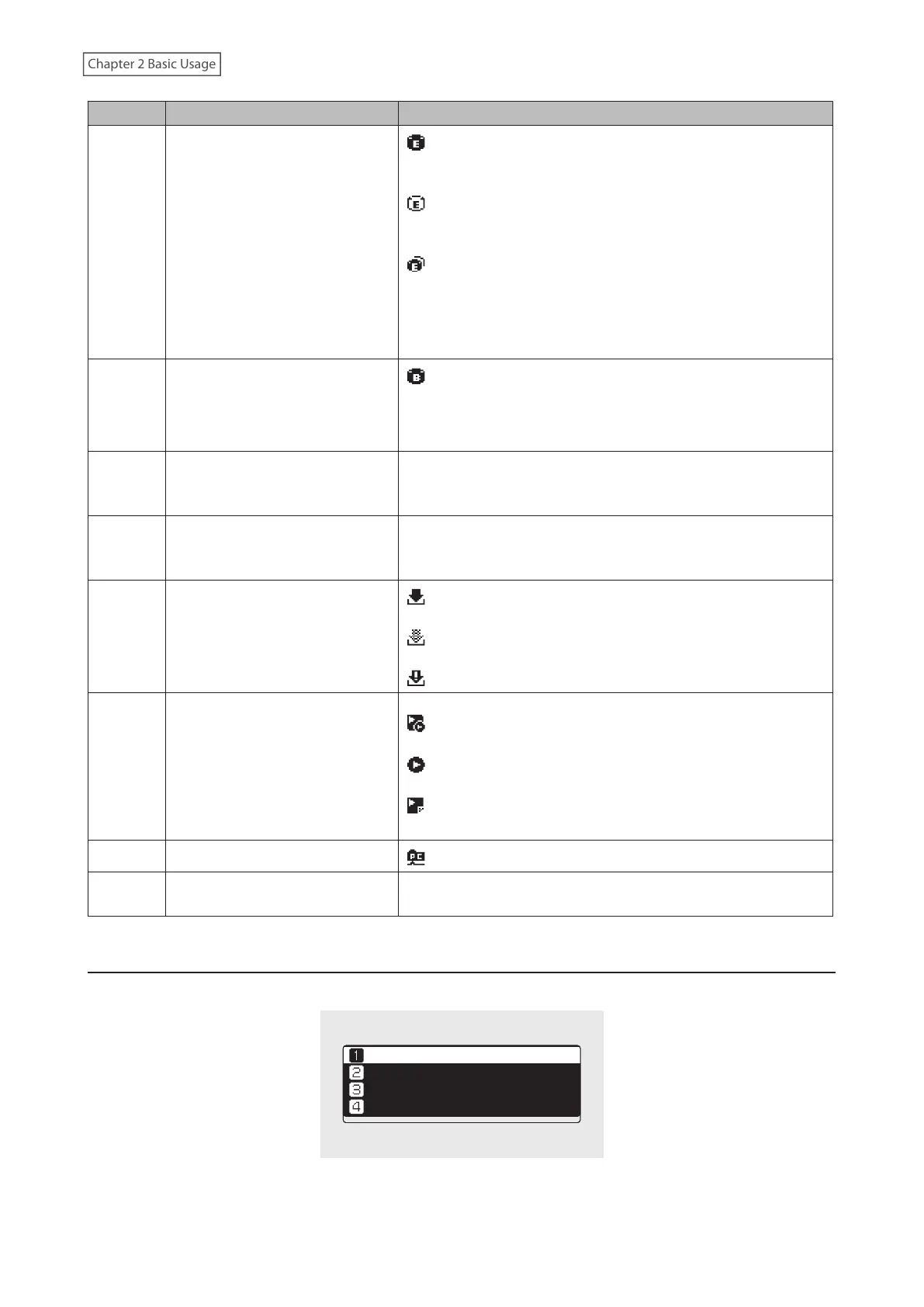
Number Item Description
5 Expansion Drive Indicator
: Displays when a USB drive is connected to the Expansion
port of the N1 EX, or when a USB drive is connected to the N10/
N100 and “Mount and Scan” is selected as an action for the drive.
: Displays when “Mount and Scan” is selected as an action for
the USB drive that is connected to the front port on the N1A EX
model.
: Displays when USB drives are connected to the front and
Expansion ports on the N1A EX model.
On the N1 EX, the icon will blink while the device searches for
music files. When the icon stops blinking, playback is ready.
6 Backup Drive Indicator
: Displays when a USB drive is connected to the Backup port
on the N1 EX, or when a USB drive is connected to the N10/
N100 or the front USB port on the N1A EX model and “Backup or
Restore” is selected as an action for the drive.
7 Friendly Name (Hostname)
Displays the friendly name (hostname) of the Digital Music
Library. The friendly name is used when accessing the Digital
Music Library from an app or computer.
8 IP Address
Displays the IP address. The IP address is used when accessing
the Digital Music Library from a computer. If no IP address is
displayed, the Player port is set to isolated mode.
9 Status of Downloader
: Displays when an account was added and periodic
downloads is enabled.
: Displays when an account was added but periodic
downloads is disabled.
: Displays when an error occurs and downloading fails.
10
Controller Settings
The icon will appear when a USB-DAC is connected.
: Displays when controller mode is configured to “Hybrid
Mode”.
: Displays when controller mode is configured to “UPnP/DLNA
compatible Mode”.
: Displays when controller mode is configured to “Playlist
Mode”.
11 File Sharing Indicator
: Displays when file sharing is enabled.
12 Usage Capacity of Internal Drive
Displays the used capacity of the internal drive in the Digital
Music Library, using a bar chart and a percentage (%).
Menu
Press the Menu/Enter button while the home screen is displayed.
ùęĆęĚĘ
èėĔĜĘĊÆùĔēČĘÆ Ö
èĆĈĐĚĕ
ùĊęęĎēČĘ
Move the cursor by pressing the Up button or the Down button, then press the Menu/Enter button to make a
selection.



 To Next Page