37
Configuring the Mode for Managing USB-DAC Using Controller App
“Hybrid Mode” is configured by default and it supports using many types of controller apps. However, it is
recommended to change the controller settings to “UPnP/DLNA compatible Mode” or “Playlist Mode” that is
compatible with your controller app. It will optimize communication between the Digital Music Library and the
controller app.
• UPnP/DLNA compatible Mode: Select when your controller app is UPnP/DLNA-compatible.
• Playlist Mode: Select when your controller app is not UPnP/DLNA-compatible.
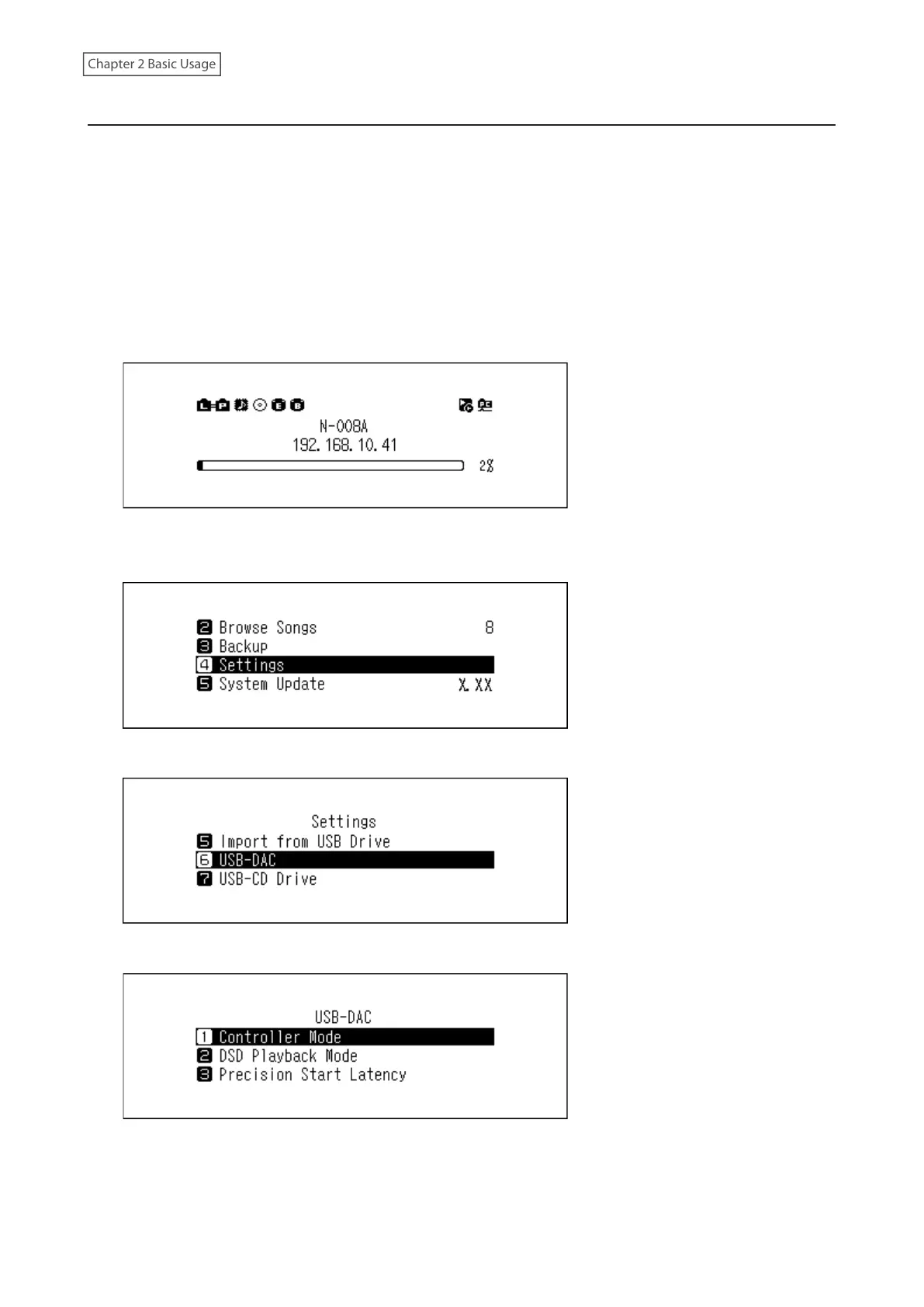
To change the controller settings, follow the procedure below.
1 Press the Menu/Enter button to display the menu list at the home screen.
Note: The screenshot above shows the N1 EX.
2 Press the Up/Down buttons and select “Settings”, then press the Menu/Enter button.
3 Press the Up/Down buttons and select “USB-DAC”, then press the Menu/Enter button.
4 Press the Up/Down buttons and select “Controller Mode”, then press the Menu/Enter button.



 To Next Page