38
Service IPP 200-500/HPP 108 | 10/2008
R18.2.2 eplace the dehumidification power supply unit
Disconnect the mains plug.1.
Remove the top panel (see page 11).2.
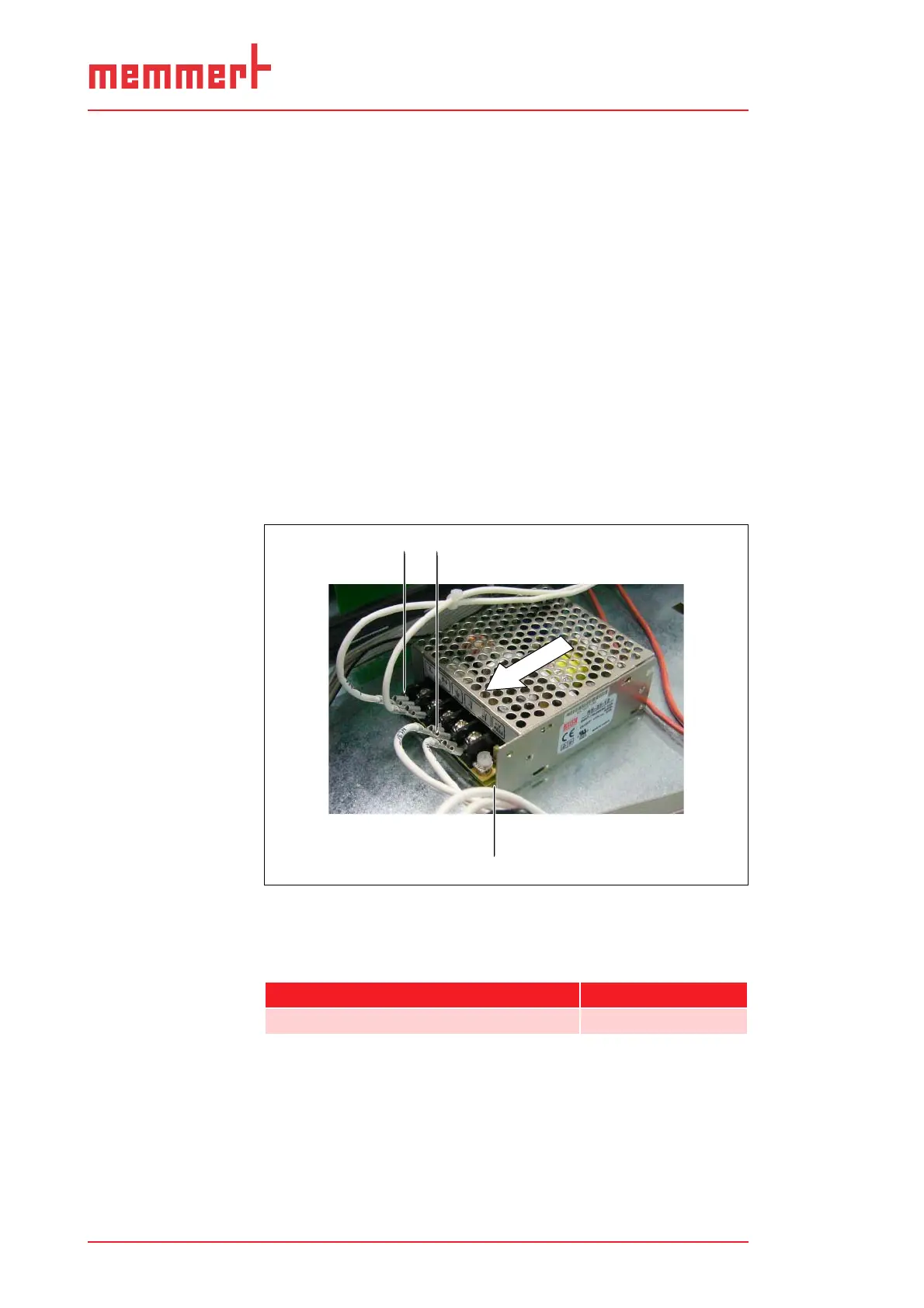
Pull off all the plugs from the dehumidification power supply 3.
unit (1).
Undo the screw connection (2) for the ground plate on the 4.
connection side of the power supply unit (2 screws).
Pull the power supply unit horizontally away, in the direction 5.
of the arrow, from the third screw on the opposite side (3)
and remove.
Push in new power suppy unit underneath the remaining 6.
screw and screw tight on the connection side.
Reconnect the plug connectors.7.
Re-attach the top panel.8.
Reconnect the mains plug.9.
Check that the dehumidification is now working properly. If 10.
this is not the case, contact the manufacturer.
2
1
2
3
Replace the power supply unit for dehumidificationFig. 29:
Undo the plug1
Undo the screws on the bottom plate (2 screws)2
Pull away power supply unit to the side3
Spare part Spare part number
Dehumidification power supply unit E05400


 To Next Page