D39374 | Date 08/2018 55
Menu mode
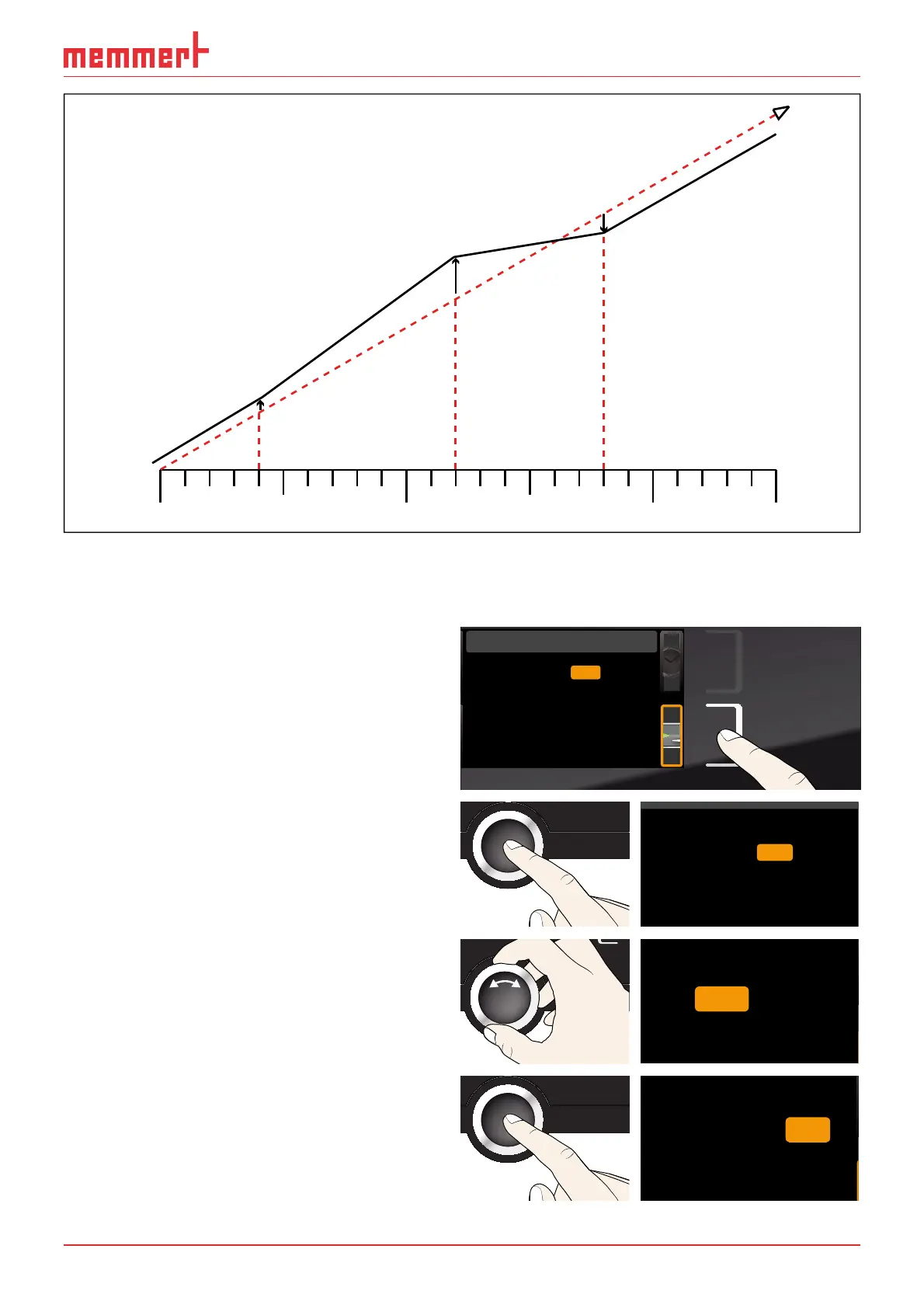
CAL 1
+0,5 K
CAL 3
-0,8 K
CAL 2
+2,6 K
180°C
40°C
120°C
0°C
factory calibration
Fig. 35 Schematic example of temperature adjustment
Example: Temperature deviation at 120 °C should be corrected.
1. Activate the adjustment setting. To
do so, press the activation key on the
right of the
TIME display. The display
is enlarged and the first calibration
temperature – in this case 40 °C – auto-
matically highlighted.
Cal1
°C -0,2
K
Cal2 100.0 °C +0,1K
Cal3 180.0 °C -0,2K
JUSTIEREN
Temperatur
letzte Justierung 12.10.2012 12:00
40.0
CK0,2-
CK0,1+
CK0,2-
Kalibrierung
Temperatur
Vakuum
Zuletzt geändert 12.10.2012 12:00:00
Cal1
Cal2
Cal3
100.0
180.0
40.0
2. Press the confirmation key repeatedly,
until the calibration temperature Cal2
is selected.
CK0,2-
CK0,1+
CK0,2-
Temperature
Cal1
Cal2
Cal3
180.0
40.0
100.0
Vacuum
3. With the turn control, set the calibra-
tion temperature Cal2 to 120 °C.
CK0,2-
CK0,1+
CK0,2-
e
Cal1
Cal2
Cal3
180.0
40.0
120.0
4. Save the setting by pressing the confir-
mation key. The corresponding calibra-
tion value is automatically highlighted.
CK0,2-
CK
CK
0,2-
e
Cal1
Cal2
Cal3
180.0
40.0
120.0 0,1+



 To Next Page