D39374 | Date 08/2018 57
Menu mode
7.5.2 Pressure calibration
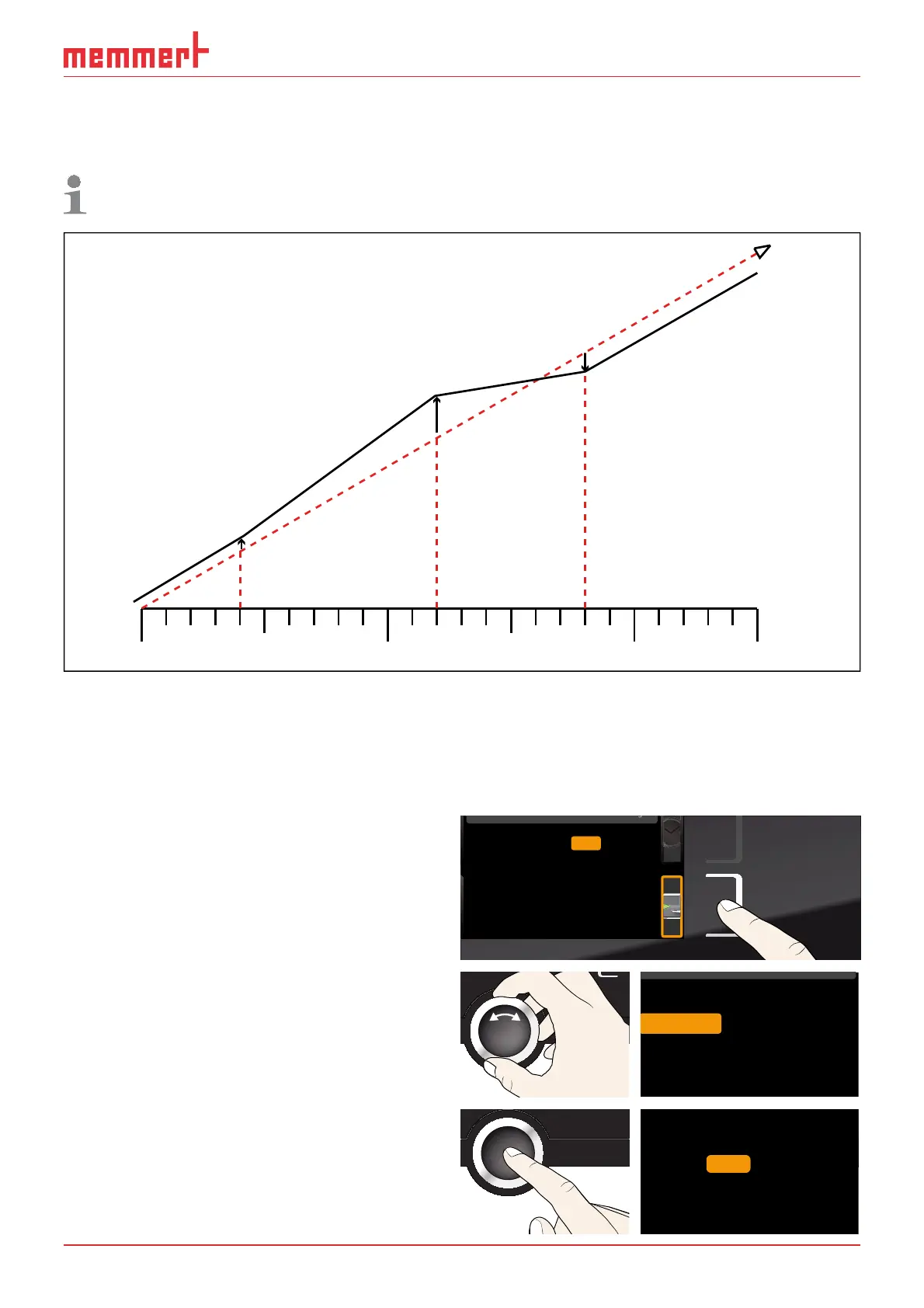
The pressure can also be calibrated using three selectable adjustment points. The mini-
mum distance between the calibration points is 20 mb. The setting range is ±20 mb.
For pressure adjustment, you will need a calibrated pressure reference measuring
device.
CAL 1
+3 mb
CAL 3
-4 mb
CAL 2
+5 mb
1000 mb
200 mb 500 mb
900 mb
5 mb
factory calibration
Fig. 36 Schematic example of pressure calibration
Example: Pressure at 600 mb is to be calibrated.
1. Connect the calibrated pressure gauge to the VO fresh air connection (see page 13)
via ISO-KF connection size DN 16.
2. Activate the adjustment setting. To
do so, press the activation key on the
right of the
TIME display. The display is
enlarged.
Cal1
°C -0,2
K
Cal2 100.0 °C +0,1K
Cal3 180.0 °C -0,2K
Temperatur
letzte Justierung 12.10.2012 12:00
40.0
CK0,2-
CK0,1+
CK0,2-
Temperature
Vacuum
Cal1
Cal2
Cal3
100.0
180.0
40.0
3. Turn the turn control until Vacuum is
highlighted.
Temperature
40.0
Vacuum
Cal1 50.0 mb 0.0 mb
Cal2 500.0 mb +4.0 mb
Cal2 950.0 mb 0.0 mb
4. Press the confirmation key repeat-
edly, until the calibration point
Cal2 is
selected.
40.0 Cal1 50.0 mb 0.0 mb
Cal2 500.0 mb +4.0 mb
Cal2 950.0 mb 0.0 mb



 To Next Page