- 32 -
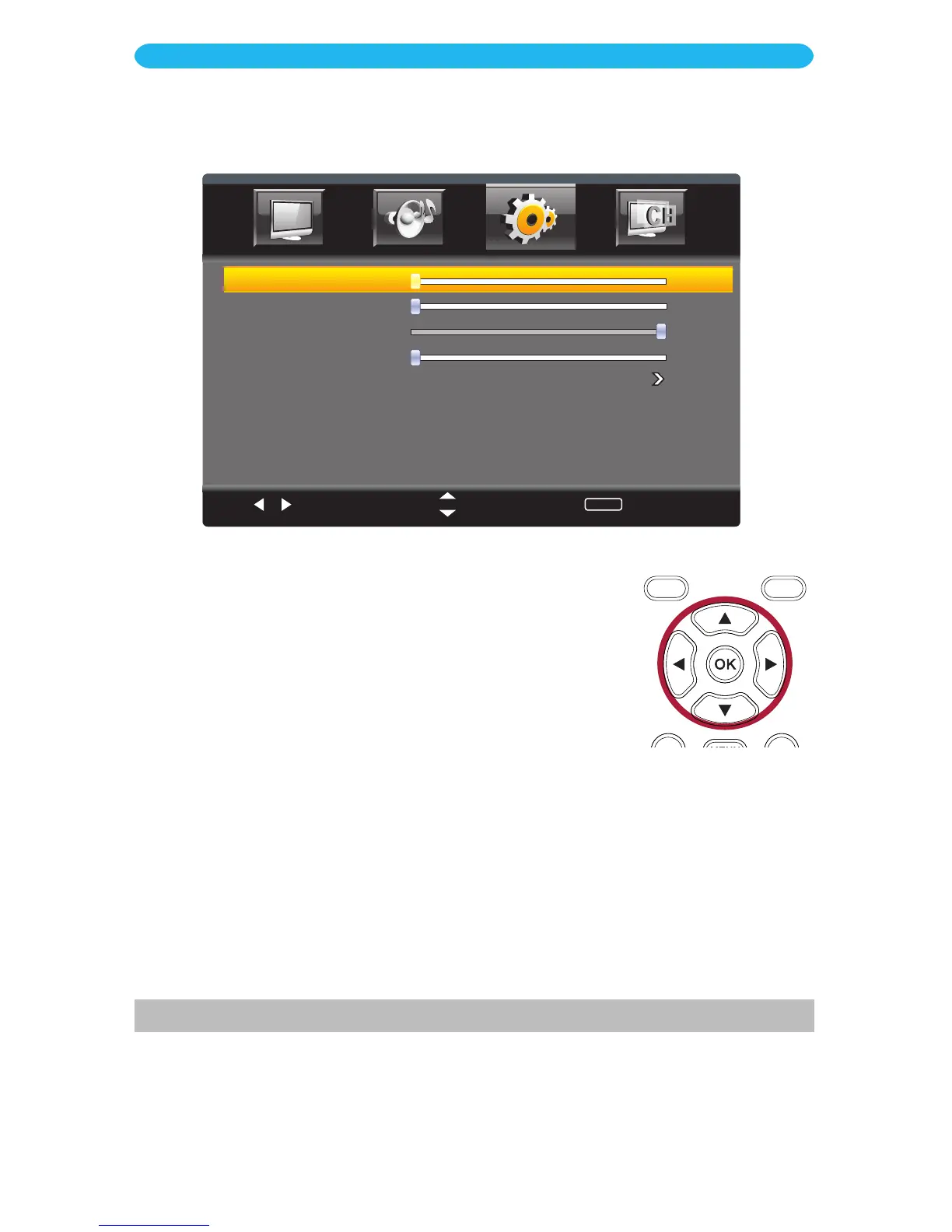
1 Access the Parental Control menu as described on page 24.
2 Press the q button to select VGA Settings.
3 Press the OK button to enter.
4 Press the q button to select a setting (i.e. H-Position, etc.).
5 Press the t/u buttons to adjust the setting.
6 When done, press the EXIT button to exit the menus or press
the MENU button to return to the previous menu.
ON SCREEN DISPLAY
Setup Menu - VGA Settings Submenu
H-POSITION: Set the desired horizontal positioning.
V-POSITION: Set the desired vertical positioning.
CLOCK (Clock Phase): Set the desired Clock Phase, which will minimize any vertical bars
or stripes visible on the screen background as well as the horizontal size.
PHASE: Set the desired Phase, which will allow you to remove any horizontal noise and
clear/sharpen the image.
AUTO: Select to have the TV automatically adjust these settings.
Select
Move
MENU
Return
V-Position
Clock
Phase
Auto
H-Position
0
0
10 0
0



 To Next Page