ENGLISH
142
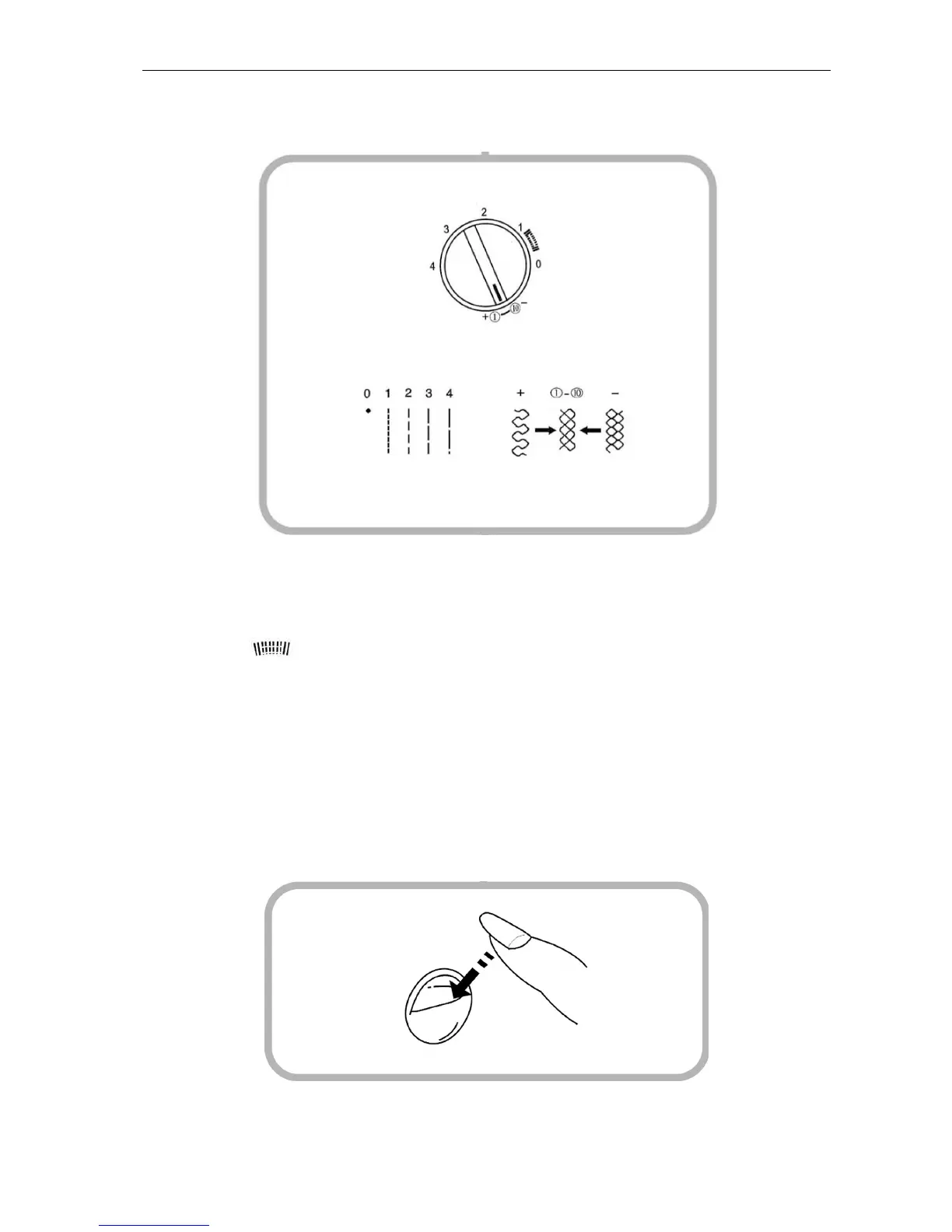
Stitch length control
Depending on which stitch you have selected, you may need to change the stitch length to achieve a
perfect result when sewing. This is done using the stitch length control.
NOTE.
• The higher the value, the longer the stitches.
• The area between 0 and 1 is suitable for buttonhole stitches.
• The area between 0.5 and 4 is suitable for zigzag stitches.
• If you want to sew elastic stitches, set the stitch length control to - and then select the desired
stitch using the stitch selection control. If the basic setting for elastic stitches does not produce a
good result, you can fine-tune the stitch length by turning the stitch length control clockwise until
you have selected the desired stitch. The closer to 0 the control is turned, the closer together the
elastic stitches.
IMPORTANT: Always lift the needle out of the fabric before you switch to a different stitch. Otherwise the
needle can break off.
Backstitch control
Press and hold the backstitch control to sew backwards. The machine sews backwards until you release
the backstitch control.


 To Next Page