Power Supply
Power supply options
Your MERGING+NADAC can be powered from a standard domestic AC supply, or an external DC power source
such as a battery.
Using an AC power source
The MERGING+NADAC can be run from any AC power source that supplies 100-240V at 50-60 Hz. Ensure that
the maximum power supply voltage is not exceeded, as excessive voltages can seriously damage the unit. We
recommend that you use the power supply cable supplied with the unit and this must be plugged into a
grounded outlet.
For safety and EMC reasons, and to prevent audio hum, the system must be properly grounded. If
your power source does not have a standard three-prong socket, the system must be grounded in
another appropriate manner. Please consult an appropriately qualified electrician if you are unsure about the
suitability of the power outlet you propose to use.
Using a DC power source
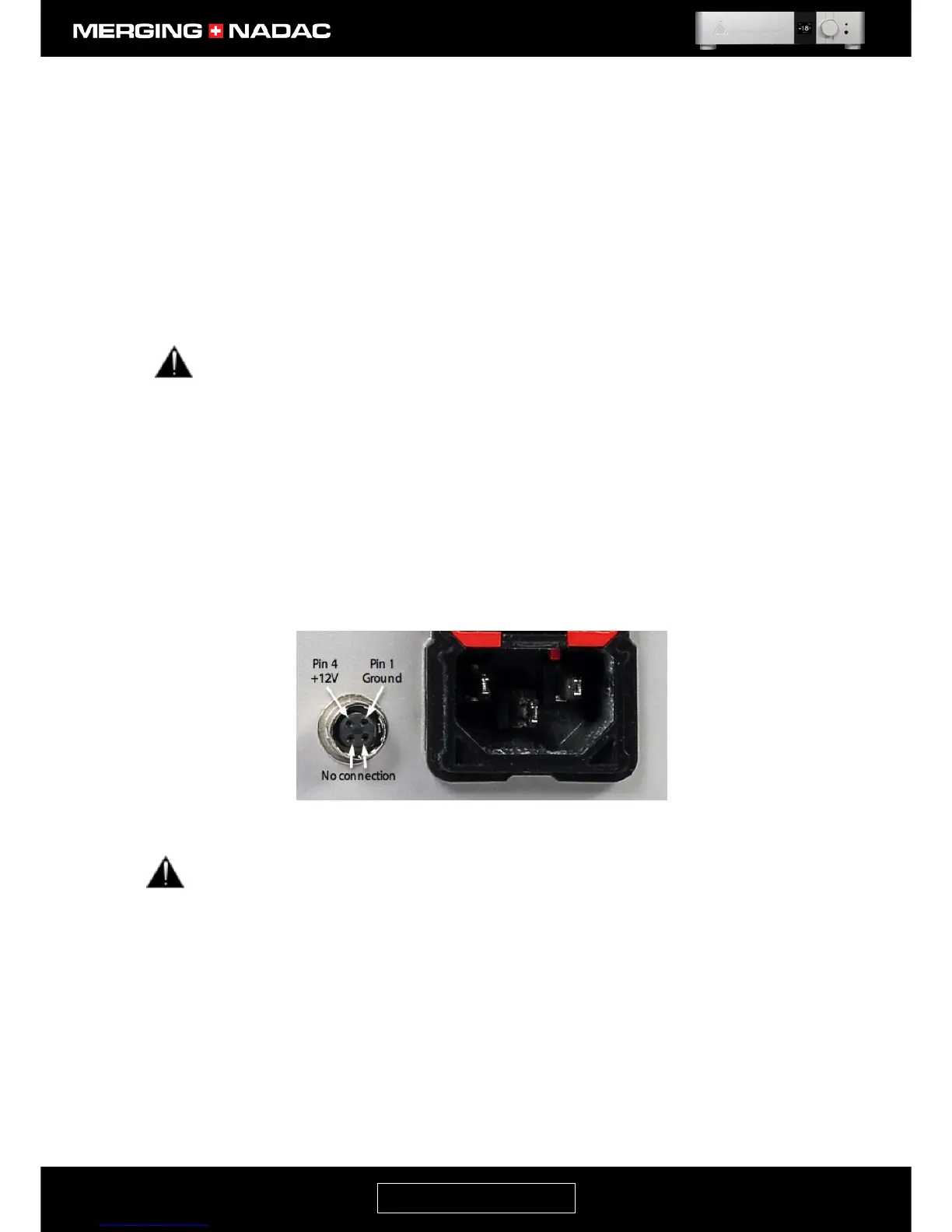
The MERGING+NADAC may also be run from a DC power source. This should be connected to the DC Input
connector on the rear panel, immediately to the left of the AC power inlet – Figure11. The mating part for this
connector is a Hirose HR10-7P-4P, which can be ordered separately from your Merging Technologies reseller.
The pinout of this connector is:
• Pin 1: Ground
• Pin 4: 12V
• Pins 2 and 3: Not connected
The DC power input accepts voltages from 10V to 14V, with a maximum power consumption of 30W.
Do not exceed the maximum DC input voltage or the unit may be damaged.
The DC power supply input can be used in two ways
1. DC power as the main source using a battery or other suitable DC source.
2. Backup power supply: The unit is operated with both AC and DC supplies connected. Should either
fail or be disconnected, the unit will carry on working without any disturbance to its operation.



 To Next Page