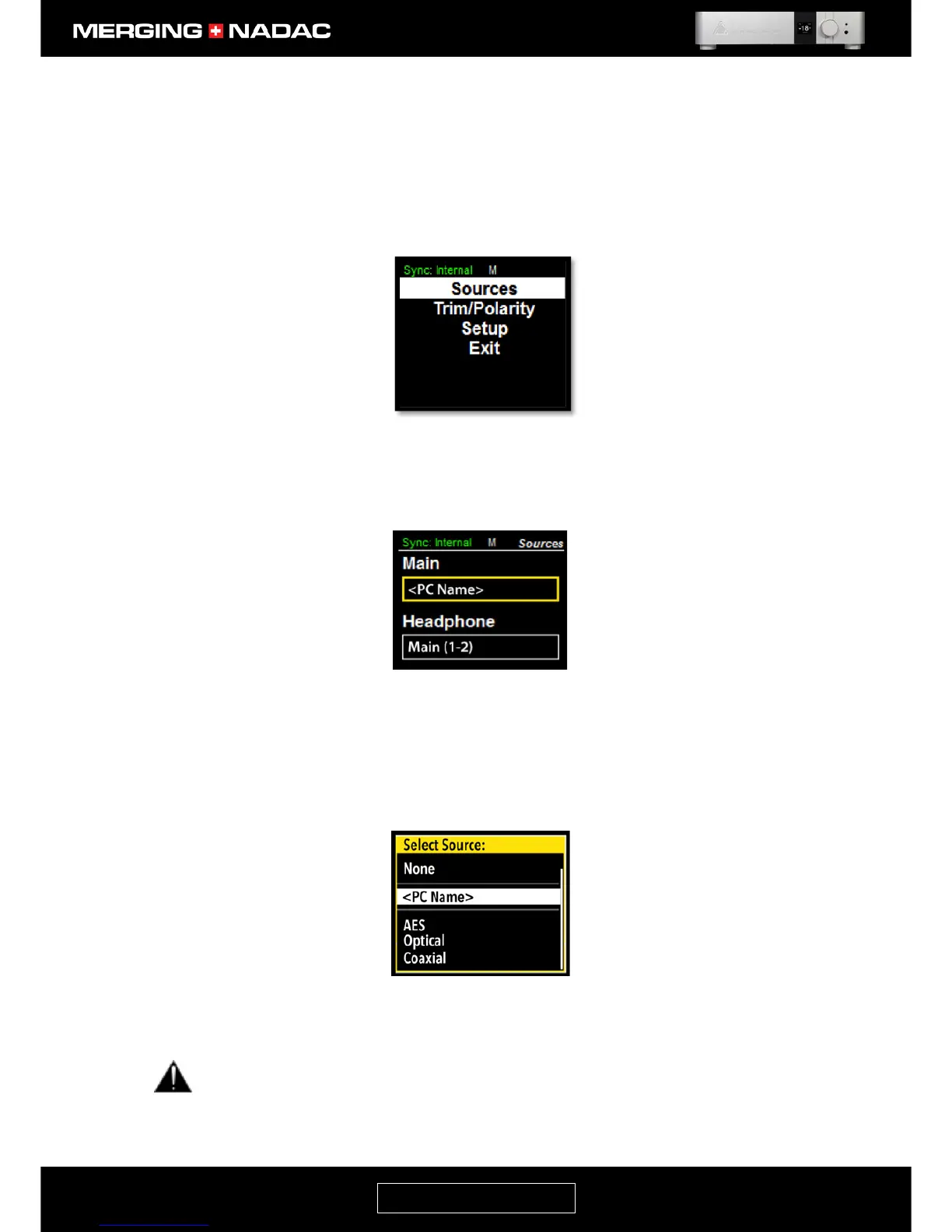
10. If the network source you wish to use is shown at the bottom of the home screen, then you should now
be able to play music, otherwise press and hold down the Rotary Control until the main menu top screen
appears – Figure 59.
11. With the Sources item highlighted, briefly press the Rotary Control to open the Sources menu – Figure
60. Use the Rotary Control to outline the Main source option box as shown, then briefly press the Rotary
Control.
12. The source option menu will appear – Figure 61. Use the Rotary Control to highlight the network source.
Note: The name of your network source may appear twice in the Main menu. One in the form <PC Name>
and also as <PC Name>_Headphone. In this case the first version is the one to choose.
If you start your music server playing, you should now have music from the Main output.
If the network source name in the source options menu appears in red, this indicates that the source is
not valid. Please verify the network connections and configuration. Please also refer to the trouble
shooting section of this manual on page 65.



 To Next Page