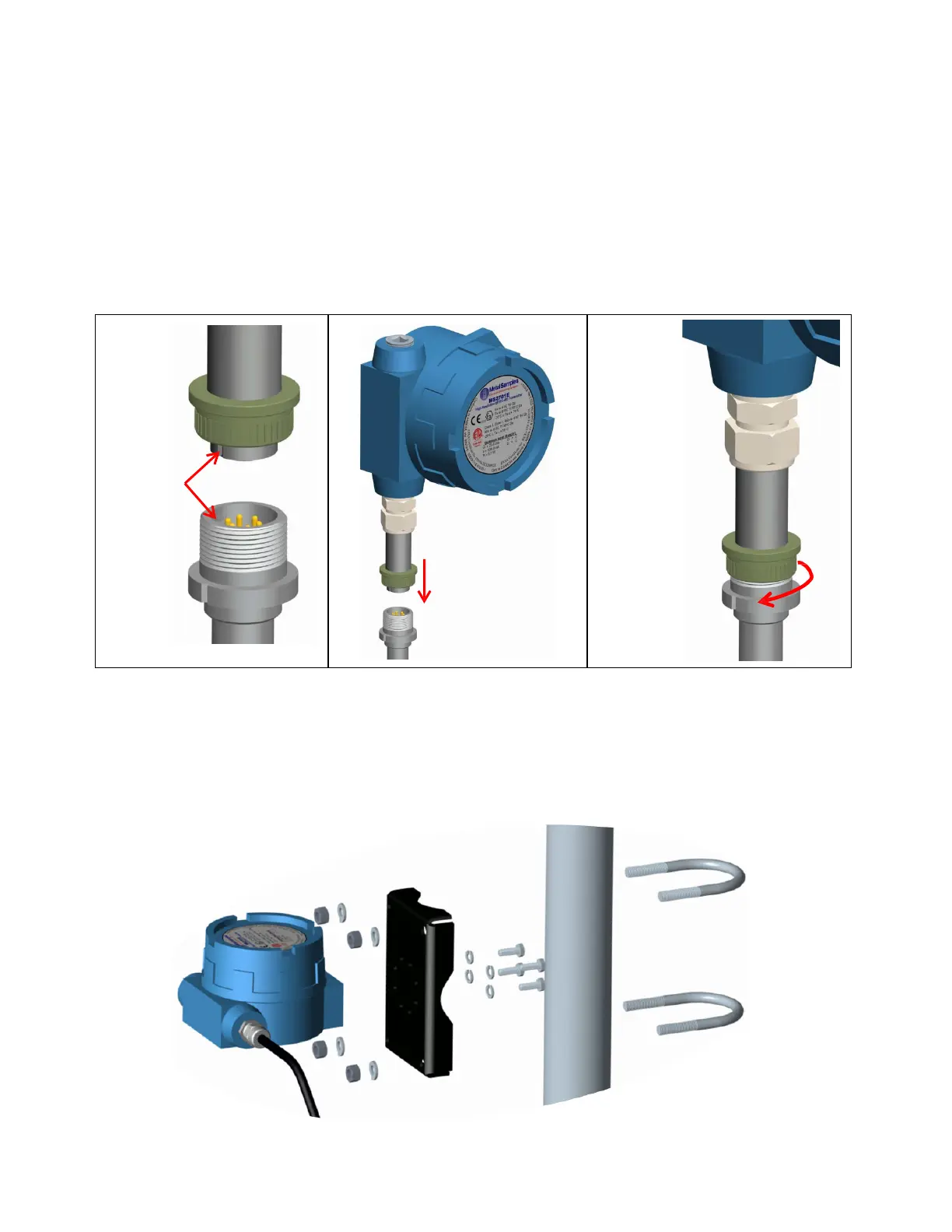
To mount the MS2601E:
1. Align the keyways of the transmitter and probe connectors.
2. Insert the transmitter connector plug fully into the probe connector receptacle.
3. Secure the transmitter to the top of the probe by tightening the coupling nut.
NOTE: Hand-tight is sufficient. Do not over-tighten the coupling nut.
NOTE: Never force the connectors to mate. If there is resistance, stop and check for bent pins on
the probe and for foreign material in the female sockets of the transmitter connector. Gently
straighten any bent pins and clear any foreign material that may be found.
Align Key
Insert
Connector
Tighten
Coupling Nut
1 2
3
Figure 2. MS2601E Direct Mount Installation
b. Remote Mounting
When it is not practical to direct-probe mount the MS2601E transmitter, the unit can be remote
mounted instead. In this case the instrument is mounted to a separate mounting pole using the
optional Remote Mounting Hardware Kit. The transmitter is then connected to the ER probe via the
probe extension cable.
Figure 3. Remote Mount Installation


 To Next Page