18
SYSTEM
3.7 LIGHTNING SENSOR
The lightning sensor acts much like an AM radio. During a thunderstorm, the crack of the
lightning disrupts the AM signal. The integrated circuit inside the sensor listens for this
disturbance and registers the time of and distance (intensity of signal) to the strike. The
sensor outputs the total number of strikes and average distance to these strikes in the
measurement period. When powered on, the ATMOS41 counts lightning events continuously
and adds each detected event to an accumulated total. When queried, the ATMOS41 outputs
the total number of lightning events that have been detected since the last query.
The sensitivity of the lightning sensor can be adjusted using the PROCHECK.
To set the Strike Reject Lvl follow the steps below:
1. Plug the weather station stereo connector into the PROCHECK stereo port.
2. Press MENU to navigate to the Configuration tab
3. Scroll down to ATMOS 41 Config. Press ENTER.
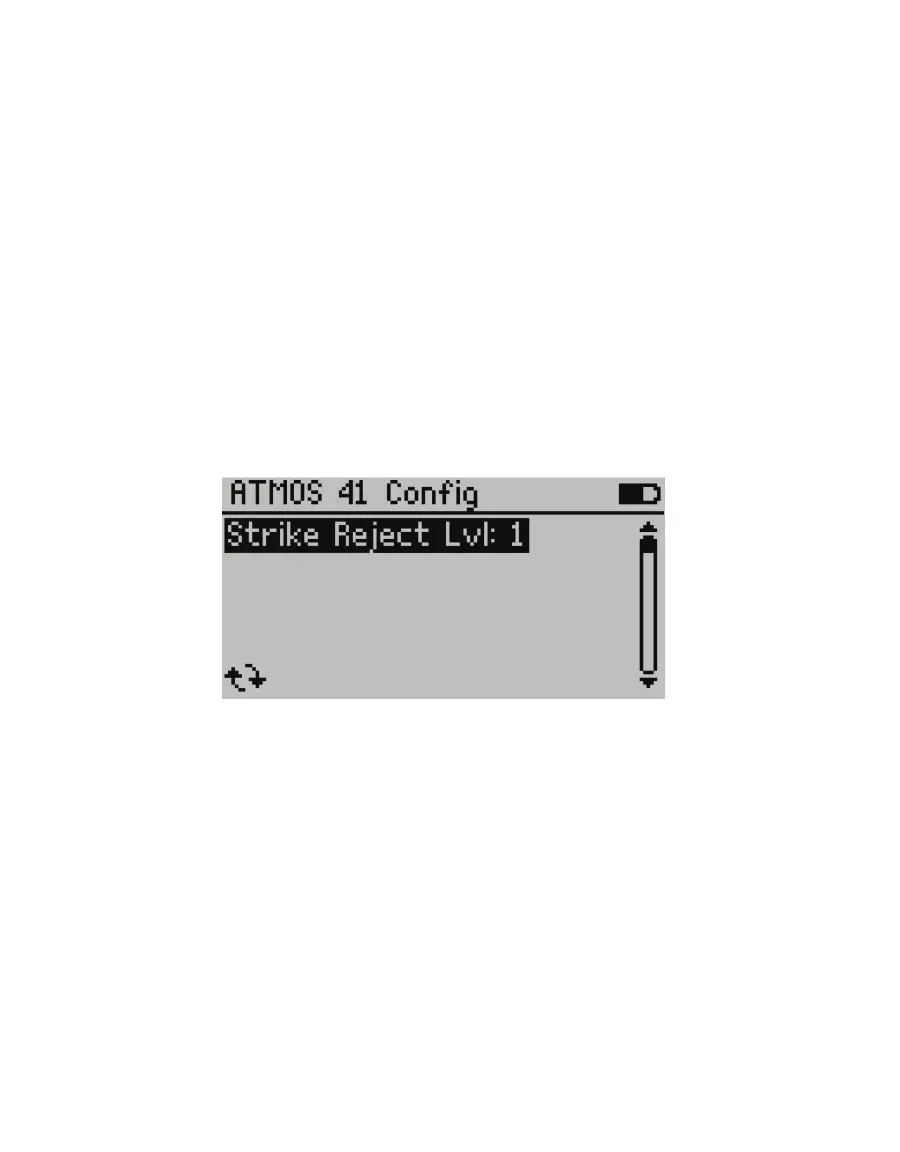
4. Press ENTER to select Strike Reject Lvl.
Figure11 ATMOS41 configuration screen using PROCHECK
The Strike Reject Lvl adjusts the lightning sensor threshold used to differentiate
between man-made electrical noise and lightning strikes. The higher the value, the less
likely man-made electrical noise will cause a false lightning strike, but the more likely
lightning strike events from far away will be filtered out and missed.
5. Press the UP and DOWN arrows to select a value between 0and15.
The default value is 5. Generally, a small deviation of 1 or 2 from the default value is
sufficient to tune the level to the installation environment.
6. Press ENTER or SAVE to save the new Strike Reject Lvl to the sensor.


 To Next Page