REV. 8/23/2018 INST99-5841B
TOUCHSCREEN DISPLAY OPERATION
11
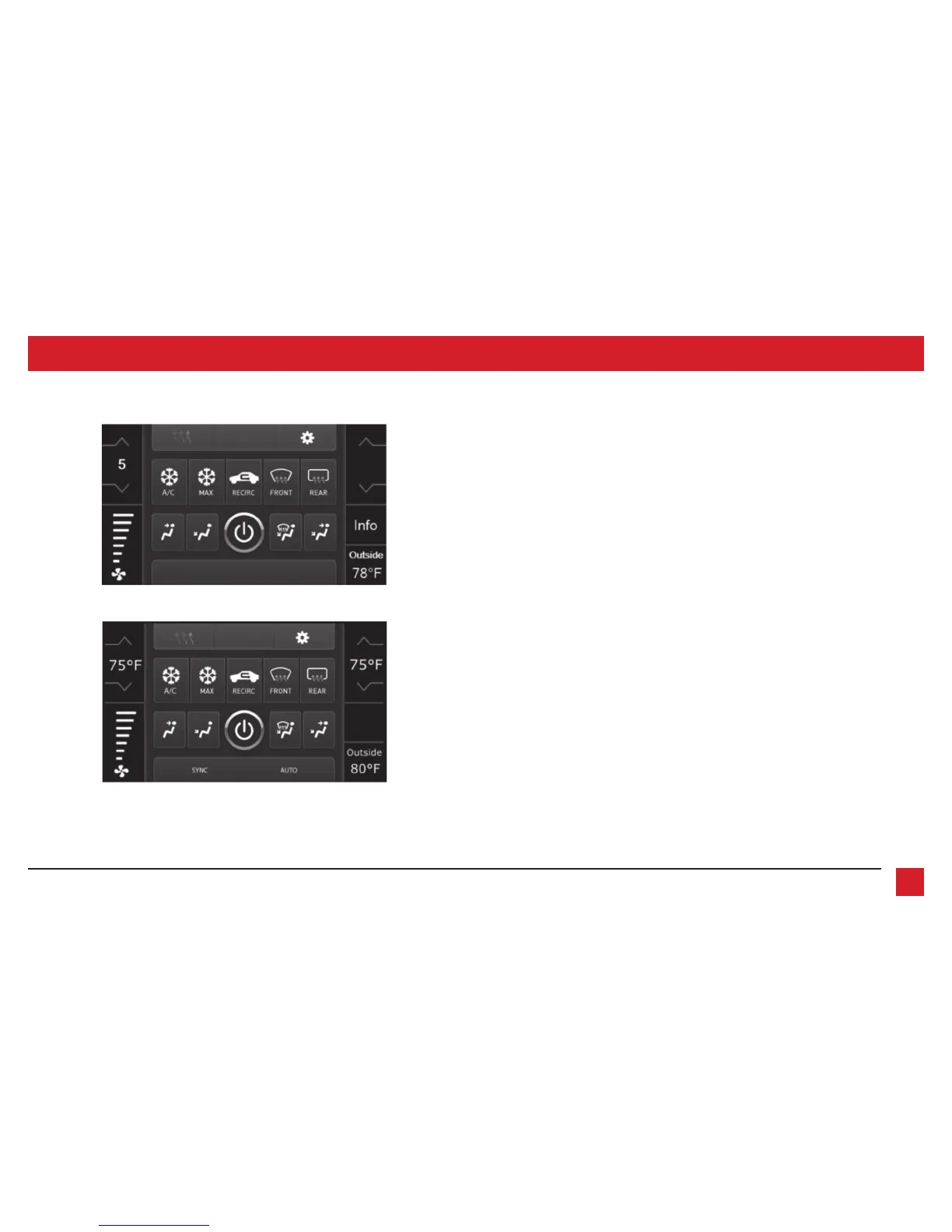
• This is the climate control screen which will be displayed on the touchscreen display.
This is considered the main screen.
• The upper left tab with (3) arrows will take you to the Heated/Cooled* seats screen, and the
Heated Steering* screen, if applicable.
• The upper right tab with the gear icon will take you to the Configuration Settings screen.
• Auto climate models: The climate controls will function in the same manner that they did
with the factory climate controls.
• Manual climate models: The climate controls will function in the same manner that they
did with the factory climate controls, yet via touchscreen buttons instead. The temperature
control will display a numerical scale, with “LO” being the coldest, and “HI” being the
hottest: LO / 1-9 / HI
Note: The “Info” button will only be shown if SYNC
®
is to be retained.
Continued on the next page
Climate Control screen
Manual climate controls
Automatic climate controls



 To Next Page