99-7803G
®
Attention! For auto-climate control models only. Turn the fan speed all the way up, and
then turn the recirculation button off, prior to turning the vehicle off and removing the
radio/climate control assembly.
1.
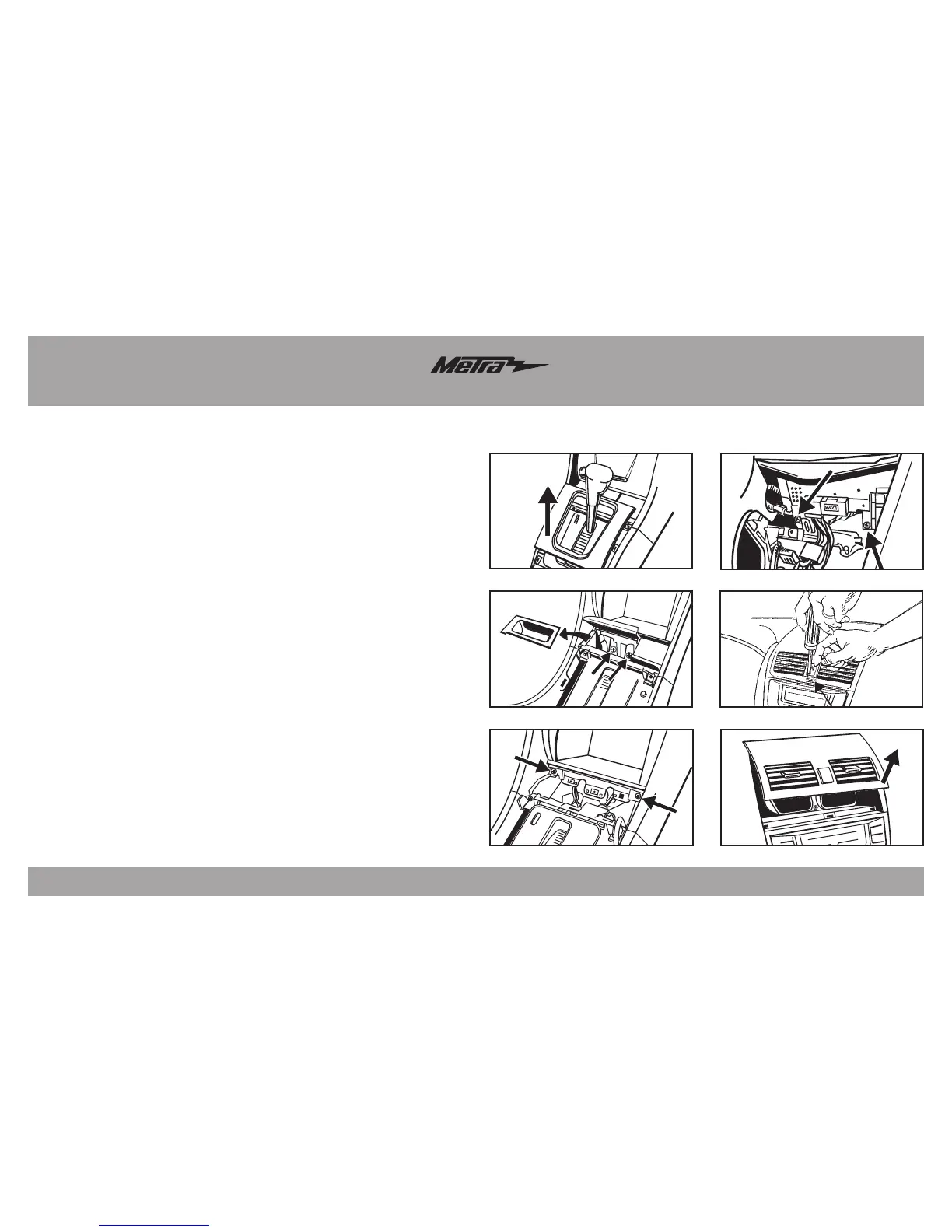
Unclip and remove the shift lever trim ring. (Figure A)
2.
Unclip and remove the coin-tray/ashtray and then remove the (2) Phillips screws
exposed. (Figure B)
3. Remove the (2) Phillips screws from the bottom of pocket, then unclip and
remove. (Figure C)
4.
Remove the (2) Phillips screws facing up,
underneath the radio/climate control
assembly. (Figure D)
5. Push and hold the hazard button down. Carefully insert a small panel removal
tool into the slot below the button, and then push down to release the center clip.
(Figure E)
6.
Unclip and remove the A/C vent panel, and then remove the (3) Phillips screws
exposed. (Figure F)
Note: You can use a hook tool to grasp the panel inside of the vent and pull
toward the rear of the vehicle. Be careful not to scratch the panel.
7. Unclip and remove the radio/climate control assembly.
Continue to Kit Preparation
Dash Disassembly
R
N
D
D
R
N



 To Next Page