99-7878B KIT ASSEMBLY
5
A
B
C
ISO MOUNT RADIO PROVISION WITH POCKET
Locate the factory wiring harness in
the dash. Metra recommends using
the proper mating adapter from Metra
or AXXESS. Re-connect the negative
battery terminal and test the unit for
proper operation.
1
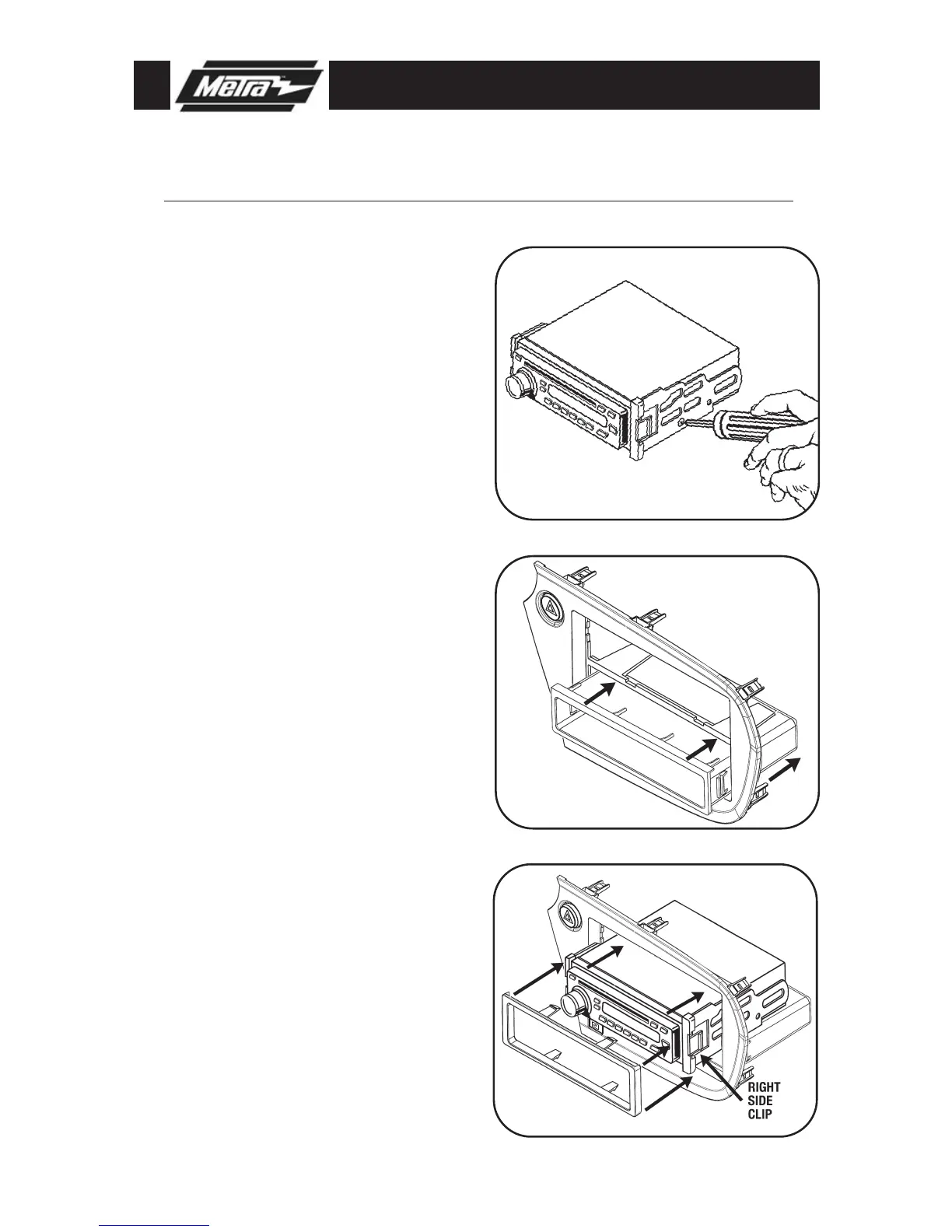
Mount the ISO Brackets to the head
unit with the screws supplied with
the unit.
(Figure A)
2
Snap the pocket into the bottom
opening of the radio housing.
(Figure B)
3
Slide the head unit into the radio
opening until the side clips engage.
(Figure C)
4
Snap the Trim plate into the Radio
Housing.
(Figure C)
5
Reassemble dash in reverse order of
disassembly.
6
*
Note: Refer also to the instructions included with the aftermarket radio.



 To Next Page