ENGLISH
5 — 1
86-81700-00 A01
Maintenance
5.1 Troubleshooting
5.2 Replacing the Battery Module in the Tower Model
Safety recommendations
See Section 5.3 on Page 5—2 for safety recommendations.
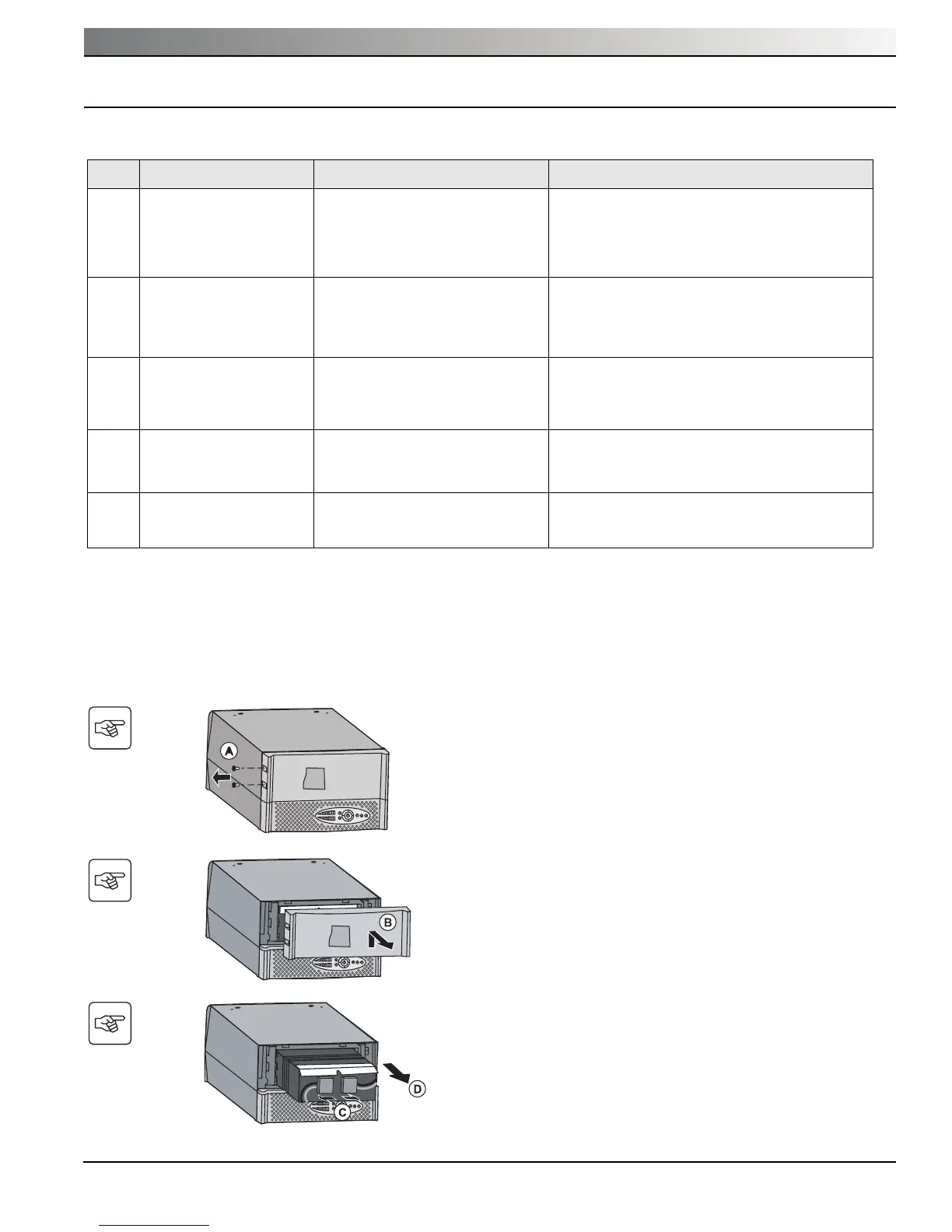
Battery-module removal
C. Pull on the two connectors to disconnect the battery
(never pull on the wires).
D. Pull the plastic tab to remove the battery.
B. Lift and pull away the panel with the logo.
The UPS must be turned as shown in the figure
opposite.
A. Remove the two screws on the left-hand side.
Indication Diagnostic Correction
1
When the UPS is started
using button (10), all the
LEDs go ON once and the
buzzer beeps once, then
LED (14) remains ON.
The remote power off (RPO) contact
has been activated to shut down the
UPS and now prevents restart.
Set the contact back to its normal position and press
button (24) to restart.
2
Button (10) and LEDs (13)
and (14) are ON and all the
LEDs on bargraph (8) flash.
The percent load is greater than the
set overload level or UPS capacity.
Check the power drawn by the connected devices
and disconnect any non-priority devices. Check the
overload level setting.
3
Button (10) and LED (15)
are ON and all the LEDs on
bargraph (8) are flashing.
A critical overload has occurred on
the UPS output. If AC input power
fails, the load will not be supplied in
battery mode.
Check the power drawn by the connected devices
and disconnect any non-priority devices.
4
LED (15) is ON and all the
LEDs on bargraph (11) are
flashing.
A battery fault has been detected
during the automatic test.
Replace the battery module (See Section 5.2,
Battery-module replacement).
5
LED (15) alone is ON and
the buzzer sounds continu-
ously.
A UPS internal fault has occurred and
the load is not supplied.
Visit www.mgeops.com for after-sales support or call
(800) 279-7776.
Maintenance





 To Next Page