MGL Avionics Stratomaster Ultra “L” Owner’s manual
Page 27
DISPLAY BACKLIGHT
The Stratomaster Ultra includes display backlighting as standard. You can select one of three
modes of operation in the “Basic setup menu” (see page 42).
a) Auto – display backlight switches off after 4 minutes of inactivity (no key presses or
engine revs detected)
b) On – backlight is always on.
c) Off – backlight is always off.
We recommend that you leave the backlight off if you intend operating from a limited capacity
power supply. This will allow the instrument to operate at about a third of its normal current
consumption.
Should you be operating from a rechargeable battery such as a motor cycle or similar battery,
choose “Auto”. This will help to prevent running the battery down should you accidentally leave
the Stratomaster switched on without the engine or charging circuit running.
The backlight is a great aid when flying in dawn or dusk conditions as it provides you with a crisp
and clear display. During normal daylight, the display operates in a “transflective” mode. In this
case a reflective surface behind the LCD display provides much of the display contrast. The
backlight is not required in this mode.
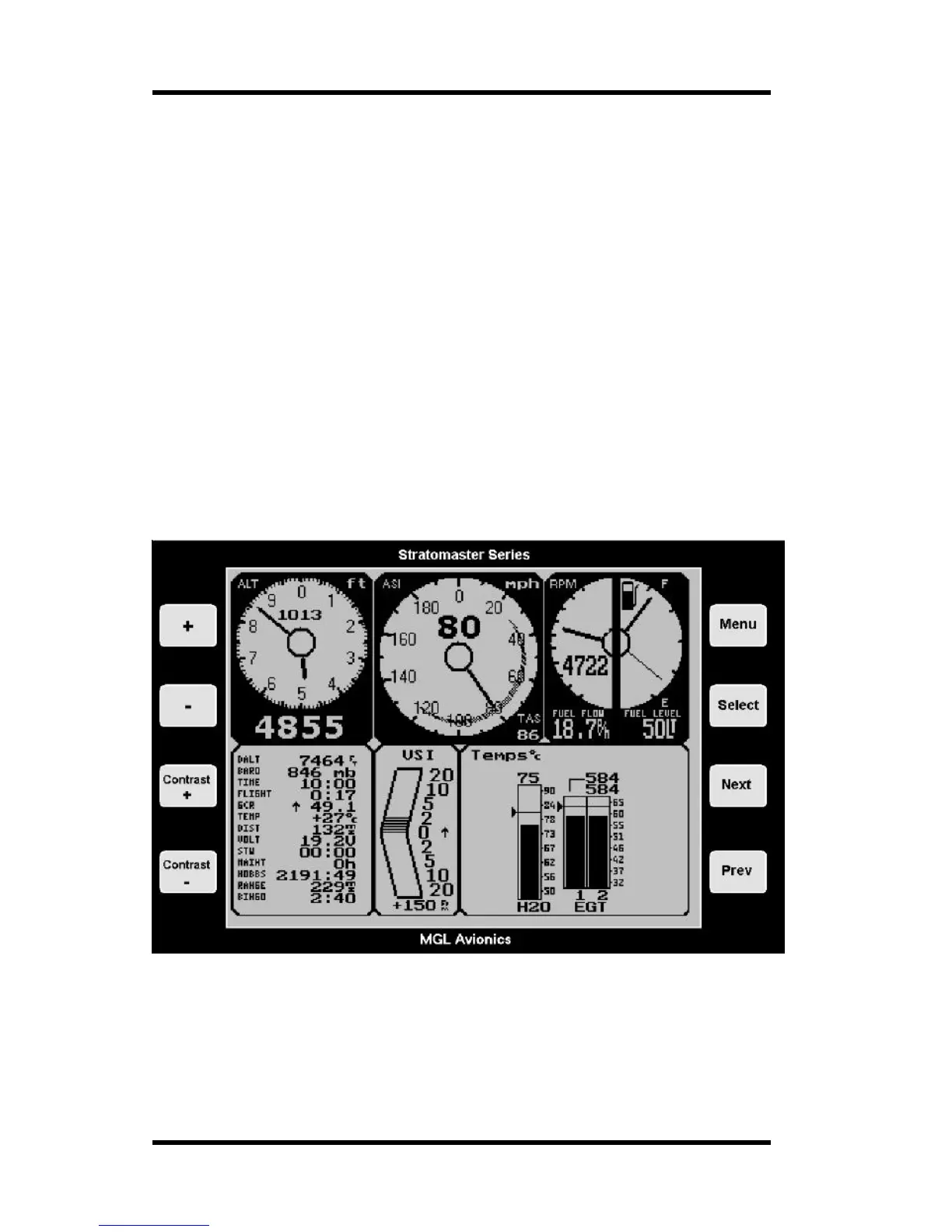
The main display – a detailed look
The above display is active whenever you are not viewing one of the functions available
through the menu system. This is the display that you will see both on the ground and in
flight. Flight mode is shown with a flashing “F” to the right of the digital altimeter display.
An active flight is subject to storage of its details in the flight log as the flight ends.



 To Next Page