6. Customizing Module Parameters
6.1 Config Tool Setup
The IS208x_Config_GUI_Tool Config Tool setup is a configuration tool that allows the user to change the BM83
module parameters such as device name, Bluetooth Low Energy connection settings, LED configuration, enable/
disable Pairing mode and other functions.
Note: For this demonstration, Config Tool version IS208x_Config_GUI_Tool v1.0.11 is used. Refer to the
latest version at http://www.microchip.com/BM83. For additional details on the Config Tool, refer to IS208x Config
GUI Tool User’s Guide.
To configure the GUI parameters, perform the following steps:
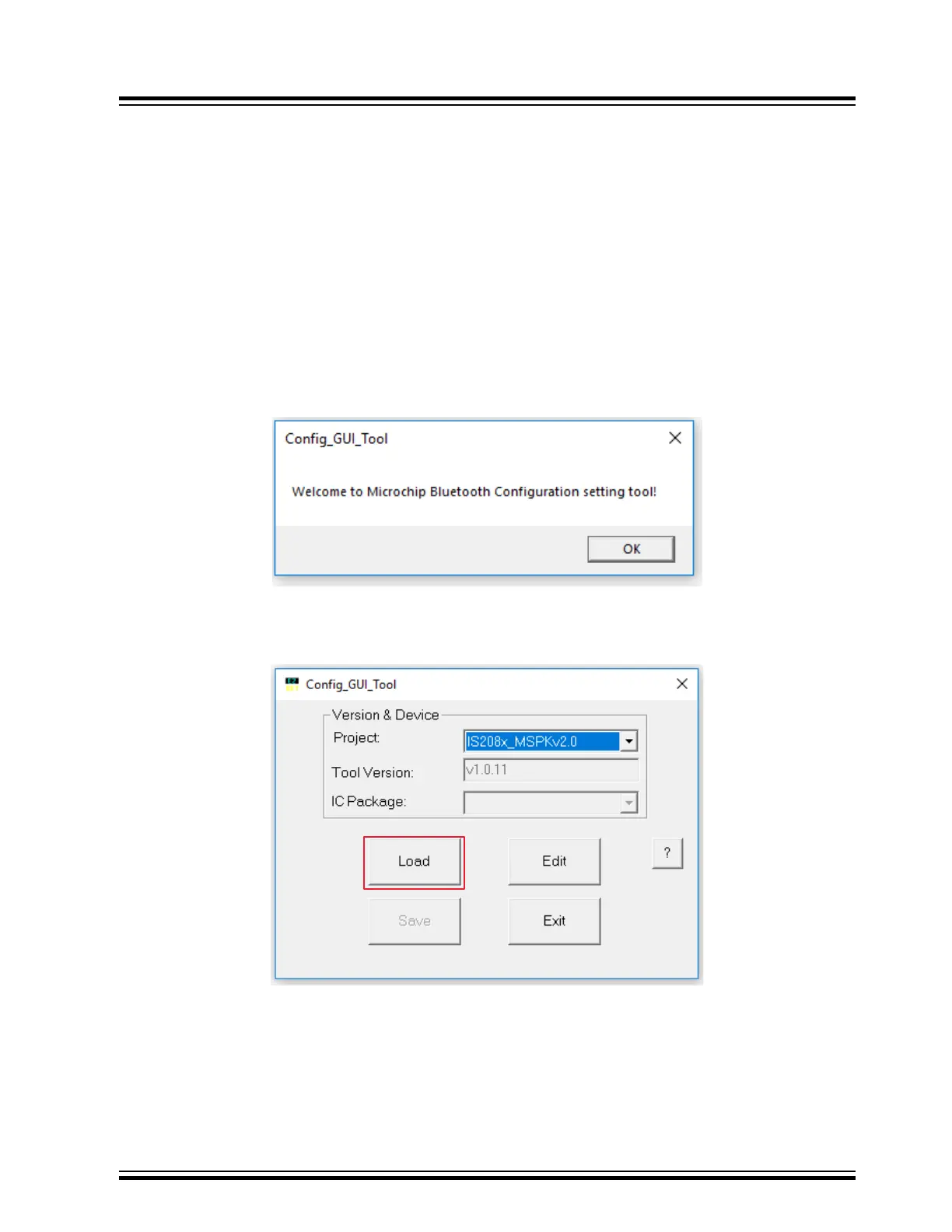
1. Open the Config Tool and click OK to configure the parameters.
Figure 6-1. Config Tool - Welcome Window
2. In the Config Tool, click Load.
Figure 6-2. Config Tool
BM83 EVB
Customizing Module Parameters
© 2019 Microchip Technology Inc.
User Guide
DS50002902A-page 28




 To Next Page