© Microhard Systems Inc. 22
3.0 Hardware Features
Caution: Using a
power supply that
does not provide
proper voltage may
damage the IPn4G
unit.
3.1.2 Connectors and Indicators
3.1.2.1 Front
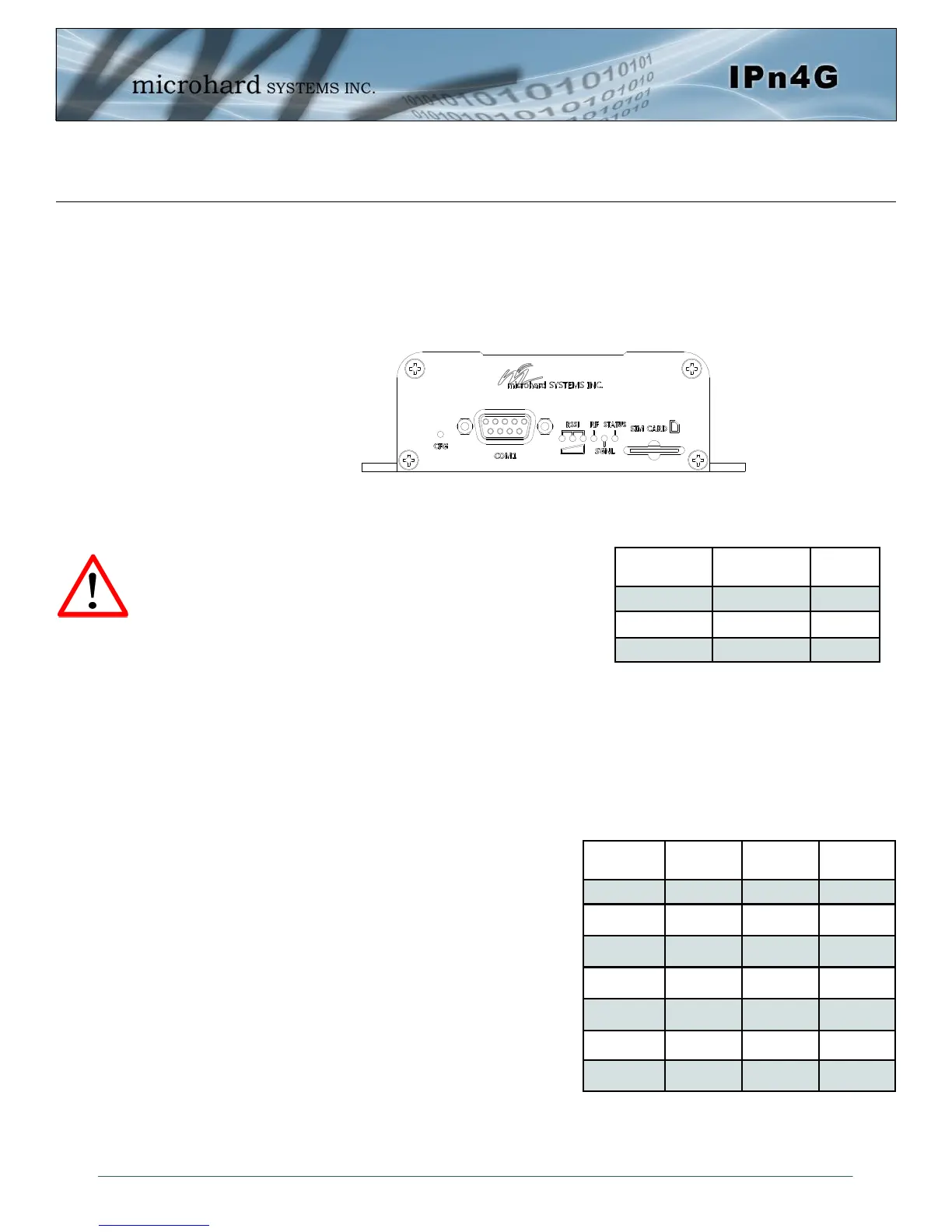
On the front of the IPn4G is the COM1 port, CONFIG Button, RSSI, STATUS, RF and SGNL LED’s as
described below:
The COM1 port (RS232) is used for:
AT Command Interface at 115.2kbps and
HyperTerminal (or equivalent).
User data (RS232 - RxD, TxD, and SG)
CONFIG (Button) - Holding this button depressed while
powering-up the IPn4G will boot the unit into FILE SYS-
TEM RECOVERY mode. The default IP address for system
recovery (only - not for normal access to the unit) is static:
192.168.1.39.
If the unit has been powered-up for some time (>1 minute), depressing the CFG Button for 8 seconds will
result in FACTORY DEFAULTS being restored, including a static IP address of 192.168.168.1. This IP
address is useable in a Web Browser for accessing the Web User Interface.
RF(Red)/SGNL(Green) LED’s - When the unit is equipped with WiFi, the RF/SGNL LED’s indicate WiFi
activity. In units not equipped with WiFi, the RF/SGNL LED’s indicate carrier (cellular) traffic. Also, during
system bootup, the RF & SGNL LED’s will flash.
Receive Signal Strength Indicator (RSSI) (3x
Green) - As the received signal strength increases,
starting with the furthest left, the number of active
RSSI LEDs increases.
STATUS LED (Red) - The Status LED indicates that
power has been applied to the module.
SIM Card - This slot is used to install a SIM card pro-
vided by the cellular carrier to enable communication
to their cellular network. Ensure the SIM card is in-
stalled properly by paying attention to the diagram
printed above the SIM card slot.
Drawing 3-4: IPn4G Front View
Signal
Name
PIN
#
Input or
Output
RXD 2 O
TXD 3 I
SG 5
Table 3-1: COM1 Port RS232 Pin Assignment
Signal Level
(dBm)
RSSI1
(Left)
RSSI2
(Mid)
RSSI3
(Right)
(-85, 0] ON ON ON
(-90, -85] ON ON FLASH
(-95, -90] ON ON OFF
(-100, -95] ON FLASH OFF
(-105, -100] ON OFF OFF
(-109, -105] FLASH OFF OFF
Other SCANNING SCANNING SCANNING
Table 3-2: RSSI LED’s



 To Next Page