EasyManua.ls Logo

Microlight TX Series - Applied Configuration

Default Icon
27 pages
Print Icon
To Next Page IconTo Next Page
To Previous Page IconTo Previous Page
Loading...
21
(4)WIFI Options:
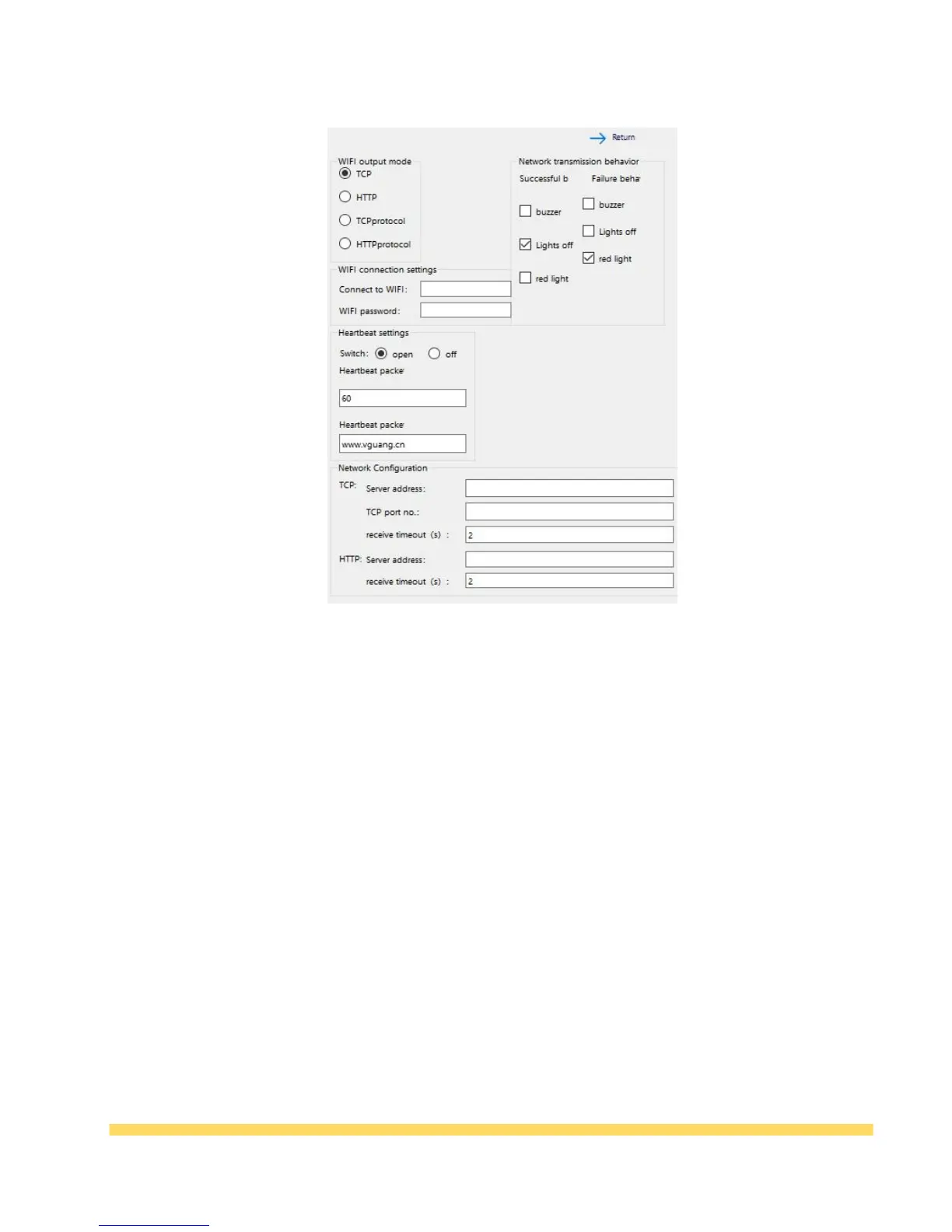
Table 3-7 Wifi configuration
* Wi-Fi output mode: Can be configured into four output methods, namely TCP, HTTP, TCP
protocol and HTTP protocol, in the protocol mode, the data transmission format will be in
accordance with the Microlight wifi transmission protocol;
* Network transmission behavior: You can configure the feedback of transmission success and
failure after scanning the code;
* Wifi connection setting: You can configure the connected wifi name and wifi password;
* Heartbeat settings: Heartbeat packet function can be set, heartbeat packets only work in TCP
environment;
* Network Configuration: Configure the server's address, port number, and timeout period.

Chapter IV Application configuration
Direct connection configuration: After the modification of the configuration item is completed,
click Save Configuration. The save success message indicates that the configuration takes effect
after the device is powered off and restarted. Note that this configuration can be used only in the
USB connection mode;
Scan code configuration: After the configuration item is modified, click Generate QR Code on the
left to generate the configuration code. After the device scans the generated configuration code, it