10 Setting up Xpress
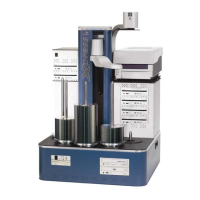
Arm to Elevator
1. Remove threaded knob from underside of Hoist (on Elevator).
2. Line up holes on rear end of Arm with pins on Hoist.
3. Replace threaded knob and finger tighten to secure Arm to
Hoist.
4. Connect Arm to Hoist with small “phone” cord.
5. Place long Spindles on locations 1 – 4.
6. Place short Spindle on location 5.
7. Replace packing material in shipping box and store for
moving/shipping.
Disc Printer Option
1. Slide Printer Base Plate (from Box #2) into slots on top of drive
enclosure.
2. Finger-tighten two thumbscrews to secure Printer Base Plate to
Drive Enclosure.
3. Place Printer onto pegs on surface of Printer Base Plate.
Printer Connection
Perfect Image
1. Connect data cable between port on back of Printer and COM1
on back of Xpress Base Unit.
2. Connect Printer Power Cord to port on back of Printer, plug
opposite end into standard electrical outlet.
3. Install Software Key into any USB port on back of Xpress Base
Unit.
Note: If using ImageAligner Option, insure that Software Key is installed
in Parallel Port on back of Xpress Base Unit.
Signature Pro
1. Connect Data Cable between port on back of Printer and port on
back of Xpress Base Unit.
2. Connect Control Cable between port on back of Printer and port
on back of Drive Enclosure.
3. Connect Printer Power Cord to port on back of Printer, plug into
standard electrical outlet.
4. Install Software Key into any USB port on back of Xpress Base
Unit.
PRINTER IS READY FOR INITIAL TESTING


 To Next Page