Guide to the appliance
19
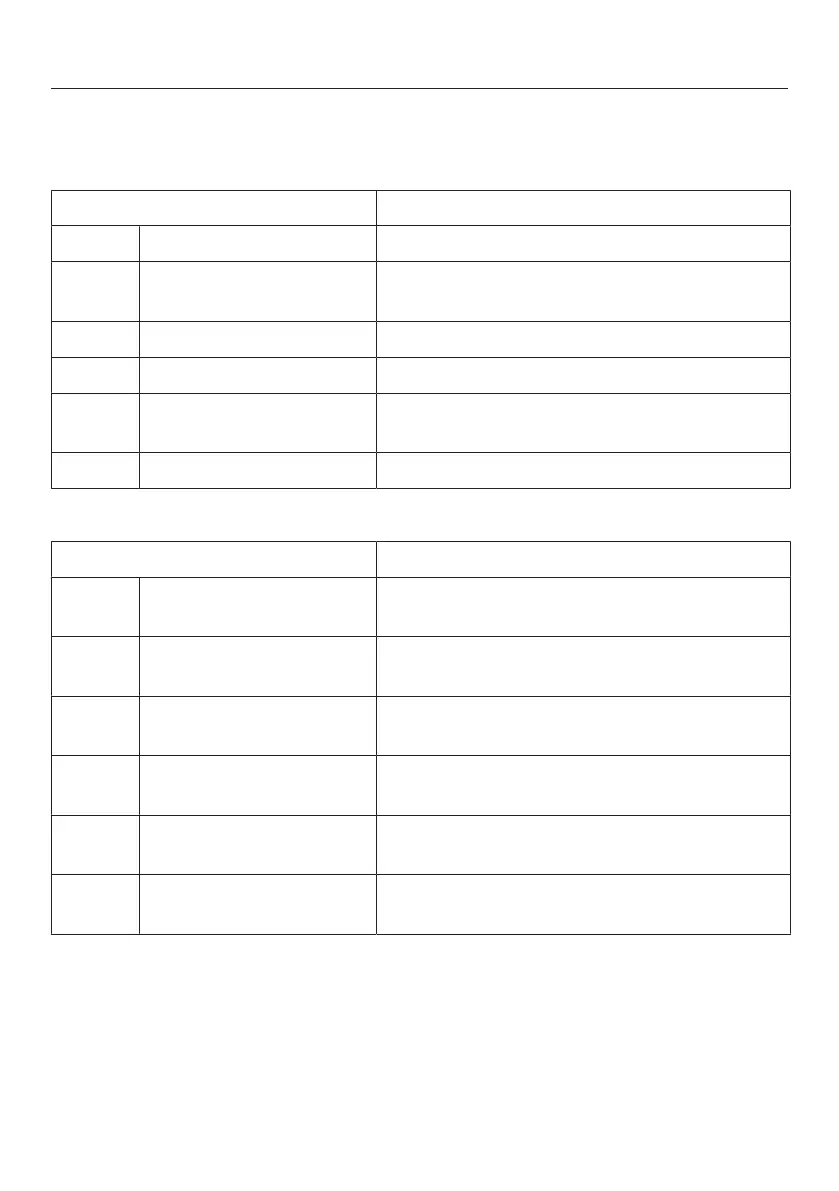
Symbols on the display
Controls
Symbol Function
Standby For switching the appliance on
Settings mode For selecting settings (see “Selecting further
settings”)
/ Minus/Plus For altering a setting (e.g. temperature)
OK For confirming a setting
/ Navigation arrow
Left/right
For scrolling in Settings mode to select a
setting
Back For exiting a menu
Information
Symbol Meaning
Standby The appliance is connected to the power
supply but is not switched on.
Freezer section Identifies the freezer section temperature
display
SuperFreeze Function can be selected (see “Using Super
freeze”).
Temperature alarm Warning (see “Problem solving guide -
Display warnings”).
Door alarm Warning (see “Problem solving guide -
Display warnings”).
Power failure Warning (see “Problem solving guide -
Display warnings”).





 To Next Page