Operating the washing machine
14
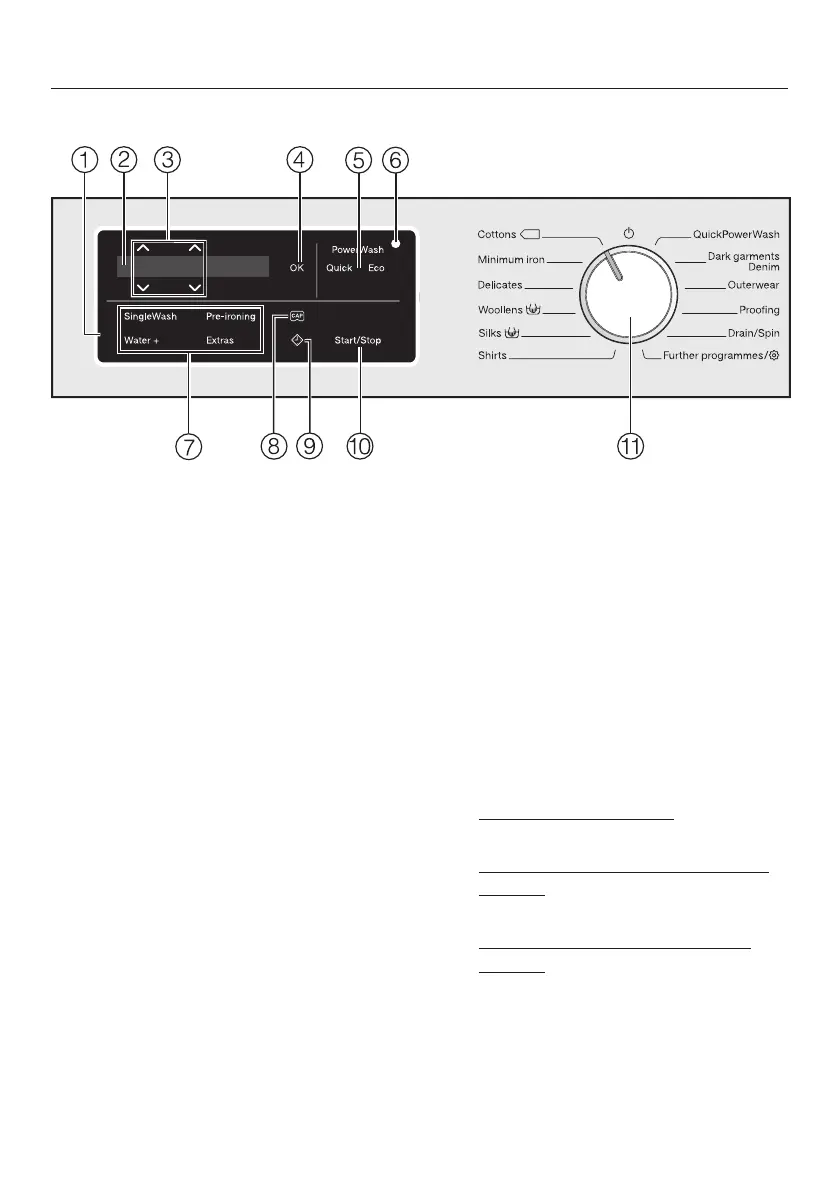
Control panel
a
Control panel
The control field consists of a
display and various sensor controls.
The individual sensors are explained
in the following sections.
b
Display
The following values are shown in
the display and/or selected from it:
1. The temperature, spin speed and
time left for the selected wash
programme.
2. The individual values of the
selection lists for Extras and
settings.
c
Sensor controls
Values shown in the display can be
changed with the sensors. The
sensor increases the value or
moves the selection list up; the
sensor decreases the value or
moves the selection list down.
d
OK sensor
Confirm selected values with the OK
sensor.
e
PowerWash display with the Quick
and Eco sensors
If the PowerWash indicator lights up
when you select a wash programme,
you can choose between three
programme sequences. For further
information, go to “4. Selecting
programme settings”, section
“PowerWash display with the Quick
and Eco sensor controls”.
– PowerWash indicator: Normal
programme sequence
– PowerWash indicator with Quick
sensor: Short programme
sequence
– PowerWash indicator with Eco
sensor: Energy-saving programme
sequence


 To Next Page