4. Selecting programme settings
23
PowerWash display with the
Quick and Eco sensor controls
If the PowerWash indicator lights up
when you select a wash programme,
you can choose between three
programme sequences. The wash result
remains the same.
PowerWash display
For a normal programme sequence.
Do not activate the Quick or Eco
sensors.
Quick sensor
For a short programme sequence. The
mechanical action and energy will
increase with this option.
Touch the Quick sensor.
Eco sensor
For an energy-saving programme
sequence. The wash temperature is
reduced and the programme duration
increased.
Touch the Eco sensor.
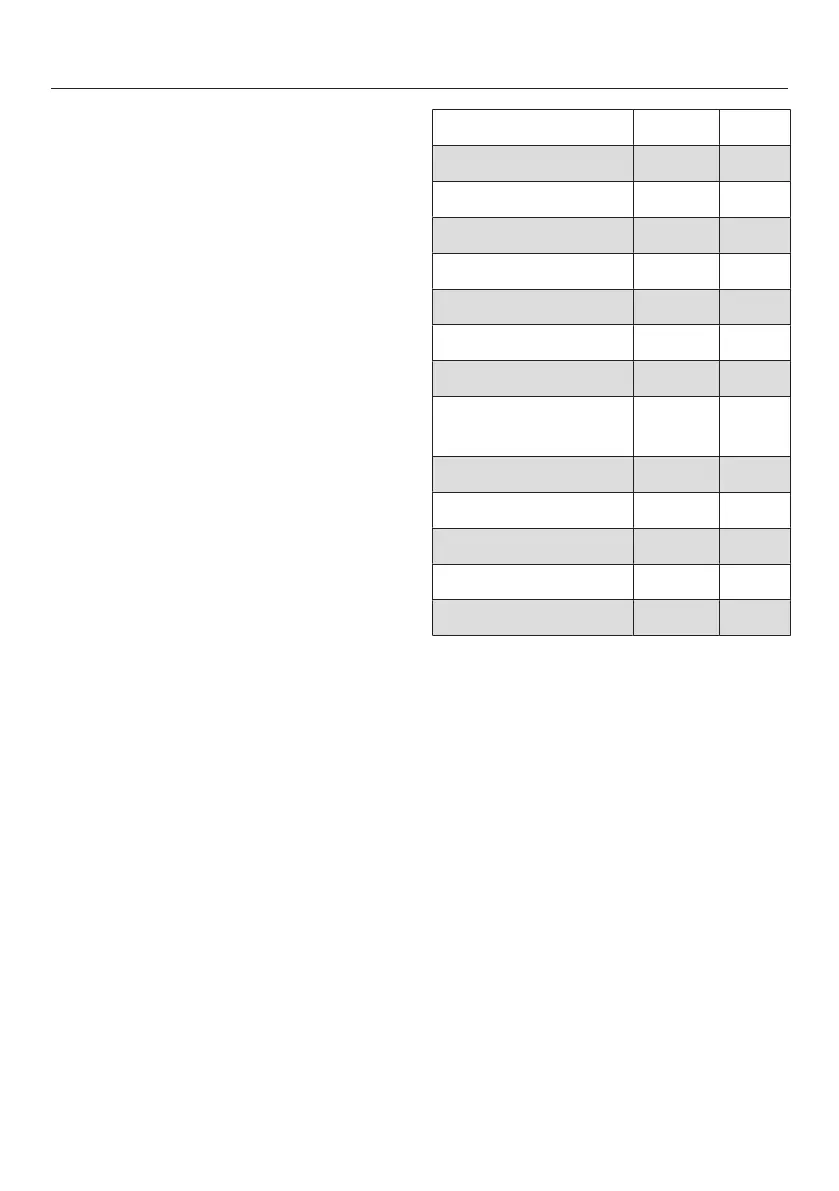
Useful tip: See the following table for a
list of programmes in which the
PowerWash display is active.
Quick ECO
Cottons X X
Cottons X –
Cottons X –
Minimum iron X X
Delicates X X
Shirts X X
QuickPowerWash –
Dark garments/
Denim
X X
Outerwear X X
Express 20 –
Sportswear X X
Automatic plus X X
Clean machine –
X = can be selected
– = cannot be selected
= activated


 To Next Page