4
IMPORTANT: TURN OFF the power and dis-
connect the battery wires before you begin to connect
the SENSOR wires to any gate opener.
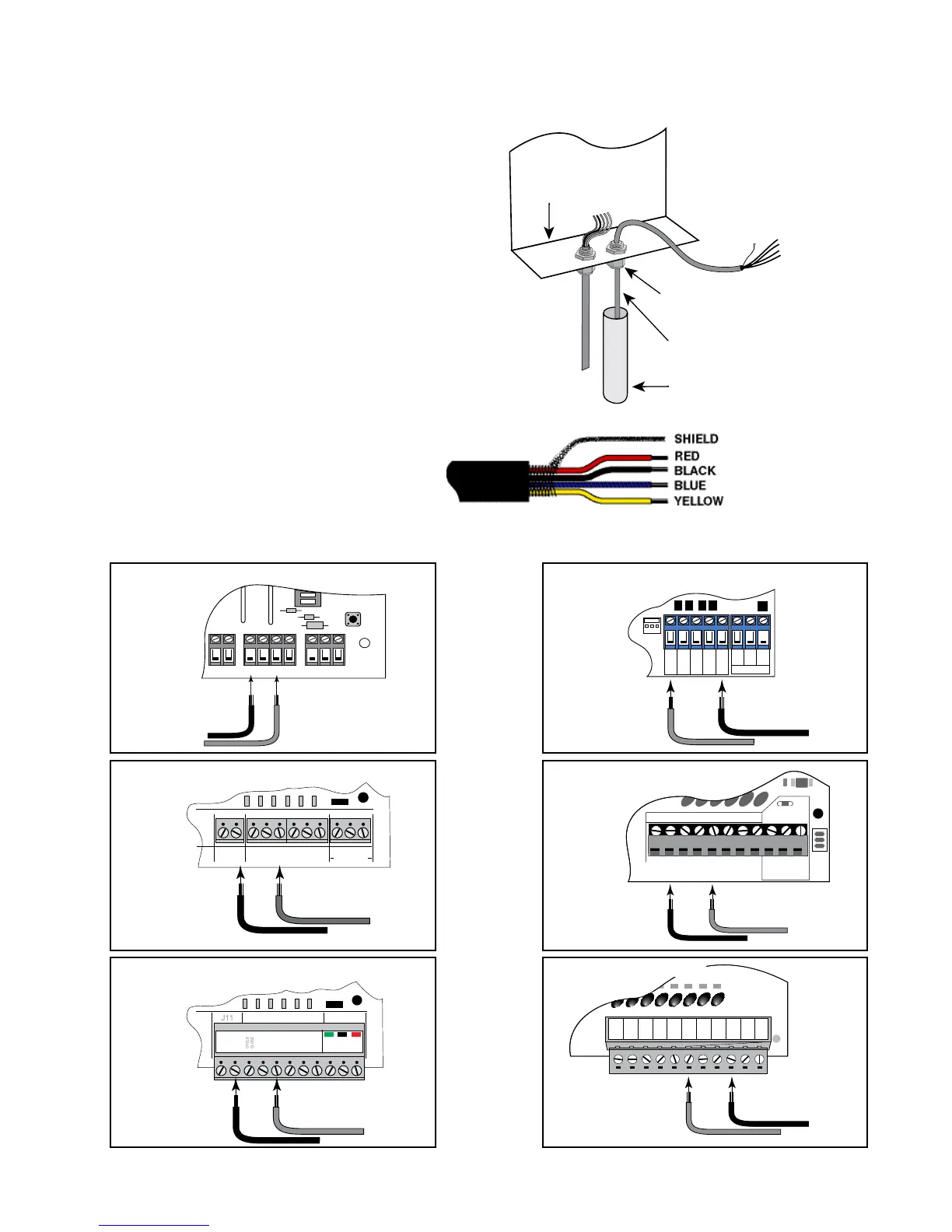
Step 5: Run the cable from the SENSOR through a
WIRE CLAMP into the control box. Pull about 8 - 10
inches of cable into the control box to reach the AC-
CESSORY TERMINAL BLOCK and BATTERY TER-
MINALS in the control box. Now tighten the WIRE
CLAMP nut to secure the cable in the WIRE CLAMP.
Step 6: Strip about 3/8 of an inch of insulation from the
YELLOW, BLACK, RED and BLUE wires in the SEN-
SOR CABLE.
Wiring the SENSOR to Mighty Mule Gate Openers:
NOTE: The SHIELD is the braided metal
wire wrapped around the insulated leads
inside the SENSOR CABLE.
PVC Conduit
WIRE CLAMP in Knockout
Bottom of Control Box
CABLE from
the Opening Sensor
ON
ALARM ACCESSORY RCVR
SEQ1
SEQ2
LEARN
BLU
ORG
WHT
GRN
R B G
Connect BLUE wire from the
SENSOR CABLE to the
BLU terminal on the opener
control board.
Connect the BLACK wire
from the SENSOR CABLE to
the GRN terminal on the
opener control board.
PRO-1000, PRO-SL1000 and Old Mighty Mule
Control Boards
BLUE
BLACK
GRN BLK RED
RECEIVER
COM COM
CYCLE
CLOSE
SAFETY
EXIT
OPEN
SHADOW
LOOP
CLOSE
EDGE
OPEN
EDGE
J11
J8
J12
GTO/PRO DC Powered PRO-SW3000
and PRO-SW4000 Control Boards
Connect the BLUE wire from
the SENSOR CABLE to the
EXIT/OPEN terminal on the
opener control board.
Connect the BLACK
wire from the SENSOR
CABLE to one of the
COMMON terminals on
the opener control board.
BLUE
BLACK
RECR
GRN
BLK
RED
EXIT
SAFETY
EDGE
CYCLE
COMMON
LINK
Mighty Mule 350 Control Board
Connect the BLUE wire from
the SENSOR CABLE to the
EXIT terminal on the opener
control board.
Connect the BLACK wire from
the SENSOR CABLE to one of
the COMMON terminals on the
opener control board.
BLUE
BLACK
RECEIVER
COM COM
CYCLE
CLOSE
SAFETY
EXIT/
OPEN
SHADOW
LOOP
CLOSE
EDGE
OPEN
EDGE
BLKGRN RED
Mighty Mule 500 & 502
Control Boards
Connect the BLUE wire from
the SENSOR CABLE to the
EXIT/OPEN terminal on the
opener control board.
Connect the BLACK
wire from the SENSOR
CABLE to one of the
COMMON terminals on
the opener control board.
BLUE
BLACK
RECEIVER
ALM
GTO RCVR.
COM
GRN
BLK
RED
CYCLE
SAFETY
EXIT
SHADOW
OPEN
EDGE
COM
CONTROL INPUTS
CLOSE
EDGE
Connect the BLUE wire from
the SENSOR CABLE to the
EXIT terminal on the opener
control board.
Connect the BLACK wire from
the SENSOR CABLE to one
of the COMMON terminals on
the opener control board.
BLUE
BLACK
GEN-3 (Blue) Control Boards
COM
COM
COM
GTO Inc.
SX4000 L
CYCLE
SAFETY
OPEN EDGE
RUN 2
OPEN
CLOSE
STOP
COM
COM
COM
SHADOW
LOOP
Connect the BLUE wire
from the SENSOR CABLE
to the OPEN terminal on
the opener control board.
Connect the BLACK wire from
the SENSOR CABLE to one
of the COMMON terminals on
the opener control board.
BLUE
BLACK
GTO/PRO GP-SL100 and GP-SW100
Control Boards












 To Next Page