20565601w Rev 07/21 2 of 17
Safety Information Sheet
A printed copy of the Safety Information has been
included in the product box and is also downloadable
from the Safety and Documentation section on the
product page at SigmaAldrich.com. This document
includes:
• Electrical Specifications
• Environmental Operating and Storage Conditions
• Warnings
• End of Life Directions WEEE Directive
• Symbol Definitions
Installation
Unboxing Instructions:
Remove protective film from the touch screen and lens.
After removal from the lens, the user may need to wipe
the lens with a Kimwipes
®
cleaning wipe. Any remaining
debris can be removed using an IPA solution and a
Kimwipes
®
cleaning wipe.
The power cord will need to be fitted with the
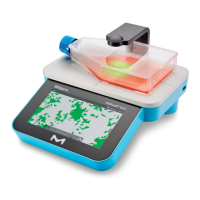
appropriate plug (included). Place Millicell
®
DCI device
on a flat level surface such as on the bench-top or in a
bio-safety cabinet. Millicell
®
DCI device is not intended
for the incubator. If you will be using the Millicell
®
Cloud
feature, locate the device near a strong WiFi
®
signal or
Ethernet access (optional). For WiFi
®
signal, insert the
WiFi
®
adapter into one of the USB ports on the back
panel of the Millicell
®
DCI device.
Plug the power cord into the back of the Millicell
®
DCI
device and into the wall electrical outlet. Using power
strips or extension cords is not recommended.
Power On/Off
The power switch is located on the back of the device.
The Millicell
®
DCI device will go to “sleep” when
not in use.
Cleaning and Maintenance
The instrument body can be sanitized by wiping
with a soft cloth moistened with 70% ethanol.
• Wipe the screen with a soft, dry, nonabrasive cloth.
Do not clean the display screen with sanitizing agents
or other aggressive solutions.
CAUTION: When sanitizing, make sure that
no liquid enters any part of the instrument.
• The instrument is NOT autoclavable. Extreme
heat will damage the display screen and other
electronic components.
Specifications
Instrument Body
Material
ABS plastic housing,
Aluminum stage
Height 15.24 cm (6 in)
Width 27.94 cm (11 in.)
Depth 30.48 cm (12 in.)
Weight < 6 lbs
Integrated Display
with Touchscreen,
Anti-glare coating
7 inches
Display Resolution 1024 x 600 pixels
Z-focus Range +/- 5 mm (0.20 in.)
System Compatibility
WiFi
®
Network
Yes, via EDIMAX External USB
WiFi
®
Adapter
Ethernet Yes, 10-100 Mb/s
Memory Storage 32 GB
Chemical Compatibility
Wiping with alcohol
Compatible with 70% ethanol
by wiping
Device is not submersible
Recommended Cell Culture ware
Compatible with most transparent culture ware
with focal planes 0-8.75 mm above the bottom
surface of the object.
Maximum vessel height ≤ 2.19 in. (55.6 mm)




 To Next Page