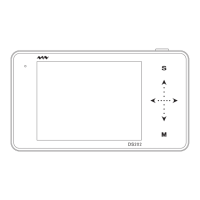
each channel
level, press(―… + ) to choose
channel(CH_A/CH_B/CH_C/CH_D)
Q X Choose the window to
display waveforms
Scroll(―…+) to choose waveforms
of different positions to display on
current window
R T0
????? ???????
S 360-4K Memory depth
Scroll (―…+) to choose memory
depth
T EXT/SAV
??????? ????????
---------------------------------------------------------------------------------------------------------------------
2.4、Menus
On screen, press (■) to access the menu, press again to exit. Detailed instructions are listed below:
Item(Up→Down)
Function Operating Instruction
Save Param Save current parameter settings
Press (―…+) to confirm,
scroll (…) to the next menu
Save Dat Save dat file to the built-in USB
disk
Press (―… +
scroll (―…+) to choose file
no., scroll (…) to next menu
Save Buf Save buf file (sample data in
buffering area) to built-in USB
disk
Press (―… + ) to confirm,
scroll (―…+) to choose file
no., scroll (…) to next menu
Save Bmp Save bmp file (waveform
image) to the built-in USB disk.
Press (―… + ) to confirm,
scroll (―…+) to choose file
no., scroll(…) to next menu.
Save Csv Save csv file (export sampling
data of buffering area) to
built-in USB disk
Press (―… + ) to confirm,
scroll (―…+) to choose file
no., scroll(…) to next menu.
Load Dat Load dat file
Press (―… + ) to confirm,
scroll (―…+) to choose file
no., scroll (…)to next menu.
Load Buf Load buf file
Press (―… + ) to confirm,
scroll (―…+) to choose file
no., scroll (…)to next menu.
BackLight Adjust backlight brightness
Press (―… + ) to confirm,
scroll (―… + ) to adjust
backlight brightness, scroll
(…) to next menu.
Buzzer Adjust buzzer volume
Press (―… + ) to confirm,
scroll (―…+) to adjust buzzer
volume, scroll (…) to next
menu.
Standby Choose screensaver
Press (―… + ) to confirm,
scroll (―…+) to choose file
no., scroll (…) to next


 To Next Page