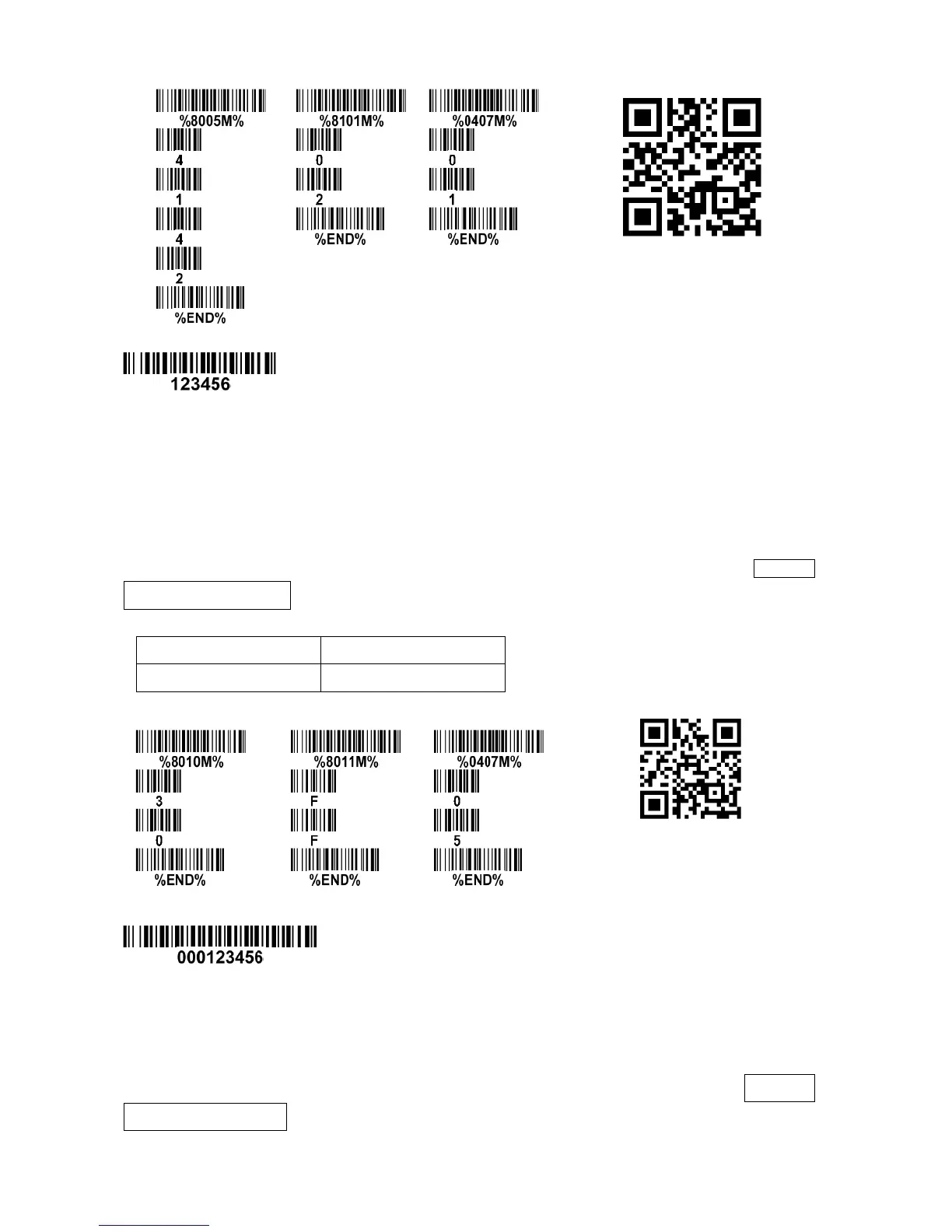
Testing barcode:
FN1 substitution string setting: The FN1 character (0x1D) in an UCC/EAN128 barcode, or a Code 128
barcode, or a GS1 DataBar barcode can be substituted with a defined string.
Truncate leading G5 string setting: by setting, a defined leading character or string can be truncated.
Also a single character can be un-defined.
Repeat of a G5 character setting: While G5 is set as a single defined or un-defined character, G5 can
also be set to be repeated. This setting is ignored when the truncated number is more than the
barcode data characters. The option of “FF” for this setting is not active while the option of Truncate
leading G5 string setting is “00”.
Example: Truncate all leading zeros for all symbols.
Testing barcode:
Truncate ending G6 string setting: By setting, a defined ending character or sting can be truncated.
Also a single character can be undefined.
Repeat of a G6 character setting: while G6 is set as a single defined or undefined character, G7 can
also be set to be repeated. This setting is ignored when the truncated number is more than the
barcode data characters. The option of “FF” for this setting is not active while the option of Truncated
ending G6 string setting is “00”.
Single character C1/C2 replacement: By setting, a defined character in the data string can be replaced



 To Next Page