miniDSP Ltd, Hong Kong / www.minidsp.com / Features and specifications subject to change without prior notice 17
3.4 DIRAC LIVE LICENSING
3.4.1 License activation
This step is necessary to activate your Dirac Live license.
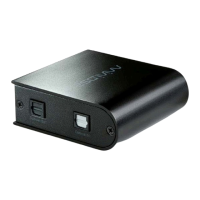
1. Drop down the Help menu and select the Get Activation Serial Number item:
2. The plugin will get your unique serial number from the connected DDRC-24 and display it:
3. Using the provided activation serial number, activate your license from this webpage:
http://www.minidsp.com/dirac-series/activate/#activate
If you have not activated a Dirac Live license before, use the New User screen on the left. If you have
previously activated one or more Dirac Live licenses, use the screen on the right.
Notes:
1. The serial number requested in the activation screen is not the serial number printed on the hardware unit.
A unique activation serial number for Dirac Live is programmed into the firmware of each unit and can only
be accessed with the DDRC-24 plugin (step 2 above).
2. The email address used during license activation is not related to your user account on miniDSP.com. To
activate and validate a Dirac Live license, you must create a separate account on the Dirac server using the
form shown at left in step 3 above.


 To Next Page