miniDSP Ltd, Hong Kong / www.minidsp.com / Features and specifications subject to change without prior notice 29
5.3 CONFIGURING FOR MEASUREMENT
Start Dirac Live Calibration Tool Stereo for miniDSP.
Be sure to quit the DDRC-88 Utility program before starting Dirac Live Calibration Tool for miniDSP.
Running the two programs at the same time will result in communication conflicts and odd behavior.
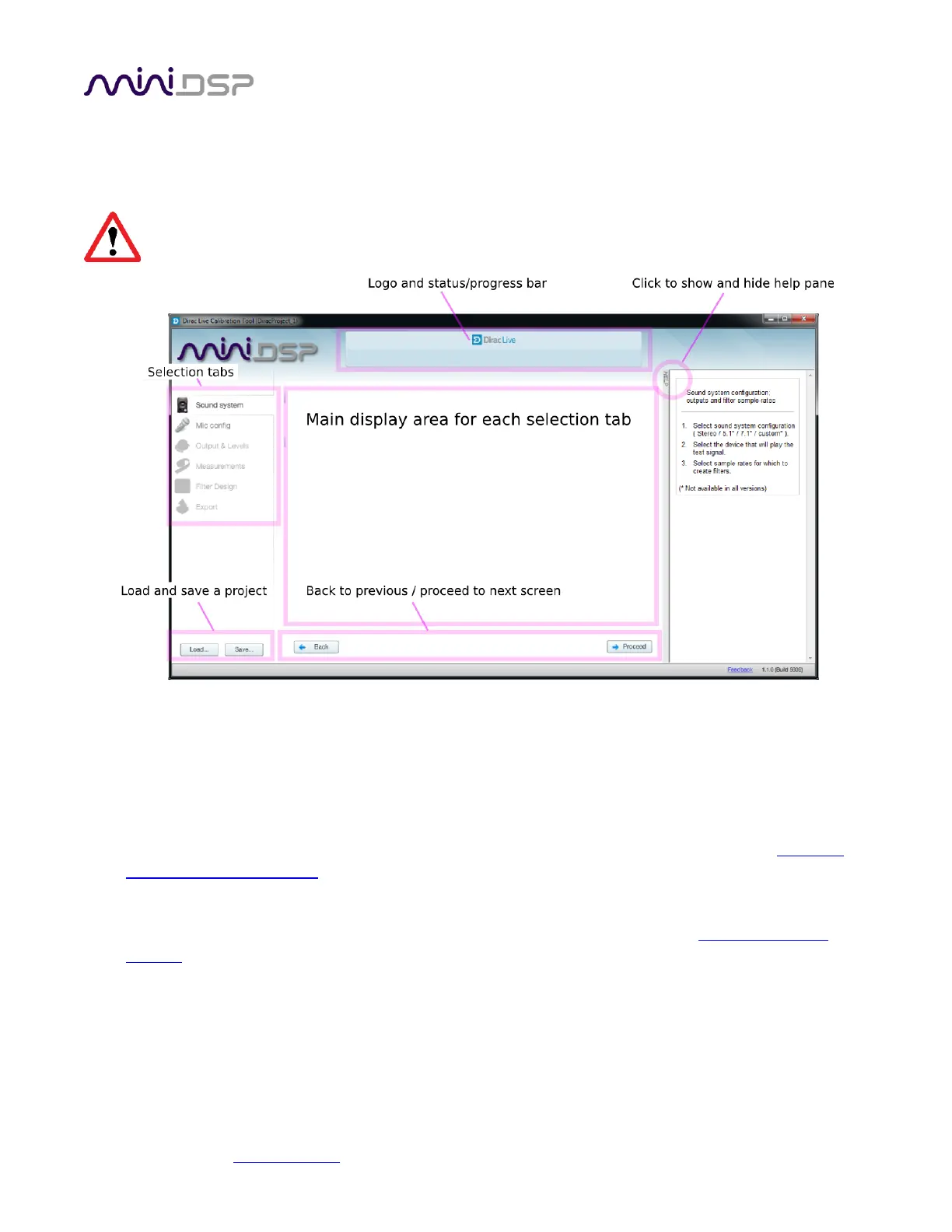
The main areas of the interface are:
Logo and status progress bar
This area shows a progress bar with current status when the program is performing calculations.
Selection tabs
Each tab selects the information shown in the main display area. These are generally worked through in
order, from top to bottom. This section covers the first four tabs; the final two are covered in Dirac Live
Filter Design and Download.
Load and save a project
Each measurement project can be saved to a file and reloaded at a later time. See Saving and loading
projects.
Back to previous / proceed to next
Use these two buttons to advance to the next tab when each is complete, or to go back to the previous
tab to make alterations. The tabs at the left can also be clicked on directly.


 To Next Page