miniDSP Ltd, Hong Kong / www.minidsp.com / Features and specifications subject to change without prior notice 30
Help open/close
Click on the small Help divider at the right of the window to open a pane with help on the currently
selected tab. Click on the divider again to close the help pane.
5.3.1 Sound System tab
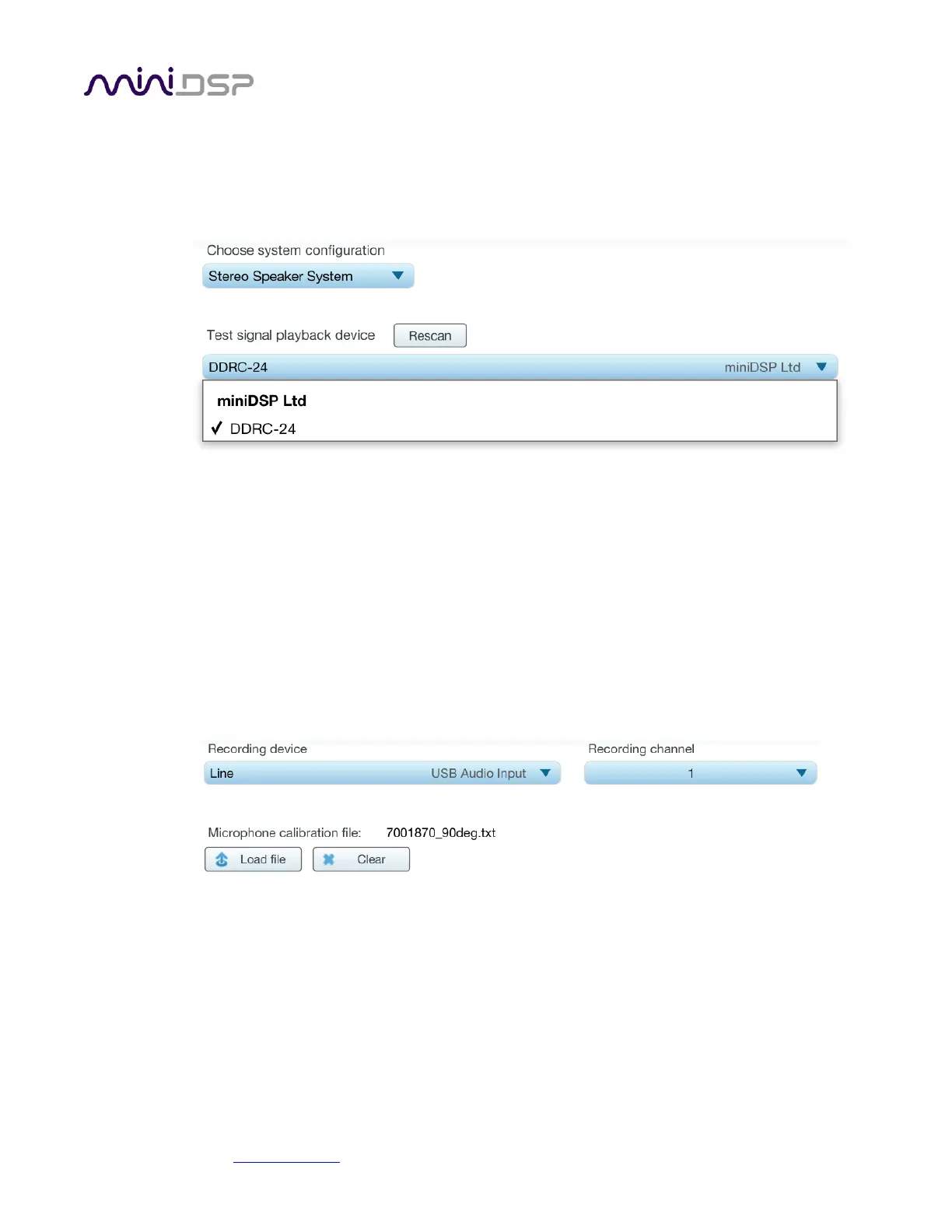
The Sound System tab is preset for you, provided that you have your DDRC-24 and UMIK-1 connected to the
computer via USB.
Choose system configuration
Preset to Stereo Speaker System. This is the only configuration supported by the DDRC-24.
Test signal playback device
Preset to DDRC-24. (If this is not present, check that your DDRC-24 is connected via USB and powered on,
and click the Rescan button.)
Once you have verified that this tab is correct, click the Proceed button.
5.3.2 Mic Config tab
On the Mic Config tab, set the following parameters.
Recording device
Preset to the UMIK-1. (If this is not present, ensure that the UMIK-1 is connected securely to the
computer via USB, and go back to the Sound System tab and click on Rescan.)
Recording channel
Select 1 from the drop-down menu.


 To Next Page