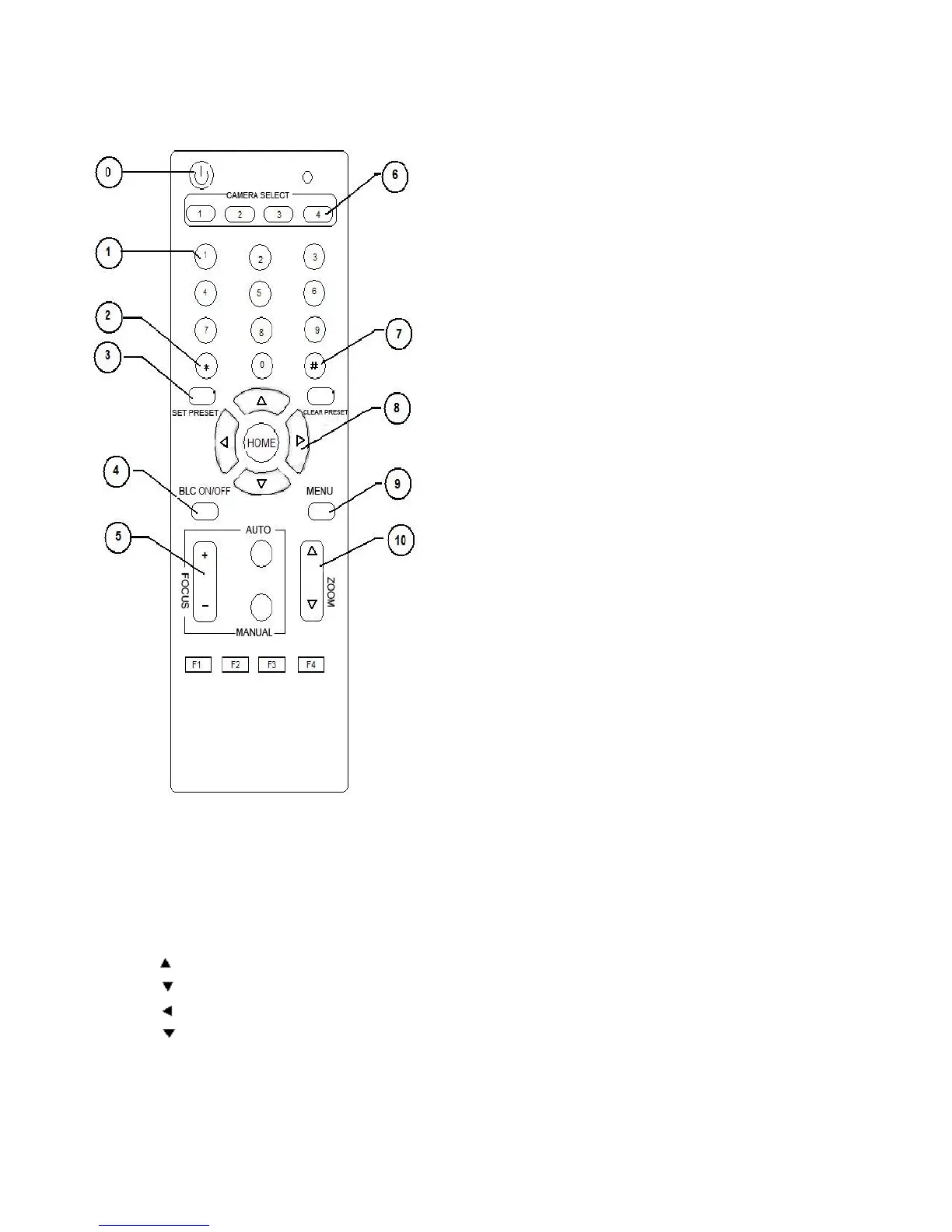
Remote Controller Explanation
0、Standby key
After pressing the standby key, the camera will step into
standby mode. Press again, the camera will self-check again
and back to HOME position. (Note: If power-on mode is turned
on, it will automatically point to the specified preset position.
1、Number key
Setting or locating presets
2、* key
Key combination use
3、Set preset key:
Set preset:
Set preset key + 0-9 number key:
Clear preset key:
Clear preset key + 0-9 number key
or:#+#+#:Clear all the presets
4、BLC control key
Backlight ON / OFF: The camera does not support
5、Focus control key
Focus+:Focus length far from near
Focus-:Focus length near from far
Auto focus:The camera focus mode is auto
Manual focus:The camera focus mode is manual
6、Camera address selection
Select the camera which wants to be controlled
7、 # key
8、pan/tilt control key
Press key :Up
Press key :Down
Press key :Left
Press key:Right
“HOME” key: Return to the middle position
9、Menu setting
Open or close the OSD menu


 To Next Page