10、Zoom Control key
zoom+:Lens near
zoom-:Lens far
11. Camera IR remote control address selection
【*】+【#】+【F1】:Camera Address No.1
【*】+【#】+【F2】:Camera Address No. 2
【*】+【#】+【F3】:Camera Address No. 3
【*】+【#】+【F4】:Camera Address No. 4
Usage of IR Remote Controller
Finishing initialization, it can receive and execute the IR commands. Users can control the pan/tilt/zoom,
setting and running preset positions via the IR remote controller.
Key Instruction:
1、In this instruction, “press the key” means a click rather than a long-press, and a special note will be given if
a long-press for more than one second is required.
2、When a key-combination is required, do it in sequence. For example, “ 【 *】+【#】+【F1】”means
press“【*】”first and then press“【#】” and last press“【F1】”.
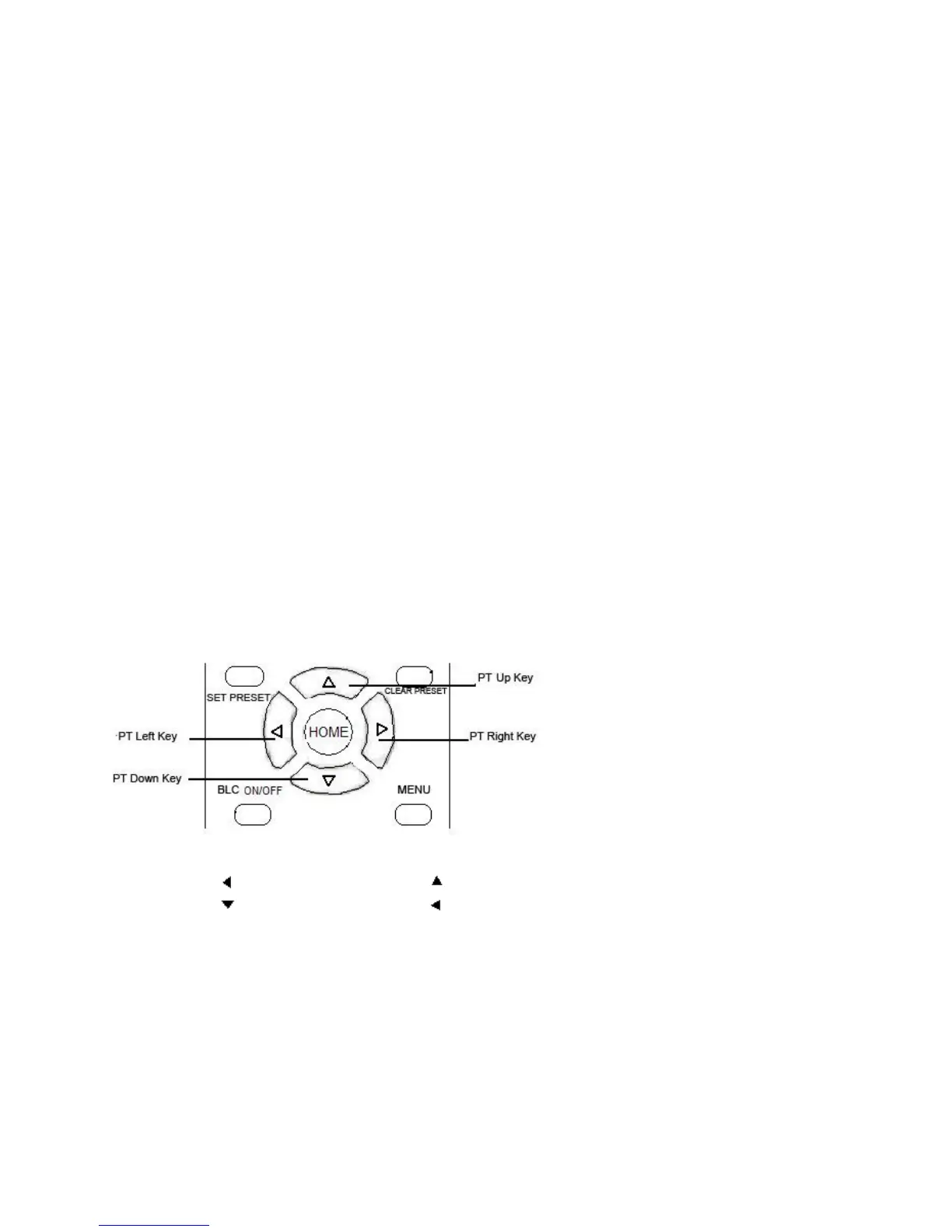
1. Pan/Tilt Control
Up: press Down: press
Left: press Right: press
Back to middle position:press“【HOME】”
Press and hold the up/down/left/right key, the pan/tilt will keep running, from slow to fast, until it runs to the
endpoint; the pan/tilt running stops as soon as the key is released.
2、Zoom Control


 To Next Page