17
© 2015 Minuteman International, Inc.
X17 ECO CFS Carpet Extractor #988751UM Rev. * 04/15
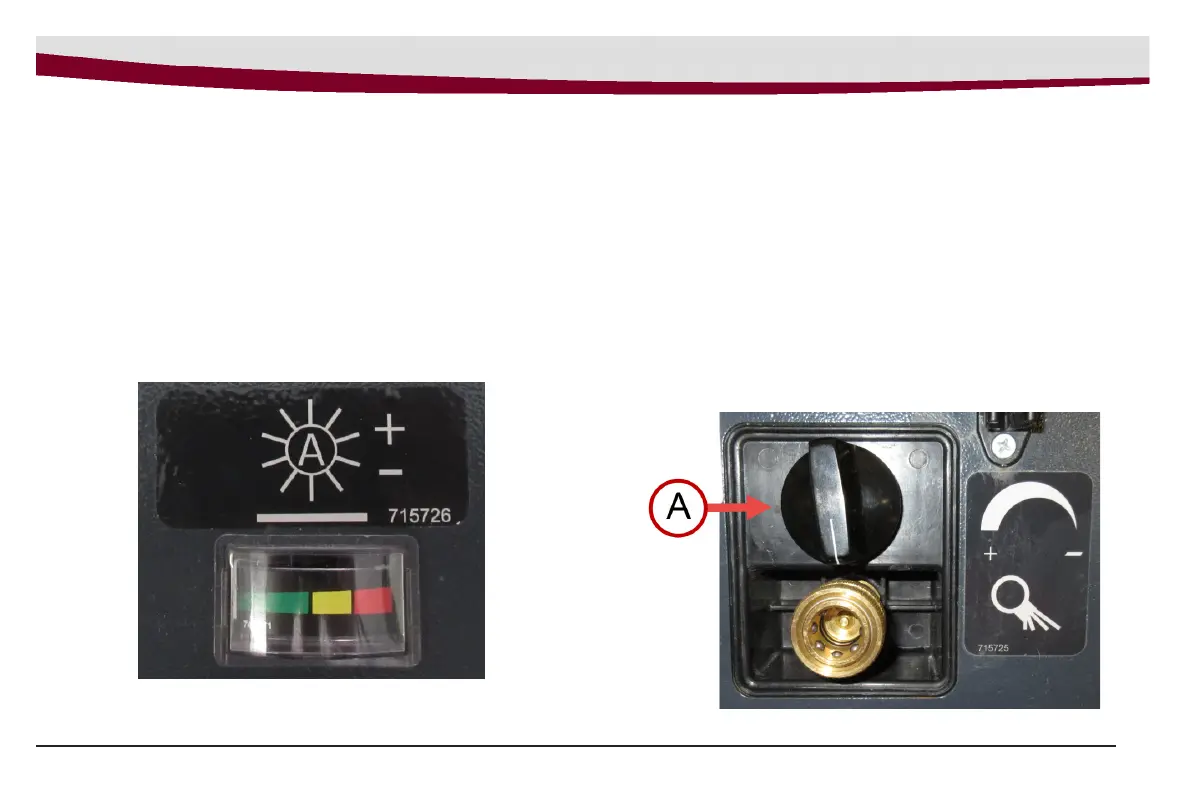
Brush Pressure Gauge
The brush pressure gauge informs the operator if the brush
pressure setting is in optimum range. (See Figure 3) The
machine operates best in the green range. If the machine
reaches the yellow or red range, the brush pressure can
be lowered by using the Brush Pressure Adjustment Knob.
See Brush Pressure Adjustment Knob for brush pressure
adjustments.
Machine Overview
Figure 3
Figure 4
Brush Pressure Adjustment Knob
The Brush Pressure Adjustment Knob allows the operator to
decrease or increase the brush pressure. The adjustment
knob (item A, Figure 4) is located on the lower right side of
the back panel of the machine.
To DECREASE brush pressure: Turn the adjustment knob
CLOCKWISE (in the ‘-’ direction) until the desired pressure
range is achieved.
To INCREASE brush pressure: Turn the adjustment knob
COUNTER-CLOCKWISE (in the ‘+’ direction) until the
desired pressure range is achieved.



 To Next Page