5. Usage
MiR Precision Docking Operating guide (en) 2019/11 - v.1.2 ©Copyright 2019: Mobile Industrial Robots A/S. 18
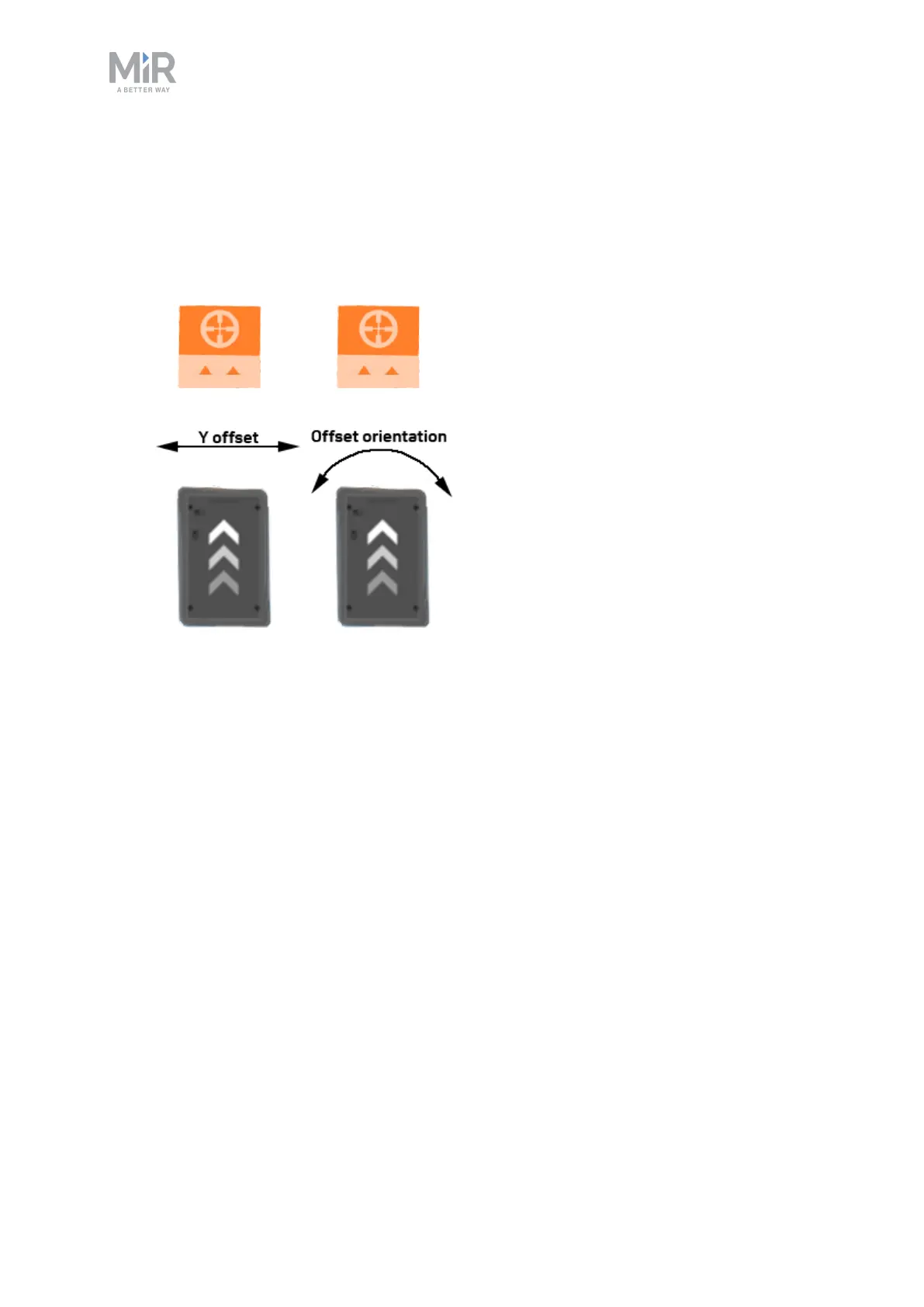
7. There are two offsets within the editor you can modify. Positive values modify the offset
to the left of the robot, and negative values modify to the right.
• Y offset
How far to either side the robot should dock.
• Offset orientation
How much the docking angle should change
Continue to modify these until the precision pins and holes align correctly when the robot
docks to the marker.
8. To test that the docking is correct, check that the robot locks to the pins once docked.
Then send the robot to another position. It must automatically release the pins when
undocking from the station.
9. If the robot does not release itself from the pins, the offsets may require further
adjustment.
5.3 Creating a precision docking mission
This section describes how to create a mission that makes a MiR robot autonomously dock to
a MiR Precision Docking station. The procedure is identical to any other case where the
robot must dock to a marker, the only difference is that a precision docking station is chosen.
This example demonstrates a mission where the robot docks to the MiR Precision Docking
station and waits there for five minutes. Another mission can be listed after this example
mission to send the robot to another position.


 To Next Page