
 Need help?
Do you have a question about the Mircom FA-1025T and is the answer not in the manual?
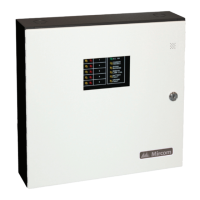
The FA-1025T is a sophisticated Fire Alarm Control Panel designed to provide comprehensive fire detection and alarm capabilities for various applications. This ULC-listed panel is engineered to meet all performance and operational requirements set forth by Underwriter's Laboratories of Canada (ULC), ensuring reliability and compliance with safety standards.
At its core, the FA-1025T is a supervised five-zone, 24VDC Fire Alarm Control Panel. This means it can monitor up to five distinct areas for fire conditions, providing a robust and segmented approach to fire safety. Each of these detection zones operates as a Class B circuit, a common wiring configuration that allows for easy installation and maintenance.
Beyond detection, the panel features two Class B signal zones, capable of delivering up to 1.7A of signal power. These zones are crucial for activating audible and visual notification appliances like bells and horns, alerting occupants to a fire event. The panel offers flexibility in how these signals are activated, with DIP switch selectable outputs for either Temporal Code 3 (a standardized fire alarm sound pattern) or Steady signals, allowing customization based on local codes or preferences.
The FA-1025T integrates essential relay contacts for both alarm and trouble conditions. These relays provide outputs that can be used to interface with other building systems, such as HVAC shutdown, elevator recall, or remote monitoring stations, enhancing the overall safety infrastructure.
Remote annunciation is a key feature, allowing for the extension of alarm and trouble indications to remote locations. This includes remote trouble indicators and buzzers, as well as supervised alarm annunciation, which ensures that the remote indicators themselves are functioning correctly. This capability is vital for large facilities or those with multiple points of entry/exit where centralized monitoring might not be immediately visible.
Powering the system, the panel is designed to operate on A.C. power with battery backup. It supports 24V 4AH Gel Cell or Sealed Lead-Acid batteries for standby power, with options for 24 hours of standby and 5 or 30 minutes of alarm, depending on the specific battery configuration and load. The panel's electrical rating is 120V, 60Hz, 1A or 240V, 50Hz, 0.5A, making it adaptable to different electrical environments.
The FA-1025T offers a user-friendly interface with a range of LED indicators and control switches, providing clear status information and operational flexibility.
For immediate status updates, the panel includes LED indicators for various conditions:
Control switches provide essential operational capabilities:
The panel's behavior can be customized through DIP switch DSW1 and several jumpers:
The sequence of operation is straightforward:
The FA-1025T is designed with maintenance and troubleshooting in mind, offering features that simplify system checks and fault identification.
Before initial power-up, a system checkout procedure is recommended:
After power-up, the panel provides clear indications for troubleshooting:
The manual provides detailed wiring tables for detection zones, bells, and horns, including wire gauge recommendations and maximum wiring run distances, which are crucial for proper installation and system performance. These tables help technicians ensure that wiring adheres to electrical codes and maintains signal integrity.
Furthermore, the manual includes comprehensive compatibility lists for 2-wire smoke detectors from various manufacturers (Mircom, Cerebrus Pyrotronics, Fenwal, System Sensor, Mirtone, Edwards, Simplex, Sentrol - ESL, Detection Systems Inc.) and signaling devices (System Sensor - SpectrAlert, Wheelock, Gentex, Mircom). This information is essential for selecting compatible devices, ensuring the system operates as intended and meets regulatory requirements. Notes on total standby current for detectors and reset times are also provided to aid in system design and maintenance.
A dedicated section on battery calculations (Appendix B) serves as a selection guide, allowing installers to determine the required battery capacity based on standby and alarm current draw. This ensures that the system has sufficient power backup for the specified duration, a critical aspect of fire alarm system reliability. The guide also notes that larger batteries may require an external battery box, aiding in planning the physical installation.
The FA-1025T's design, with its clear indicators, customizable functions, and detailed documentation, aims to provide a reliable fire alarm control panel that is both effective in operation and manageable in terms of installation and ongoing maintenance.
 General
| Type | Fire Alarm Control Panel |
|---|---|
| Model | FA-1025T |
| Battery Standby | 24 hours |
| Voltage | 120V AC, 50/60 Hz |
| Alarm Outputs | 2 |
| Auxiliary Power | 24V DC, 0.5A |
| Operating Temperature | 0°C to 49°C |
| Relative Humidity | Up to 93% non-condensing |
| Weight | 8 lbs |
| Compliance | UL 864 |
| Dimensions | 14.5" x 12.5" x 3.5" (368mm x 318mm x 89mm) |


 To Next Page