MICRO 8
Installation and user manual
Page 18 of 24
Displays the level of the alarm signal.
The values entered in this column cannot be changed.
Displays the status of the alarm output (ALARM terminal RX output).
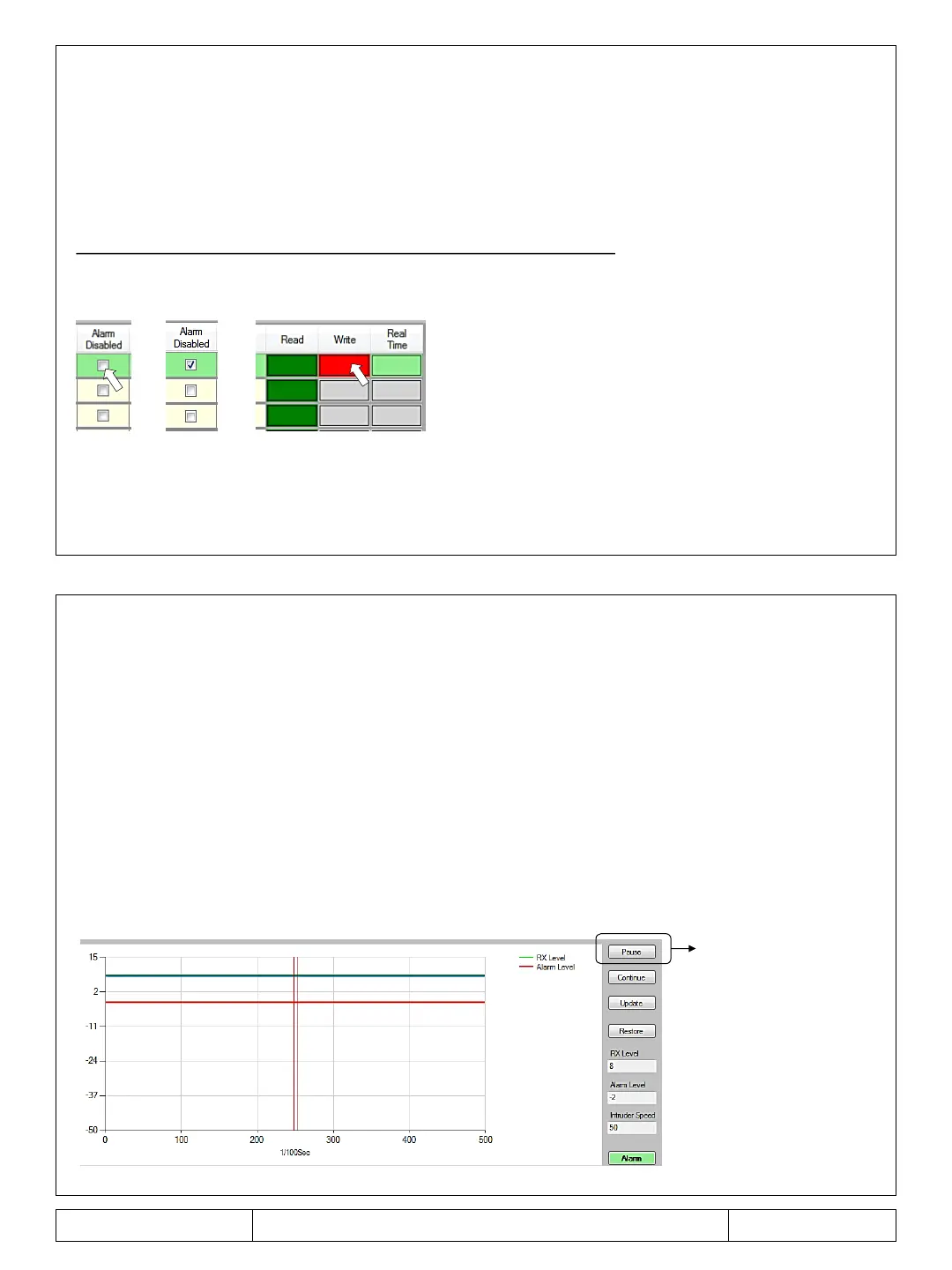
To change the activation or deactivation condition, position the mouse on the panel of the output
whose status you want to change (figure 1), then click once (figure 2).
The flag in the box indicates that the output is not active (figure 2).
To save the modification, click with the mouse on the red cell of the address you are configuring
(figure 4).
Displays the default detection mode.
This parameter cannot be changed.
Figure 1
Figure 2
Figure 3
– WRITE – REAL TIME COLUMNS
Reading / enabling column for changes.
Instructions: click with the mouse on the green box of the address you want to read / modify.
Column for writing / editing parameters.
Instructions: Once the changes have been made to an address, click on the corresponding red box
with the mouse.
-time display panel of the signal level for each pair of antennas. Function to be
used during the installation phase to verify, according to the parameters assigned, the signal level.
IMPORTANT: once the display panel is activated, the configuration table is automatically inhibited
and parameters can no longer be changed. To reactivate the commands, click on the Pause button.
Pause



 To Next Page