MICRO 8
Installation and user manual
Page 15 of 24
Program the S/A dip-switches of the RX and TX modules in OFF mode.
IMPORTANT: the CNF dip-switches of both modules must be programmed in OFF mode.
Connect the antennas (see Connection options - RS485-USB adapter).
Select the MITECH radar barrier configuration program and wait a few seconds.
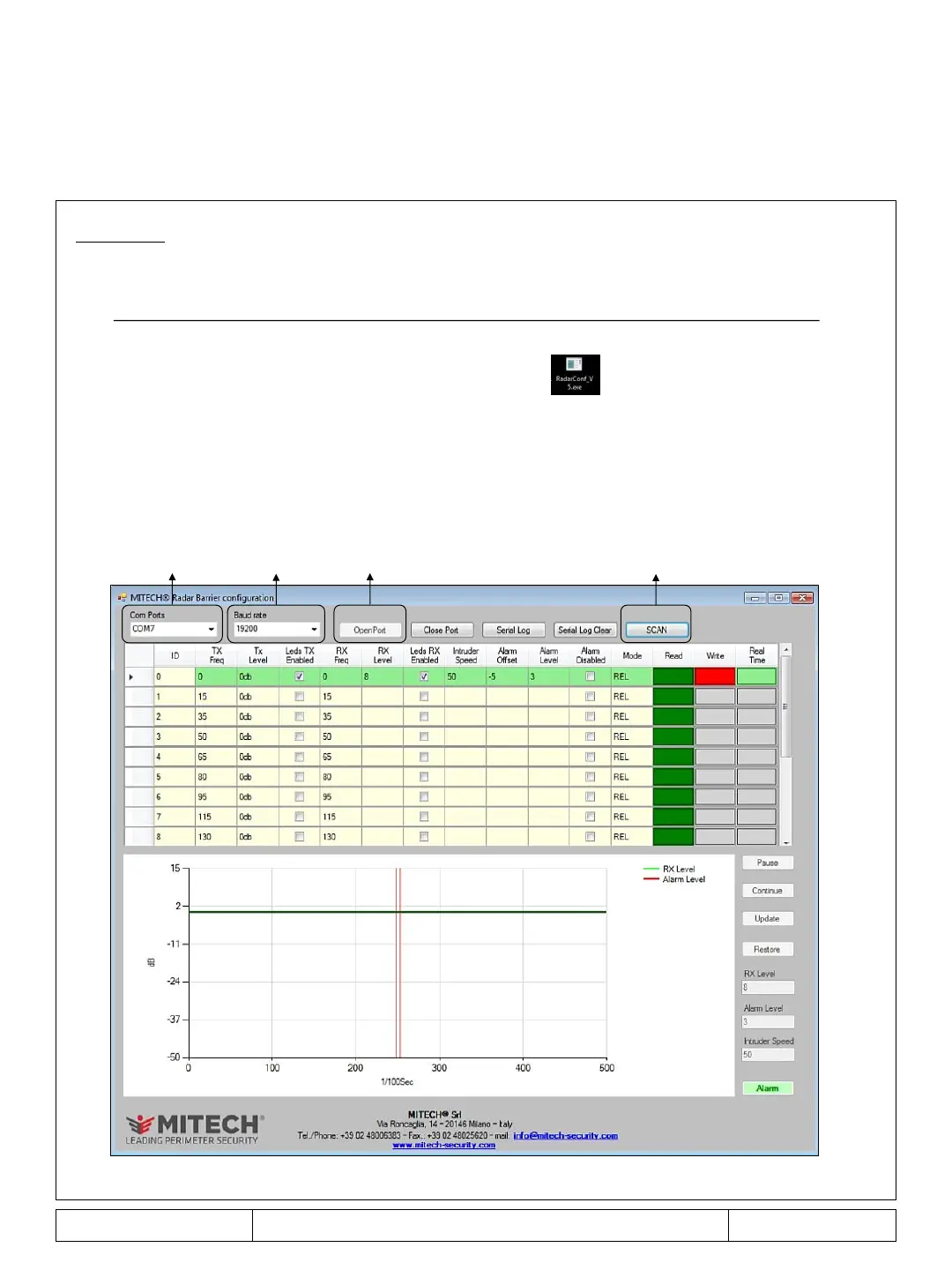
- Select Com Ports and select the serial port on which the RS485 adapter is connected.
-
Select the communication speed according to the converter model used (standard 19200 bps).
- Select the Open Port command, wait a few seconds and then the SCAN key.
After about 16 seconds all the antennas connected to the serial port will be displayed
(see Figure 1, example of a pair of antennas connected to COM7).
- MITECH radar barrier configuration program start
Com Ports
Baud rate Open Port SCAN
Figure 1
The MITECH Radar Barrier Configuration program allows, via the RS485 serial connection, the maximum
and simultaneous management of 16 pairs of antennas, using only one COM port.
In case it is necessary to manage more than 16 pairs of antennas, more COM ports must be used.



 To Next Page