Manual operation
Pump
Back
Back
Function settings
Ref. add
All
Unit
Group
Back
Ref. add Unit: Grp
Mode
Mode
Mode
Mode
Mode
30
The service menu provides functions to be used by installer or service engineer. It is NOT intended for the home owner to alter settings within this menu. It is for this
reason password protection is required to prevent unauthorised access to the service settings.
The factory default password is "0000".
Follow the procedure described in [Password protection] for the set up operation.
The service menu is navigated using the up and down icon to scroll through the functions. The menu is split across 4 screens and is comprised of the following
functions;
1. Manual operation
2. Function settings
3. Thermistor adjustment
4. Auxiliary settings
5. Heat source setting
6. Pump speed
7. Heat pump settings
8. Operation settings
9. Energy monitor settings
10. External input settings
11. Thermo on output
12. Commissioning wizard
13. Running information
14. Thermistor reading
15. Summary of settings
16. Error history
17. Password protection
18. Manual reset
19. SD card
9-4. Service Menu
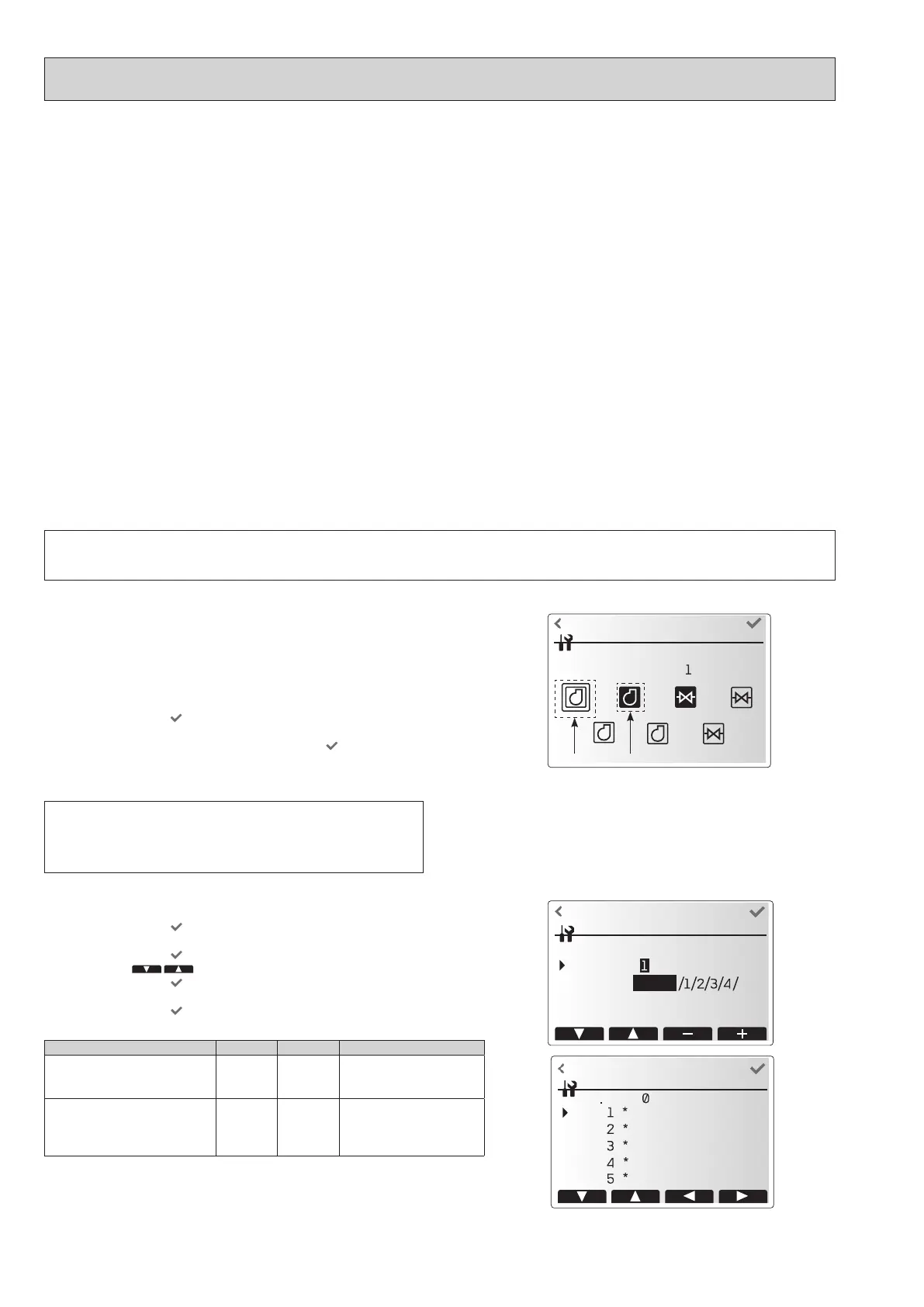
<Manual operation>
During the lling of the system the water circulation pump, 3-way valve and
mixing valve1 or 2 can be manually overridden using manual operation mode.
When manual operation is selected a small timer icon appears in the screen.
The function selected will only remain in manual operation for a maximum of 2
hours. This is to prevent accidental permanent override of the FTC.
►Example
Touching the conrm icon
will switch manual operation mode ON for the
main 3-way valve. When lling of the DHW tank is complete the installer
should access this menu again and touch the conrm icon
to deactivate
manual operation of the part. Alternatively after 2 hours manual operation
mode will no longer be active and FTC will resume control of the part.
Many functions cannot be set whilst the indoor unit is running. The installer should turn o the unit before trying to set these functions. If the installer attempts to
change the settings whilst the unit is running, the main remote controller will display a reminder message prompting the installer to stop operation before continuing.
By selecting “Yes”, the unit will cease operation.
Manual operation and heat source setting cannot be selected if the system is
running. A screen will be displayed asking the installer to stop the system
before these modes can be activated.
The system automatically stops 2 hours after the last operation.
Selected Running
Manual operation menu screen
<Function settings>
1. Select function settings from the Service menu.
2. Touch the conrm icon
.
3. Ensure the Ref address and unit number are displayed to the right.
4. Touch the conrm icon
.
5. Touch the icon
to select Mode.
6. Touch the conrm icon
.
7. Touch the +/- icon to select number.
8. Touch the conrm icon
.
Setting Unit Mode Number
Auto recovery after power failure Grp Mode1 1 - Inactive
2 - Active *1
3 - NO FUNCTION
Defrosting operation during DHW
mode or Legionella prevention
mode
1 10 1 - Heating circuit
(default setting)
2 - DHW circuit *2
3 - NO FUNCTION
*1 Approx. 4-minute delay after power is restored.
*2 Defrosting operation can be performed in heating circuit depending on the condition (op-
eration time and temperature of the tank).
A number will be displayed on
* depending on the connected outdoor unit.
OCH815A



 To Next Page