24
Begin quick start?
Pair wireless sensors
Skip
Yes
Back
Zone
Zone
Zone
Zone
Emitter selection
Back Next
Next
setting
[Emitter selection]
Zone
°C °C+
°C
°C °C °C
Zone DHW
[Home screen]
Lock
Press and hold
the icon for 3
seconds.
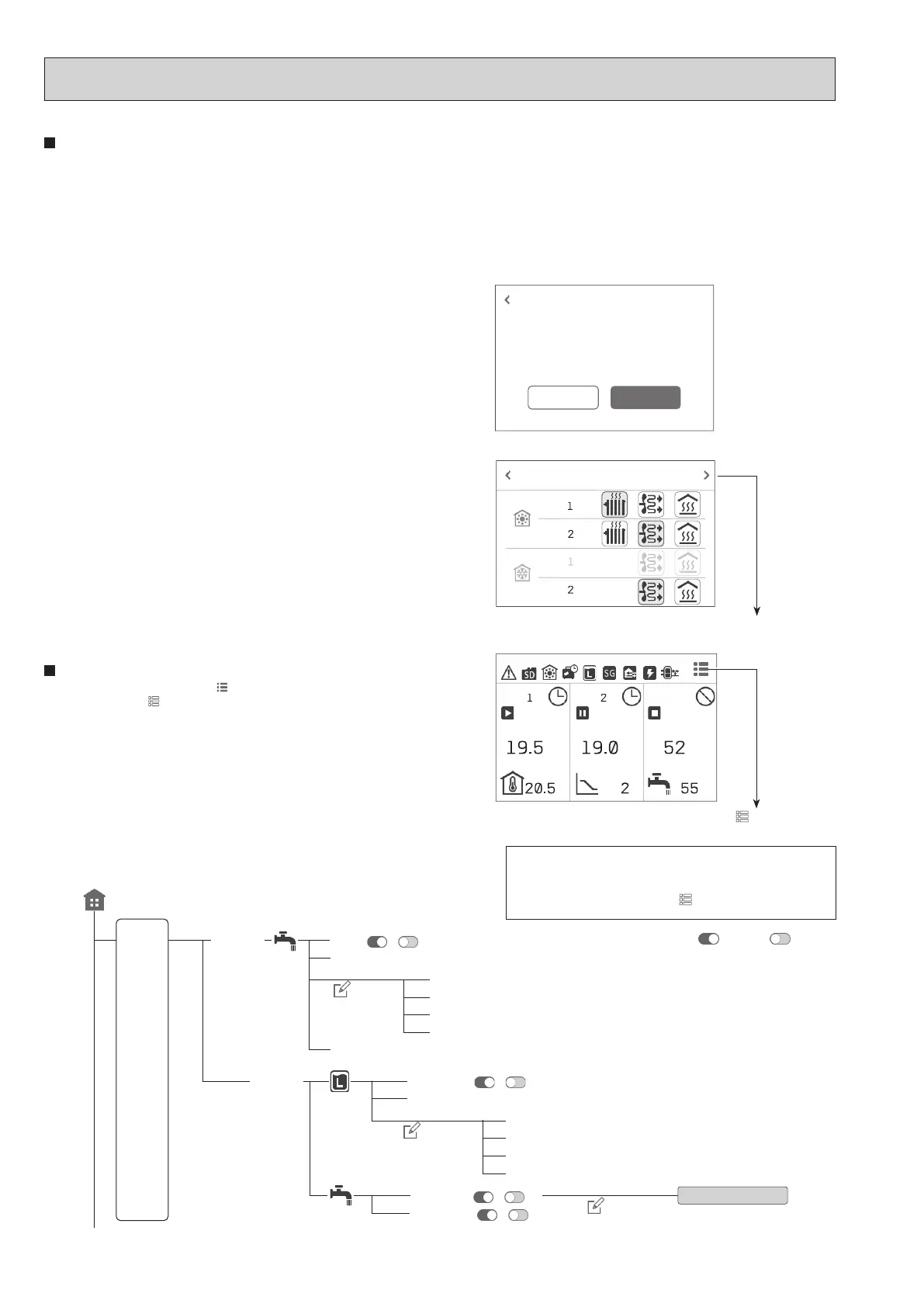
<Main Controller Menu Tree>
When the system is started up for the rst time, the quick start
setting screen appears.
The items with an asterisk (*) cannot be edited when the lock
menu is on. (The icon changes to
when the lock menu is on.)
Note: State description indicated by toggle
Active;
, Inactive;
Quick start
When the main remote controller is switched on for the rst time, the screen automatically goes to the [Language], [Date/Time], [System conguration], and quick start
setting screen in order. On the quick start setting screen, the following items can be set.
Note:
[Electric booster heater use]
This setting restricts the booster heater capacity. It is NOT possible to change the setting after starting up.
If you do not have any special requirements (such as building regulations) in your country, skip this setting (select [Next]).
Quick start
• [Zone sensor selection]*1
• [Emitter selection]
• [Control logic]
• [Outdoor design temperature]
• [Zone sensor selection]*2
• [DHW]
• [Flow rate & pump speed]
• [Electric booster heater use]*3
*1 Selection of zone to assign each wireless remote controller
*2 Selection of room sensors for monitoring the room temperature
*3 It cannot be reset, so be careful when you set it.
Lock menu
Pressing and holding the menu icon for 3 seconds switches the lock menu to on.
(The icon changes to
when the lock menu is on.)
Some functions cannot be edited in this state.
Note: You need a password to edit [Service] even when the lock menu is o.
Refer to the main controller menu tree for details of the items which cannot be
edited when the lock menu is on.
[Home screen]
[Eco] ( / )*
[Legionella] ( / )*
Target temperature ( + / - )*
[Schedule] ( / )
[Always o] ( / )
Schedule setting
[DHW]
DHW Target temperature ( + / - )*
[Boost] (Start / Cancel)
[Max. temp. drop] ( + / - )
[Start time] ( + / - )
[Duration] ( + / - )
[Frequency] ( + / - )
[Max. operation time] ( + / - )
[Max. operation time] ( + / - )
[Interval] ( + / - )
[Volume] ( + / - )
[DHW1/2]
[DHW2/2]
[Next]
Edit*
Edit*
Edit*
OCH815A



 To Next Page