Back
Summary of settings
HWmax °C
°C
°C
day
HWmin
HWtime min.
min.
h
min.
Normal
No HW
HWset
Ltemp
Lfreq
Lstart
Ltime
Lkeep
Error Unit Date
Error history
Back
E
P
L
AM
PM
PM
Error Unit Date
Error history
Back
E
P
L
AM
PM
PM
Delete OK?
Back
Password protection
New password setting
Press to confirm
Back
New password setting
Update?
Password protection
36
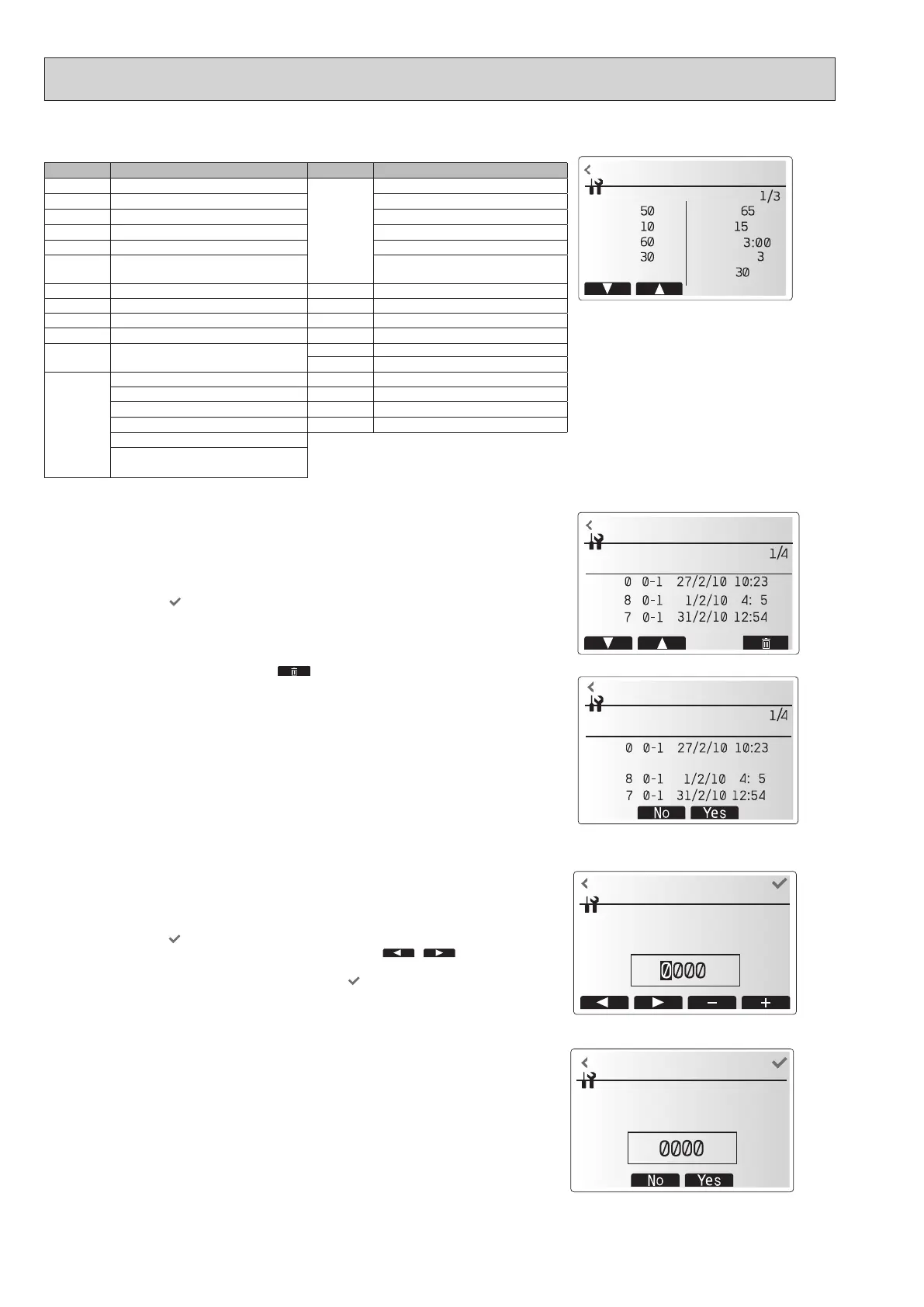
<Summary of settings>
This function shows the current installer/user entered settings.
Abbreviation
Explanation
Abbreviation
Explanation
HWtemp DHW max temperature Z2 mode Operation mode
HWdrop DHW temperature drop - HER (Heating room temperature)
HWtime DHW max operation time - HE (Heating flow temperature)
NO HW DHW mode restriction - HCC (Heating compensation curve)
HWset DHW operation mode (Normal/Eco) - COR (—)
- CO (Cooling flow temperature)
/Cooling weather compensation curve)
Ltemp Legionella hot water temperature Hroom 1 Heating target room temperature
Lfreq Legionella operation Frequency Hroom 2 Heating target room temperature
Lstart Legionella mode start time Hflow 1 Heating target flow temperature
Ltime Legionella max operation time Hflow 2 Heating target flow temperature
Lkeep Duration of max (Legionella) hot water
temperature
Croom 1 Cooling target room temperature
Croom 2 Cooling target room temperature
Z1 mode Operation mode Cflow 1 Cooling target flow temperature
- HER (Heating room temperature) Cflow 2 Cooling target flow temperature
- HE (Heating flow temperature) FSflow Freeze stat function flow temperature
- HCC (Heating compensation curve) FSout
Freeze stat function ambient temperature
- COR (—)
- CO (Cooling flow temperature)
/Cooling weather compensation curve)
<Error history>
Error history allows the service engineer to view previous check codes, the unit
address and the date on which they occurred. Up to 16 check codes can be stored
in the history and the most recent Error event is displayed at the top of the list.
1. From the service menu, select Error history
2. Touch the conrm icon
.
Please see "10-4. Self diagnosis and action" for check codes diagnosis and
actions.
To delete an Error history item;
1. From Error history screen, touch rubbish icon
.
2. Then touch Yes icon.
Password input screen
Password verify screen
<Password protection>
Password protection is available to prevent unauthorised access to the service menu by
untrained persons.
1. From the service menu, select Password protection.
2. Touch the conrm icon
.
3. When password input screen is displayed, touch left and right icon (
/ )
to move left and right between the 4 digits, set a password with the +/- icon.
4. When you have input your password, touch the conrm icon
.
5. The password verify screen is displayed.
6. To verify your new password, touch Yes icon.
7. Your password is now set and the completion screen is displayed.
OCH815A



 To Next Page