Back
SD card
SD Main remote controller
Main remote controller SD
Back
SD Main remote controller
Domestic hot water
Ref add.
Back
Main remote controller SD
Domestic hot water
Ref add.
Back
Manual reset
Main remote controller
Initialise?
Back
Manual reset
Main remote controller
Flow temperature controller
Back
0
21 3 4 5
76 8 9 0
Password protection
Next
0 0 0
Back
0
21 3 4 5
76 8 9 0
Password reset
0 0 0
[Password protection]
[Password reset]
37
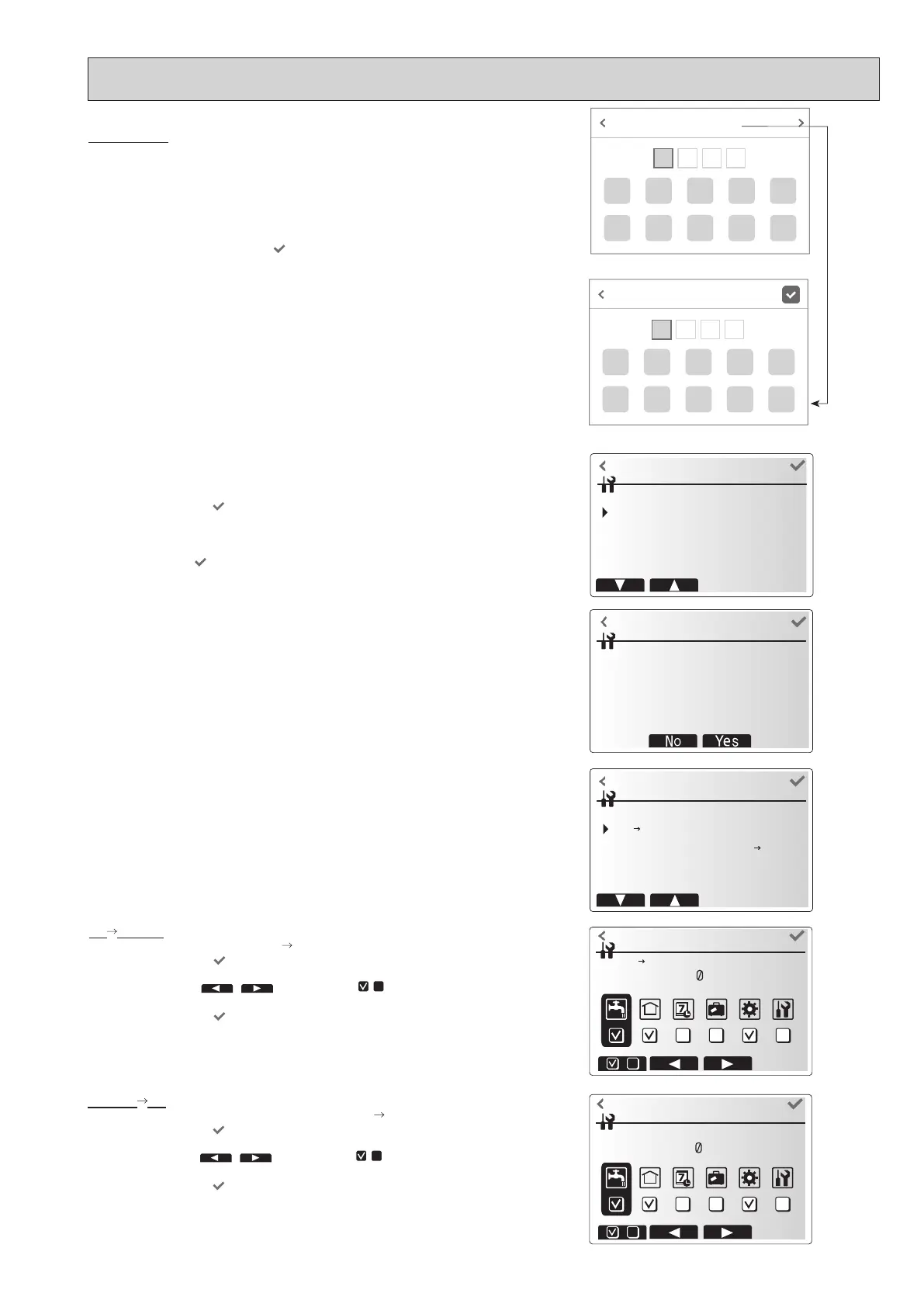
<SD card>
The use of an SD memory card simplies the main remote controller settings in the
eld.
*Ecodan service tool (for use with PC tool) is necessary for the setting.
SD Main RC
1. From the SD card setting, select "SD
Main remote controller".
2. Touch the conrm icon
.
3. Touch the +/- icon to set the Ref. address. *1
4. Touch left/right icon (
/ ) and check icon ( / )
to select a menu to
write to the main remote controller.
5. Touch the conrm icon to start downloading.
6. Wait for a few minutes until “Complete!” appears. *2
*1 For multiple outdoor units control system only.
*2 Be sure to check that the setting values are suitable for the connected outdoor
and indoor units.
Main RC SD
1. From the SD card setting, select "Main remote controller
SD".
2. Touch the conrm icon
.
3. Touch the +/- icon to set the Ref. address. *1
4. Touch left/right icon (
/ ) and check icon ( / ) to select a menu to
write to the SD memory card.
5. Touch the conrm icon
to start uploading.
6. Wait for a few minutes until “Complete!” appears.
*1 For multiple outdoor units control system only.
Password reset
If you forget the password you entered, or have to service a unit somebody else
installed, you can reset and change the password.
1. From [Service] in [Menu], access the [Password protection] screen.
2. Press and hold the title section for 3 seconds to access the [Password reset]
screen.
3. Enter a new password.
4. Touching [Back] or the conrm icon
saves the password.
<Manual reset>
Should you wish to restore the initial settings at any time, you should use the
manual reset function. Please note this will reset ALL functions to the factory de-
fault settings.
1. From the service menu, select manual reset.
2. Touch the conrm icon
.
3. The Manual reset screen is displayed.
4. Choose either Manual Reset for Flow temperature controller or Main remote
controller.
5. Touch conrm icon
to conrm manual reset of chosen device.
3sec.
OCH815A



 To Next Page