Back
Energy monitor settings
Electric heater capacity
Water pump input
Delivered energy adjustment
Electric energy meter
Heat meter
Back
Running information
Ref. add
Back
Thermistor reading
TH A °C
°C
°C
°C
°C
°C
°C
°C
°C
°C
TH B
TH
THW
THW
THW A
THW B
TH
THW
THW
2 7
7
6
Back
External input settings
Demand control (IN )
Boiler
Back
External input settings
Outdoor thermostat (IN )
Boiler
Back
External input settings
Demand control (IN )
Outdoor thermostat (IN )
Cooling limit temp. (IN )
35
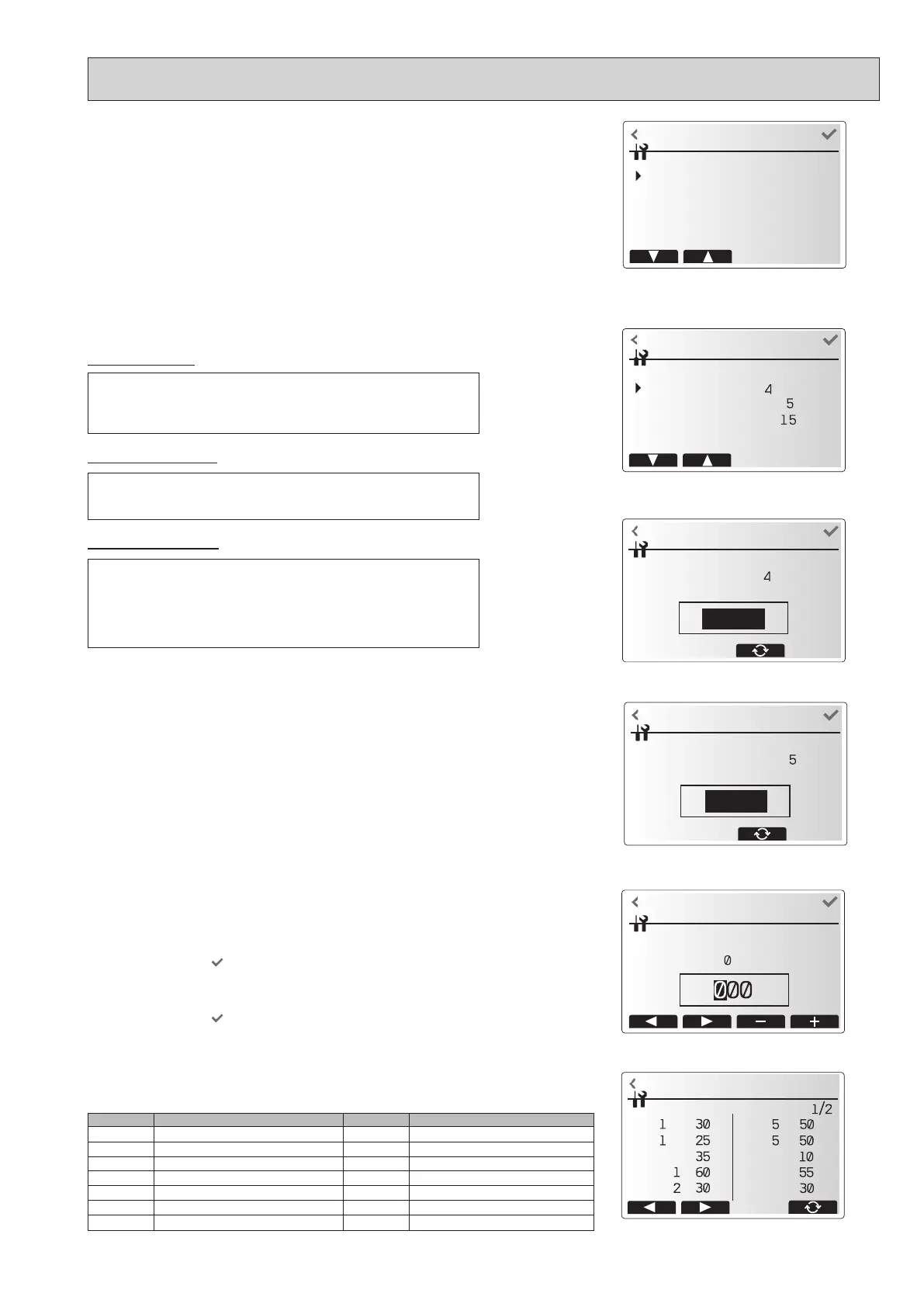
2. Settings using the main remote controller
In this menu, all parameters required to record the consumed electrical energy and the
delivered heat energy which is displayed on the main remote controller can be set. The
parameters are an electric heater capacity, supply power of water pump and heat
meter pulse.
Follow the procedure described in General Operation for the set up operation.
For Pump 1, *** can be also set besides this setting.
In the case *** is selected, the system acknowledges "factory tted pump" is selected.
Energy monitor settings menu screen
<Running information>
This function shows current temperature and other data of main component parts
of both the indoor and outdoor units.
1. From the Service menu, select Running information.
2. Touch the conrm icon
.
3. Touch the +/- icon to set the Ref. address. *
1
4. Enter index code for the component to be viewed.
(See the Table 9-4-1 for component index codes.)
5. Touch the conrm icon
.
*
1
For multiple outdoor units control system only.
<Thermistor reading>
This function shows the current readings of thermistors located on the water and refrigerant circuit
Thermistor Description Thermistor Description
TH1A Zone1 room temperature TH7 Ambient (outdoor) temperature
TH1B Zone2 room temperature THW6 Zone1 flow temperature
TH2 Refrigerant liquid temperature THW7 Zone1 return temperature
THW1 Flow water temperature THW8 Zone2 flow temperature
THW2 Return water temperature THW9 Zone2 return temperature
THW5A DHW tank water temperature (upper) THW10 Mixing tank temperature
THW5B DHW tank water temperature (lower) THWB1 Boiler flow temperature
External input settings menu screen
Demand control screen
Outdoor thermostat setting screen
<External input settings>
Demand control(IN4)
Outdoor thermostat (IN5)
Cooling limit temp. (IN15)
The selection of “OFF”, whilst a signal is being sent to IN4, forcefully stops all
the heat source operations and the selection of “Boiler” stops operations of
heat pump and electric heater and performs boiler operation.
The selection of “Heater”, whilst a signal is being sent to IN5, performs
electric-heater-only operation and the selection of “Boiler” performs boiler
operation.
Dew point thermostat can be connected to IN15. (To avoid condensation)
When the input signal (IN15) is ON, the cooling target ow temperature is
limited by remote controller.
Note : For outdoor unit protection, this target temp. is kept 60 minutes after
changing IN15 input.
OCH815A



 To Next Page