25
When the system is started up for the rst time, the quick start
setting screen appears.
The items with an asterisk (*) cannot be edited when the lock
menu is on. (The icon changes to
when the lock menu is on.)
Note: State description indicated by toggle
Active;
, Inactive;
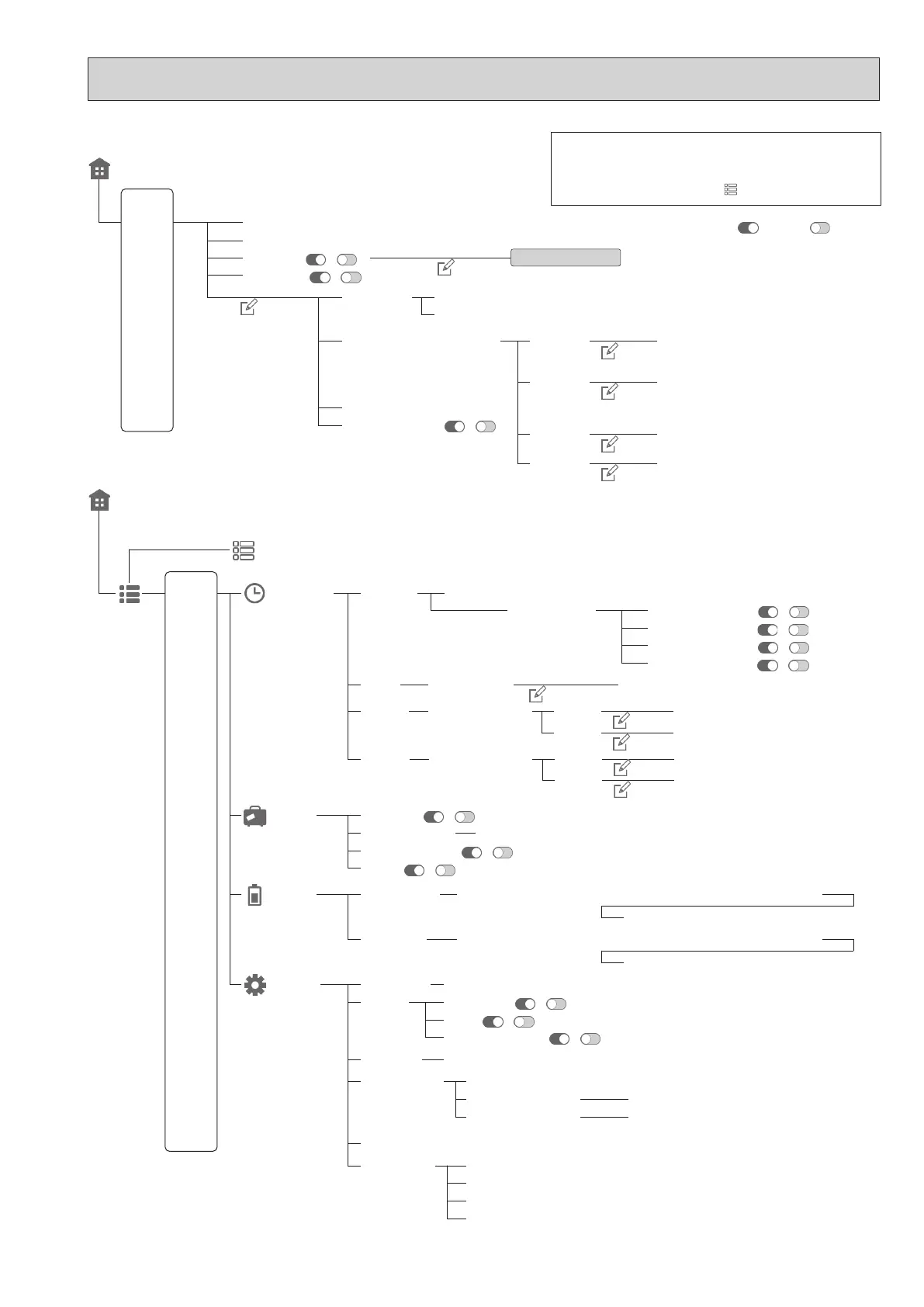
<Main Controller Menu Tree>
[Home screen]
[Zone 1] Target temperature ( + / - )
[Schedule] ( / )
Schedule setting
[Heating
/Cooling]
[Zone 2] Target temperature ( + / - )
[Always o] ( / )
[Mode] (Heating / Cooling)
[Auto change over] ( / )
[Control logic]
[Weather compensation curve]
Heating (Room temp. / Weather compensation curve / Flow temp.)
Heating Z1
Cooling Z1
Heating Z2
Cooling Z2
[Zone 1 - edit curve 1]
[Zone 1 - edit curve 2]
[Zone 1 - edit curve 3]
[Zone 1 - edit curve 1]
[Zone 1 - edit curve 2]
[Zone 2 - edit curve 1]
[Zone 2 - edit curve 2]
[Zone 2 - edit curve 3]
[Zone 2 - edit curve 1]
[Zone 2 - edit curve 2]
Cooling (Weather compensation curve / Flow temp.)
[Home screen]
[Menu]
Prohibited1-4 (Start-End)
Programme1-4 (Start / Target temperature)
Programme1-4 (Start / Target temperature)
Press and hold the
icon for 3 seconds.
[Schedule]*
[Holiday]
[Setting]*
[Energy]
[Seasonal]
[Season modes]
[DHW]
[Heating]
[Next]
[DHW schedule]
[Heating schedules] [Zone 1]
[Season 1] [Heating] ( / )
[Season 1] [Cooling] ( / )
[Season 2] [Heating] ( / )
[Season 2] [Cooling] ( / )
Season 2 term (Start - End)
[Schedule] ( / )
Programme1-5 (Start-Room sensor)
Programme1-5 (Start-Room sensor)
[Date / Time] (dd/mm/yyyy) / (hh:mm)
[Production]
[Consumption]
[Language]
[Room sensors]
[Contact number]
Detail (This year / Last year / This month / Last month / Month before last)
Detail (This year / Last year / This month / Last month / Month before last)
(EN/CZ/DA/DE/ET/ES/FR/HR/IT/LV/LT/HU/NL/NO/PL/PT/RO/SK/SI/FI/SV/TR/EL/BG)
[Zone sensor selection] ( Zone 1 / Zone 2 )
[Zone 1 programme]
[Zone 2 programme]
Breakdown (Total / DHW / Heating / Cooling)
Breakdown (Total / DHW / Heating / Cooling)
[Holiday schedule]
[Display]
[Touch screen]
(Start / End date)
[Full screen] ( / )
[Clean screen] (Start)
[Heating / Cooling] ( / )*
[Temp. (°C) → (°F)] ( / )
[Calibrate screen] (Start)
[DHW] ( / )*
[LED] ( / )
[Brightness] (Low/Mid/Hi)
[Backlight time] (5sec./10sec./20sec./30sec./60sec./Always on)
Edit*
Edit*
Edit
Edit
Edit
Edit
Lock menu
Edit
Edit
Edit
[Zone 2]
Programme1-4 (Start / Target temperature)
Programme1-4 (Start / Target temperature)
[Cooling]
[Cooling schedules] [Zone 1]
Edit
Edit
[Zone 2]
OCH815A



 To Next Page