49
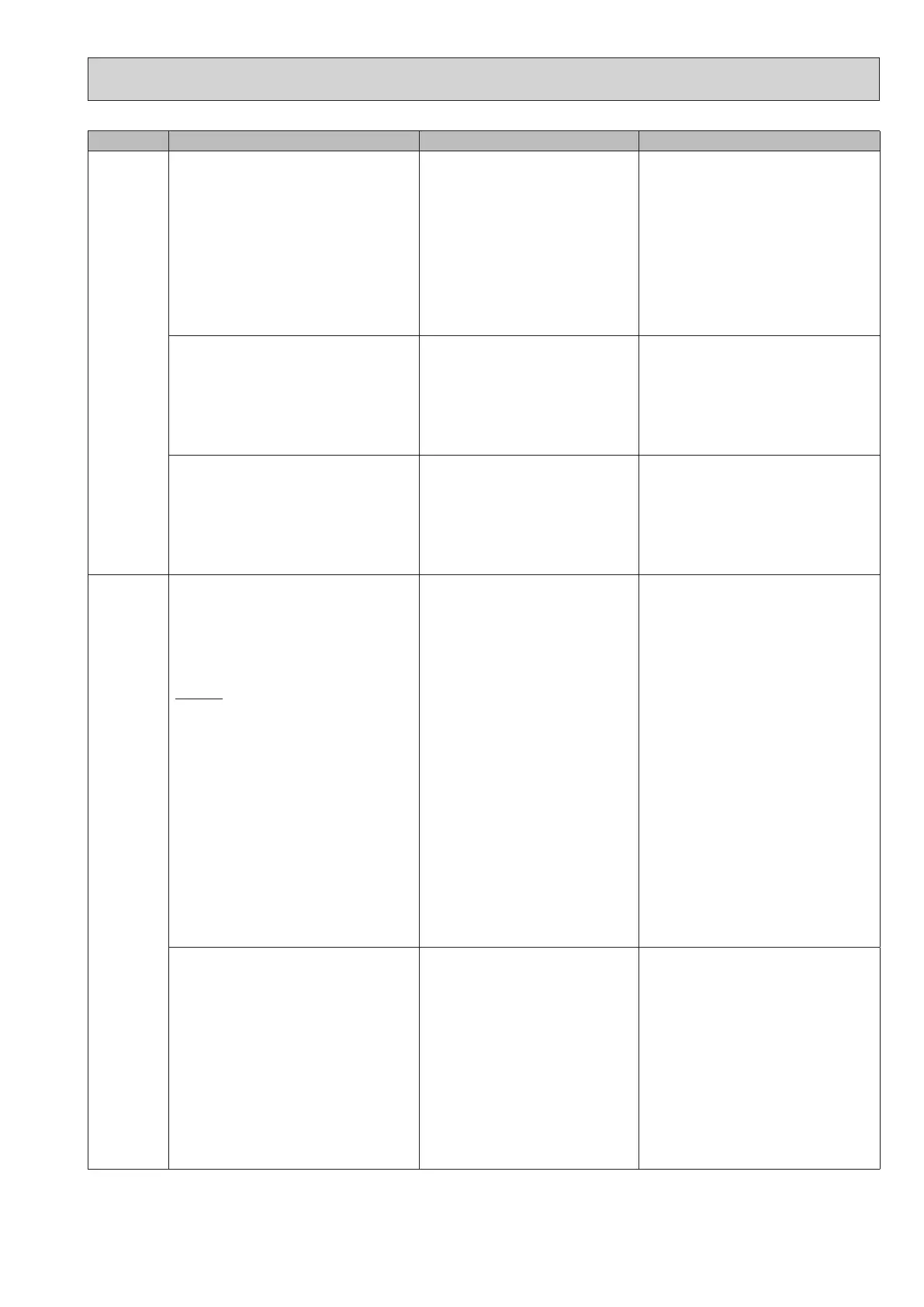
Check code Title and display conditions Possible Cause Diagnosis and action
L8 Heating operation error
Note: “3” is displayed in “Request code: 567” in
“Running information”.
<Heating/FS>
If a), b) and c) occur, L8 is displayed;
a)
No change on THW1 and THW5B
(under 1°C for 20 minutes from unit starts
operation)
b)
No change on THW1
(under 1°C for 10 minutes from booster heater
starts operation)
c)
THW1−THW2 < −5°C
(for 10 minutes continuously)
1. THW1 has become detached from its
holder.
1. Visually inspect location and reattach as
necessary.
2. Booster heater fault 2. Electrically test to determine fault.
See "10-6. Checking Component Parts'
Function" for how to check.
3. THW1 or THW2 or THW5B fault 3. Check resistance of thermistor against
table in "10-6. Checking Component Parts'
Function".
Compare FTC detected temperature to
hand held detector.
4. FTC board failure 4. Replace board.
Heating operation error
Note: “A” is displayed in “Request code: 567” in
“Running information”.
1. THW6 has become detached from its
holder.
1. Visually inspect location and reattach as
necessary.
2. THW6 or THW7 fault 2. Check resistance of thermistor against
table in "10-6. Checking Component Parts'
Function".
Compare FTC detected temperature to
hand held detector.
3. FTC board failure 3. Replace board.
Heating operation error
Note: “C” is displayed in “Request code: 567” in
“Running information”.
1. THW8 has become detached from its
holder.
1. Visually inspect location and reattach as
necessary.
2. THW8 or THW9 fault 2. Check resistance of thermistor against
table in "10-6. Checking Component Parts'
Function".
Compare FTC detected temperature to
hand held detector.
3. FTC board failure 3. Replace board.
L9
Low primary circuit (Heat source side) ow
rate detected by ow sensor
Note:
“1” is displayed in “Request code: 569” in
“Running information”.
<DHW/Heating/Cooling/LP/FS>
Check code displayed when ow sensor detects
low ow rate for 10 seconds.
Exception
For 1 minute after water circulation pump1 is
switched on.
1. Insucient system head 1. Refer to table in "10-6. Checking Com-
ponent Parts' Function" to determine if
system pump meets requirements.
If more head required either add a pump
of the same size or replace existing pump
with capacity model.
See "11. DISASSEMBLY PROCEDURE"
for how to replace pump.
2. Reduced ow in primary water circuit
Due to 1 or more of the following;
Faulty pump, insucient air purge,
blocked strainer, leak in water circuit
2. Check circulation pump (See "10-6.
Checking Component Parts' Function" for
how to check).
Open purge valve to remove trapped air.
Check the strainer for blockages.
Check the primary water circuit for leaks.
Check that the ow amount is within the
recommended range.
3. Valve operation fault 3. Check valves on primary water circuit are
installed level.
4.
2-way valve (local supply) actuator fault
4. Electrically test to determine fault.
5. Connector wire has become detached
or loose wiring.
5. Visually check the CN1A connector and
reattach if necessary.
6. Flow sensor fault 6. Electrically test to determine fault.
See "10-6. Checking Component Parts'
Function" for how to check.
7. Incorrect setting of the SW2-2 7. Check the SW2-2 setting.
8. FTC board failure 8. Replace board.
Low primary circuit (Zone1 side) ow rate
detected by ow switch
Note: “2” is displayed in “Request code: 569” in
“Running information”.
1. Insucient system head 1. If more head required either add a pump
of the same size or replace existing pump.
2. Reduced ow in primary water circuit
Due to 1 or more of the following;
Faulty pump, insucient air purge,
blocked strainer, leak in water circuit
2. Check circulation pump (See "10-6.
Checking Component Parts' Function" for
how to check).
Open purge valve to remove trapped air.
Check the strainer for blockages.
Check the primary water circuit for leaks.
Check that the ow amount is within the
recommended range.
3. Terminal wire has become detached
or loose wiring.
3. Visually check the IN3 terminal and reat-
tach if necessary.
4. Flow switch fault 4. Electrically test to determine fault.
5. Incorrect setting of the SW3-2 5. Check the SW3-2 setting.
6. FTC board failure 6. Replace board.
OCH815A



 To Next Page