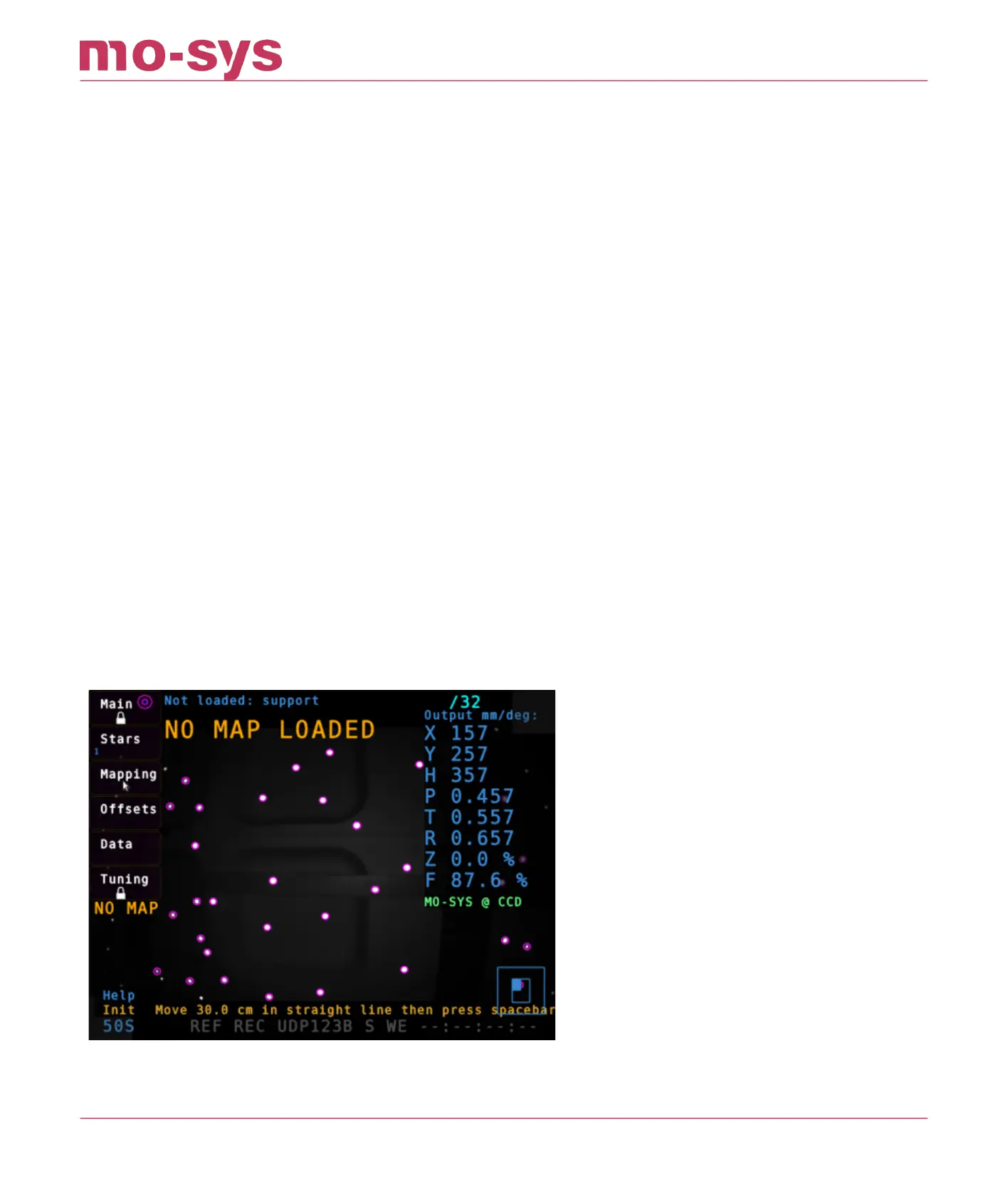
7. Mapping
7.1 Create an Initial Map
Reset mapping by pressing -R- and –Y- or clicking Mapping → Create → Unload Map then -Y-
to conrm. (The status should appear as NO MAP LOADED)
Ensure Mapping is on: Go to Mapping → Create, locate Mapping O, activate it by clicking
on it, so it shows Mapping On
Click Change… next to map name.
Enter your map name (e.g. studio 2) in lower case and hit enter.
Hit spacebar or click Begin.
A ashing message at the bottom should tell you to move the StarTracker camera XX cm.
The distance is related to the ceiling height you entered early. Use a tape measure for this
procedure.
Move the StarTracker in a straight line by XXcm and hit spacebar or press Begin again. Try
to avoid covering any of the stars, e.g. by standing in front of the sensor or the system will
lose some of the star tracks. If the ashing message switches back to “Load map or press
Spacebar to create a new map” the system has lost too many tracks or failed to start a
new map. In this case try again. Press R and Y.
1.
2.
3.
4.
5.
6.
7.
StarTracker Max Manual
2023 - 2024 © Mo-Sys Engineering Ltd. All rights reserved 21 of 70



 To Next Page