xTablet Flex 8 User Guide 5
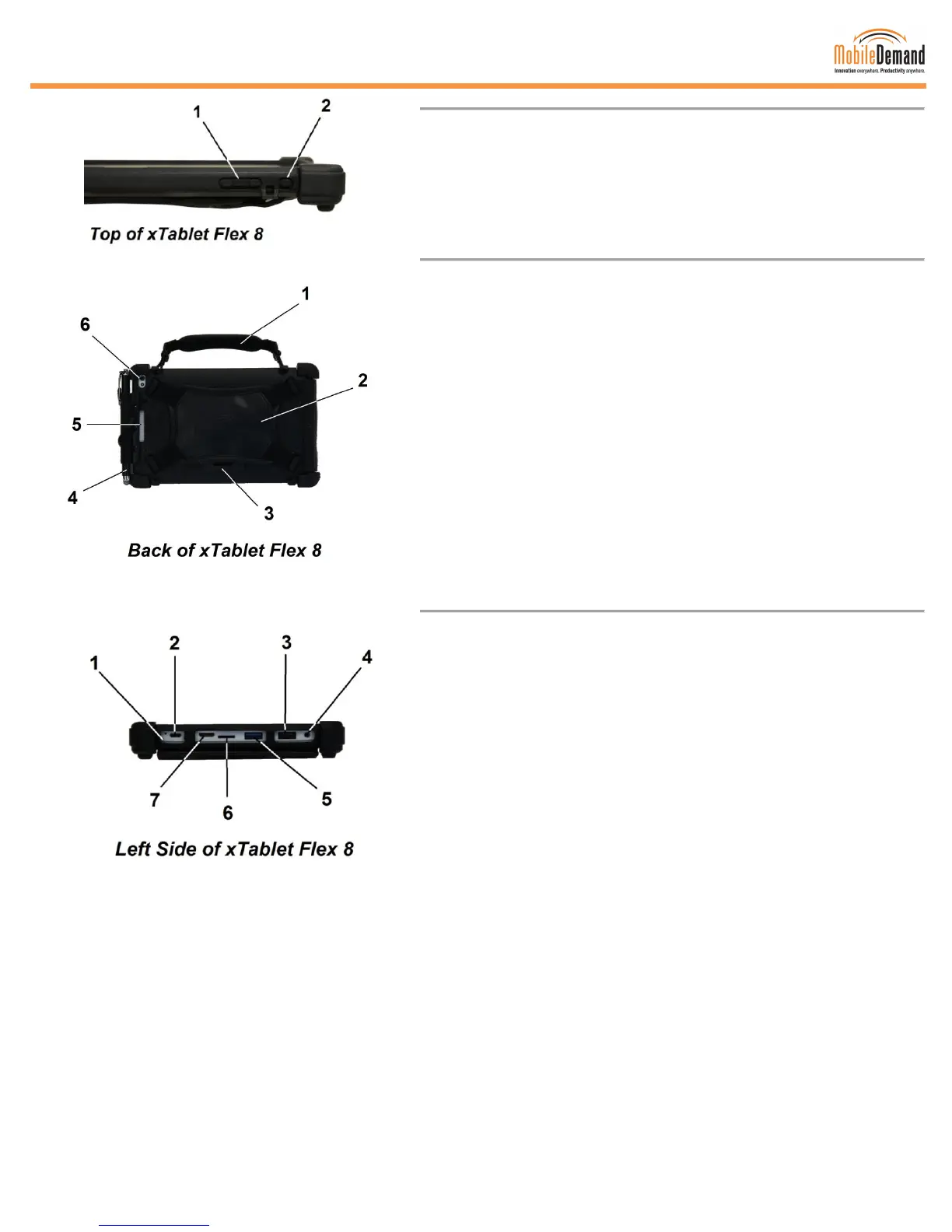
1 Volume Button
Adjusts the volume of the device
2 Power Button
Press once to turn on, to put in sleep mode, and to wake up
from sleep
1 Briefcase Handle
Detachable handle that can go on top or on the right side
(instead of the stylus)
2 Hand Strap
Detachable, sturdy, and flexible
3 Snap Mount Plate
Attaches to a vehicle mount or to a dock
4 Stylus
Use on the touchscreen display instead of your finger
5 Speaker
Provides high-quality sound
6 Main Camera
Takes photographs or videos
1 Built-In Microphone
Video conferencing, voice narrations, or simple audio recording
2 Charging microUSB
Charge or supply power to the xTablet
3 USB 2.0 Port
Connects a keyboard, mouse, and other peripheral equipment
to the xTablet
4 Headphone Output/Microphone Input Combo Jack Port
Connects to amplified speakers, headphones, or an external
microphone
5 USB 3.0 Port
SuperSpeed for data transmission up to 5 Gbit/s, compatible to
keyboard, mouse, and other peripheral equipment
6 Built-In Micro Card Slot
Memory card reader slot that supports microSE, microSDHC,
and microSDXC card formats
7 Micro-HDMI Port
HDCP-compliant for HD DVD, Blu-ray, and other protected
content playback



 To Next Page