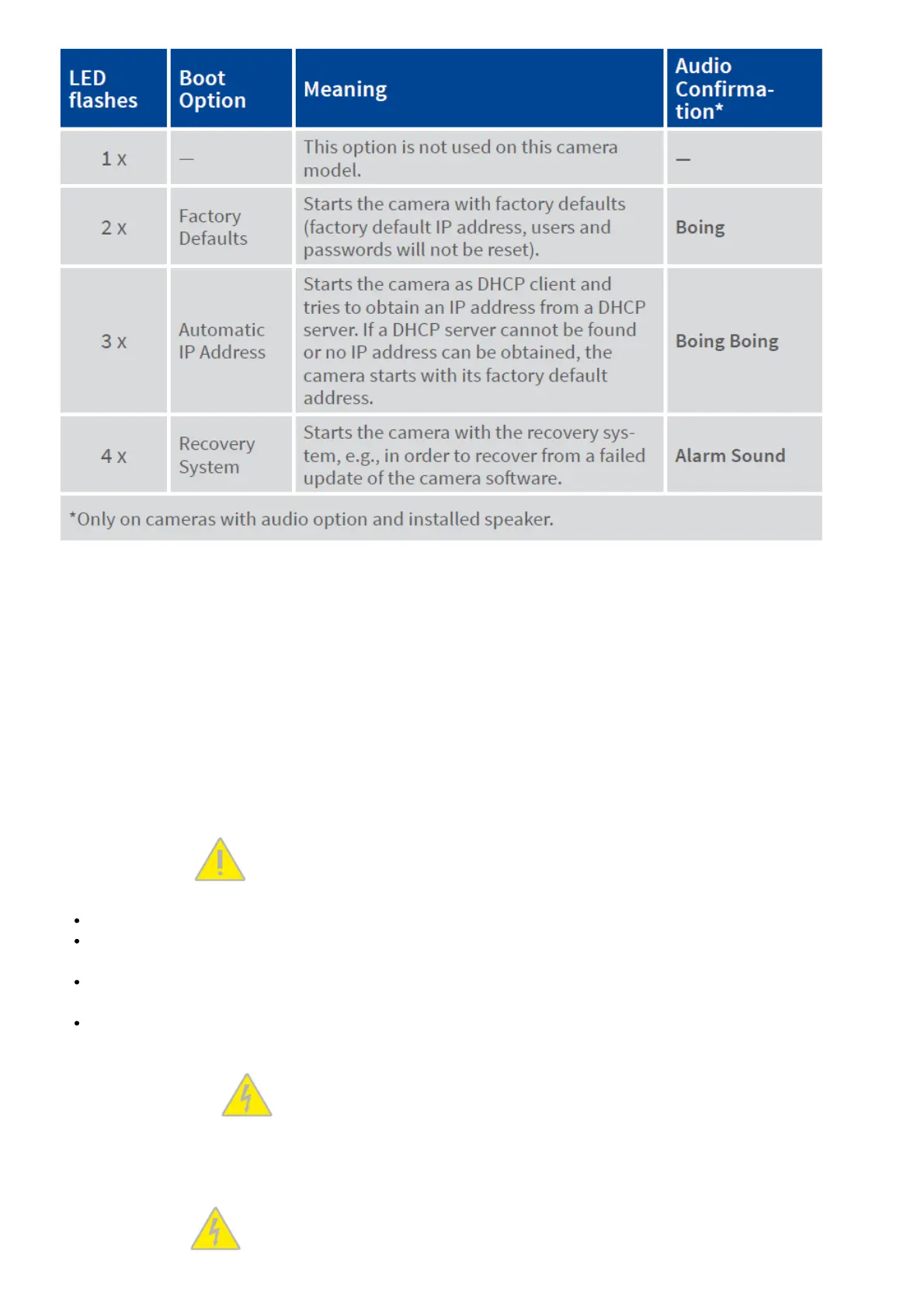
3. Select a Boot Option
Press the paper clip longer (> 2 sec) into the hole. The camera confirms the selection by flashing rapidly three times.
You can now remove the paper clip. After 20 sec, the camera will confirm the selection by playing a sound according
to the table above.
If nothing is selected, the camera will resume its normal boot process after a certain time.
Important Notes
Safety Warnings
Notes on Installing:
This product must not be used in locations exposed to the dangers of explosion.
Make sure that you install this product as outlined in the instructions of this Quick Install document. A faulty
installation can damage the camera!
When installing this product, make sure that you are only using genuine MOBOTIX parts and MOBOTIX
connection cables.
Only install this product on suitable, solid materials that provide for a sturdy installation of the fixing elements
used.
Electrical installation:
Electrical systems and equipment may only be installed, modified and maintained by a qualified electrician or under
the direction and supervision of a qualified electrician in accordance with the applicable electrical guidelines.
Make sure to properly set up all electrical connections.
Electrical surges:



 To Next Page