29
WIRELESS ROUTER ADSL
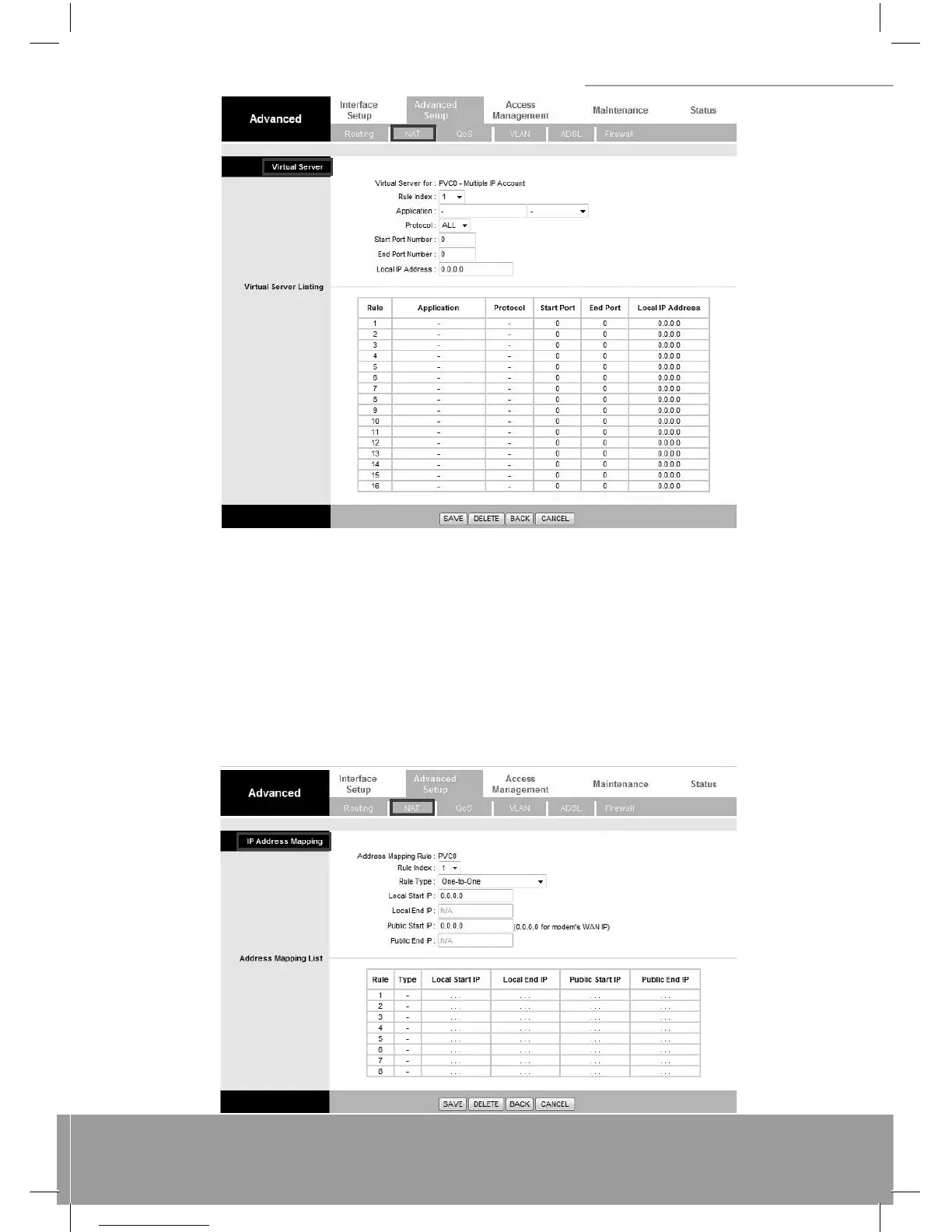
6.3.7 IP Address Mapping
The IP Address Mapping is for those VCs that with multiple IPs. The IP Address Mapping rule is per-VC based. (only for
Multiple IPs’ VCs). Rule Index: The Virtual server rule index for this VC. You can specify up to 10 rules. All the VCs with
single IP will use the same Virtual Server rules. Rule Type: There are 4 types of One-to-One, Many-to-One, Many-to-Many
Overload, and Many-to Many No-Overload. Local Start & End IP: Enter the local IP address you plan to map to. Local Start
IP is the starting local IP address & Local End IP is the ending local IP address. If the rule is for all local IPs, then the Start
IP is 0.0.0.0 and the End IP is 255.255.255.255. Public Start & End IP: Enter the Public IP Address you want to do NAT.
Public Start IP is the starting Public IP Address and Public End IP is the ending Public IP Address. If you have a Dynamic
IP, enter 0.0.0.0 as the Public Start IP. When you are done making changes, click on SAVE to save your changes, DELETE
to delete the rule with the parameters you set, BACK to return to the previous screen or CANCEL to exit without saving.



 To Next Page