www.modecom.eu
32
WIRELESS ROUTER ADSL
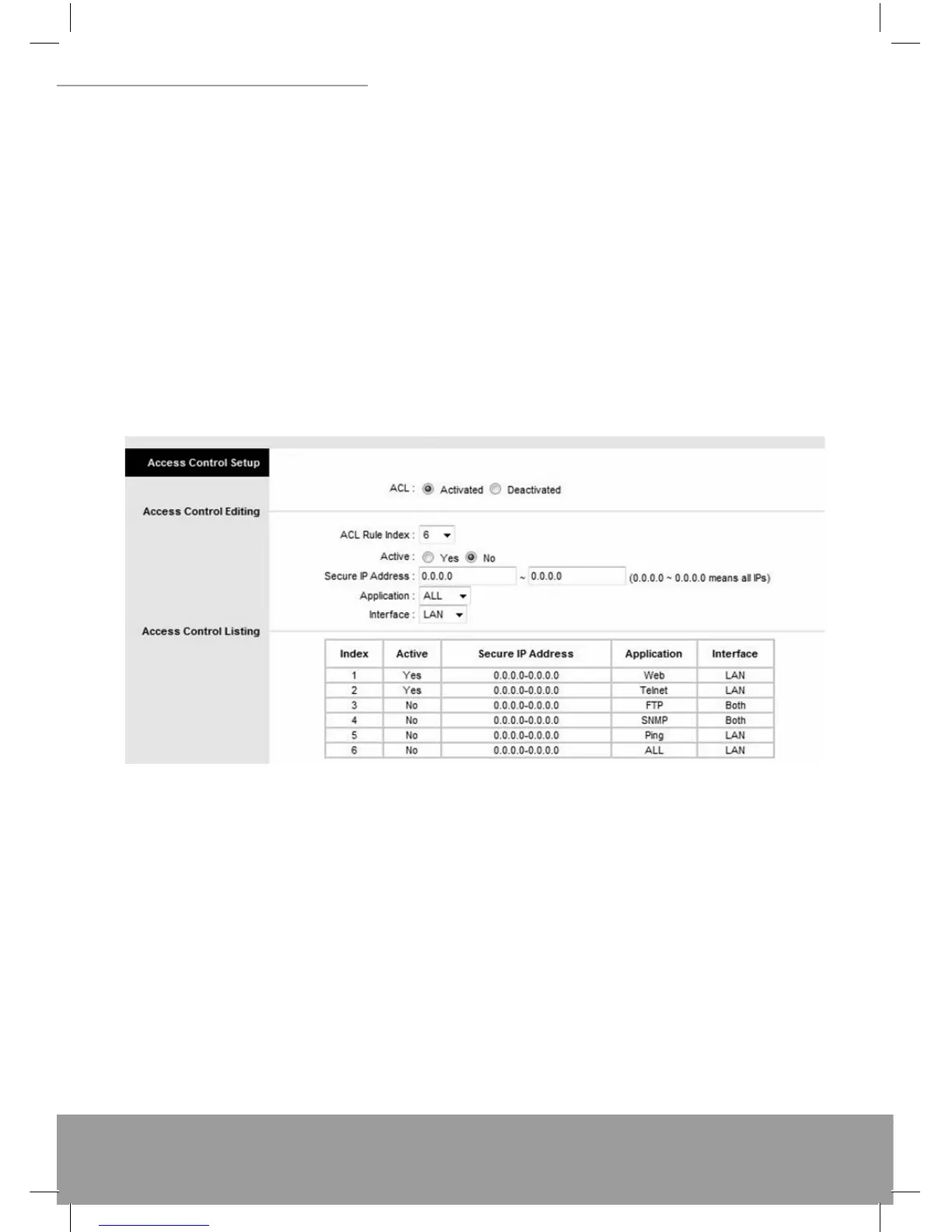
ACL: There has Activated & Deactivated option. The default setting is Deactivated which means all IP can access via
router. If you choose Activated, you only can access via router bylisted IP addresses.ACL Rule Index: Index number
from 1 and up to 16.Active: Once you choose Yes then you can access the IP via router.Application: Each of these la-
bels denotes a service that you may use to remotely manage the Router. Choices are Web, FTP, Telnet, SNMP, Ping,
ALL.Interface: Select the access interface. Choices are WAN, LAN and Both.
For Example:
How to set your ACL?
You must choose Activated to enable your ACL function.
Select the ACL Rule Index number (up to 16 number)
You can set the specifi c Secure IP address or set 0.0.0.0 for all IPs.
Choose the Application which you want to access for this ACL Rule index.
Select the Interface you want to access from.
After all settings are ready, click SAVE and continue next ACL Rule Index setting.
[Note]
You must set one ACL index to access your router via LAN interface. If you don’t, your router cannot access other listed
IP Address. (Refer to Index 1).
Remember! Once you active your ACL function, you only can access via router by listed Secure IP Address.
7.2 IP Filter
The Router provides extensive fi rewall protection by restricting connection parameters to limit the risk of intrusion and
defending against a wide array of common hacker attackers. Go to Access Management IP Filtering to set different
IP fi lter rules of a given protocol (TCP, UDP, or ICMP) and a specifi c direction (incoming, outgoing, or both) to fi lter the
packets. IP Filter is a more complex fi ltering tool, based more on IP and custom rules. Each of the indices can hold six
rules, and each interface can have four associated indices, allowing 24 rules per interface. If all six rules in an index
are Next rules, the data will be sent to the next index for fi ltering.


 To Next Page