www.modecom.eu
6
WIRELESS ROUTER ADSL
2. Hardware Installation
2.1 System Requirements
• Pentium III 266 MHz processor or higher
• 128 MB RAM minimum
• 20 MB of free disk space minimum
• RJ45 Ethernet Port
2.2 Package Contents
• Wireless ADSL2+ Router
• RJ-45 Ethernet cable
• RJ-11 Phone cable
• Power Adapter
• Quick Installation Guide
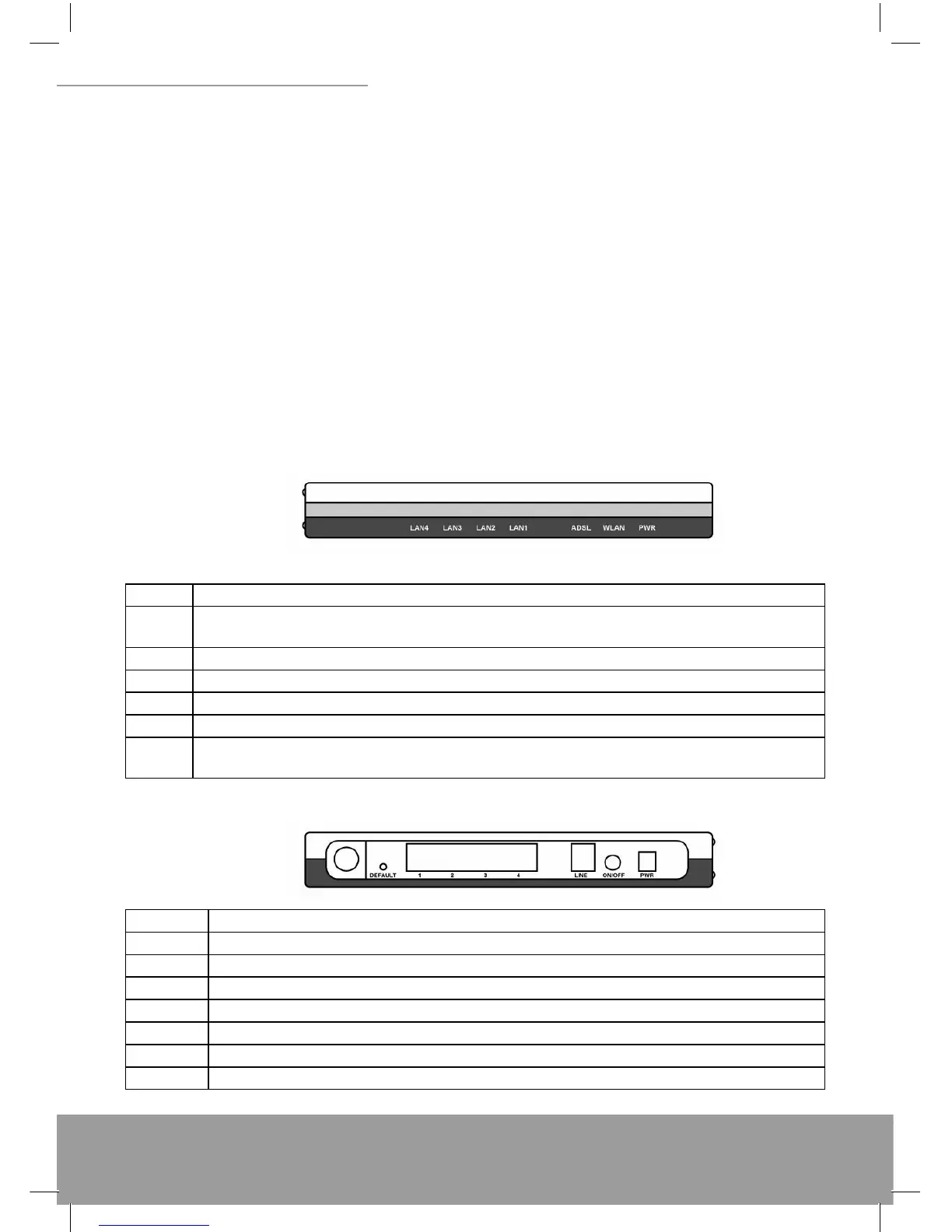
2.3 Front Panel Indicators and Description
Front panel of this Wireless ADSL2+ router has LED indicators to display router’s operating status.
Descriptions of LED status
PWR When an active power adapter is connected with this router, this LED will light up.
WLAN
When WLAN card installed properly, this LED will be fl ashing. When transferring data, the LED will be
steadily.
4 When port 4 connection with PC or Switch / Hub is established, this LED will light up.
3 When port 3 connection with PC or Switch / Hub is established, this LED will light up.
2 When port 2 connection with PC or Switch / Hub is established, this LED will light up.
1 When port 1 connection with PC or Switch / Hub is established, this LED will light up.
ADSL
When connection with Internet (ADSL Connected) is established, this LED will light up. When this LED is
fl ashing: NO ADSL physical connection
2.4 Back Panel
PWR Connect with power adapter
ON/OFF Power switch button
LINE Connect with phone cable
4 Connect with Ethernet Cable to Switch Hub or PC
3 Connect with Ethernet Cable to Switch Hub or PC
2 Connect with Ethernet Cable to Switch Hub or PC
1 Connect with Ethernet Cable to Switch Hub or PC
DEFAULT Reset button


 To Next Page